405 Method Not Allowed: What It Means & How to Fix It
Advertisement
What Is a 405 Method Not Allowed Error?
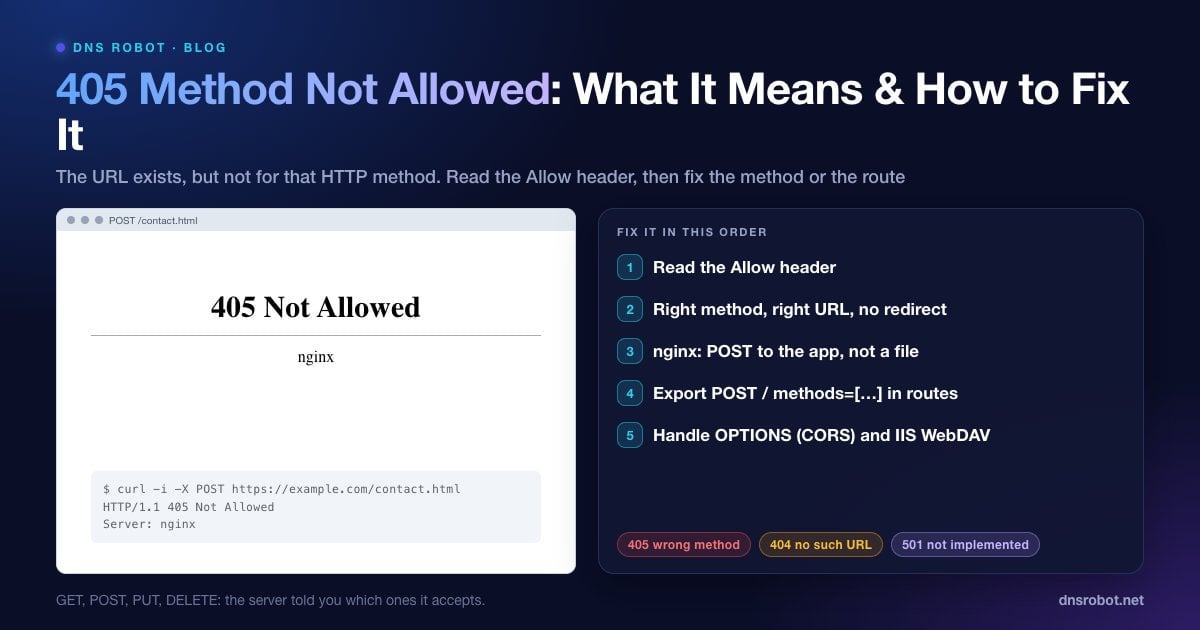
405 Method Not Allowed is an HTTP status code meaning the server knows the address you requested, but doesn't allow the method your request used. RFC 9110 (section 15.5.6) defines it as the method being "known by the origin server but not supported by the target resource."
Every HTTP request has a method: GET to read a page, POST to submit a form or create something, PUT and PATCH to update, DELETE to remove, OPTIONS to ask what's allowed. A 405 means the URL exists, but not for that verb. If the URL didn't exist at all, you'd get 404 instead.
Because it's about how a request was made rather than about a missing page, a 405 is almost always something for the site's developer to fix. Visitors usually hit it after submitting a form or following an outdated link.
What a 405 Error Looks Like
| Server / framework | Typical message |
|---|---|
| nginx | 405 Not Allowed (with nginx underneath) |
| Apache | Method Not Allowed. The requested method POST is not allowed for this URL. |
| IIS | HTTP Error 405.0 - Method Not Allowed. The page you are looking for cannot be displayed because an invalid method (HTTP verb) is being used. |
| Next.js / APIs | An empty or JSON response with status 405, often visible only in DevTools |
| Browser console (CORS) | A CORS error, because the OPTIONS preflight received a 405 |
Advertisement
Step 1: Read the Allow Header
Ask the server which methods it accepts for that URL. Either send an OPTIONS request, or repeat the failing request with headers shown:
# Which methods does this URL accept?
curl -i -X OPTIONS https://example.com/api/contact

# Repeat the failing request and look at the status and Allow header
curl -i -X POST https://example.com/api/contact -d 'name=test'
# HTTP/2 405
# allow: GET, HEAD
DNS Robot's HTTP Headers tool shows the status code and headers a URL returns to a normal GET request, which helps when you're checking a page in the browser rather than an API.
Not every server follows the rule. nginx's built-in 405 page, for example, is sent without an Allow header, so on nginx you'll need to check which location block handles the URL instead (Fix 2).
If You're a Visitor
Go back and reload the page, then submit the form again. A form loaded from an old cached copy can post to an address that has since changed.
Don't refresh after submitting. Refreshing a page that was the result of a form can resend a POST to a URL that only accepts GET.
Check the address for a typo, or open the site's homepage and navigate again.
Report it. If a form on the site always fails, the site owner needs to fix it, so send them the page address.
Advertisement
Fix 1: Send the Right Method to the Right URL
The most common cause in code is simply a mismatch: a form or fetch() call uses POST while the endpoint only accepts GET, or the request goes to the page URL instead of the API URL. Compare the method in your code with the Allow header and the API's documentation.
// The endpoint only allows POST, so a GET (the default for fetch) returns 405
const res = await fetch("/api/contact", {
  method: "POST",
  headers: { "Content-Type": "application/json" },
  body: JSON.stringify({ name: "Ana" }),
})
if (res.status === 405) console.log("Allowed:", res.headers.get("allow"))Fix 2: nginx Returns 405 for POST to Static Files
nginx's static file handler only serves GET and HEAD. A POST to an .html file, or to a location that serves files instead of passing the request to your application, gets 405 Not Allowed. This often happens when a form's action points at a static page, or when a location block meant for your app doesn't match.
The real fix is to send the POST to an application (PHP, Node, Python) with proxy_pass or fastcgi_pass in the right location block. Check which block handles the URL:
# Form posts must reach the app, not the static file handler
location /api/ {
    proxy_pass http://127.0.0.1:3000;
}

# Test and reload after changes
# sudo nginx -t && sudo systemctl reload nginxAdvertisement
Fix 3: IIS Blocks PUT and DELETE (WebDAV)
On Windows servers running IIS, the WebDAV module claims the PUT and DELETE verbs, so REST APIs (ASP.NET Web API and others) answer HTTP Error 405.0 for them. If you don't use WebDAV, remove it for your site in web.config:
<system.webServer>
  <modules>
    <remove name="WebDAVModule" />
  </modules>
  <handlers>
    <remove name="WebDAV" />
  </handlers>
</system.webServer>
Also check the site's Request Filtering settings in IIS Manager (HTTP Verbs tab), which can deny specific methods outright (IIS reports those as 404.6, not 405).
Fix 4: Add the Method to Your Route Handler
Frameworks return 405 when a route exists but has no handler for the method used:
Next.js (App Router): a
route.tsonly answers the methods it exports. If it exportsGETbut notPOST, a POST returns 405. Addexport async function POST(request: Request) { … }.Flask: routes accept only GET by default. Use
@app.route("/contact", methods=["GET", "POST"]).Django: class-based views return 405 for methods without a matching handler (add a
post()method), and therequire_http_methodsdecorator does the same.Express: by default an unmatched method falls through to 404, not 405. If your API should return 405, add a catch-all handler that sets the
Allowheader.
Advertisement
Fix 5: Handle CORS Preflight (OPTIONS) Requests
When a web page calls an API on another domain with JSON or custom headers, the browser first sends an OPTIONS preflight request. If the API answers that OPTIONS request with 405, the browser reports a CORS error and never sends the real request, even though the real endpoint would have worked.
Make the API answer OPTIONS for those routes with a 204 or 200 and the right Access-Control-Allow-Methods and Access-Control-Allow-Headers headers. Most frameworks have CORS middleware that does this for you. For example, DNS Robot's own DNS Lookup API answers the preflight with 204 and the CORS headers, so browsers can call it from any site.
405 vs 400, 403, 404 and 501
| Code | Meaning |
|---|---|
| 405 Method Not Allowed | The URL exists, but not for this method |
| 400 Bad Request | The request itself is malformed |
| 403 Forbidden | The server understood you but won't allow access |
| 404 Not Found | Nothing exists at this URL |
| 501 Not Implemented | The server doesn't support this method for any URL |
Related guides: 400 Bad Request, 403 Forbidden and 401 Unauthorized.
Check what a URL returns
DNS Robot's HTTP Headers checker shows the status code and response headers for any URL, so you can confirm a 405 and see the server software behind it.
Try HTTP Headers CheckerAdvertisement
Frequently Asked Questions
It means the server recognises the URL but doesn't accept the HTTP method used, such as a POST sent to a page that only allows GET. The response should include an Allow header listing the methods that URL does accept.