Cloudflare Error 520: What It Means & How to Fix It
Advertisement
What Is Cloudflare Error 520?
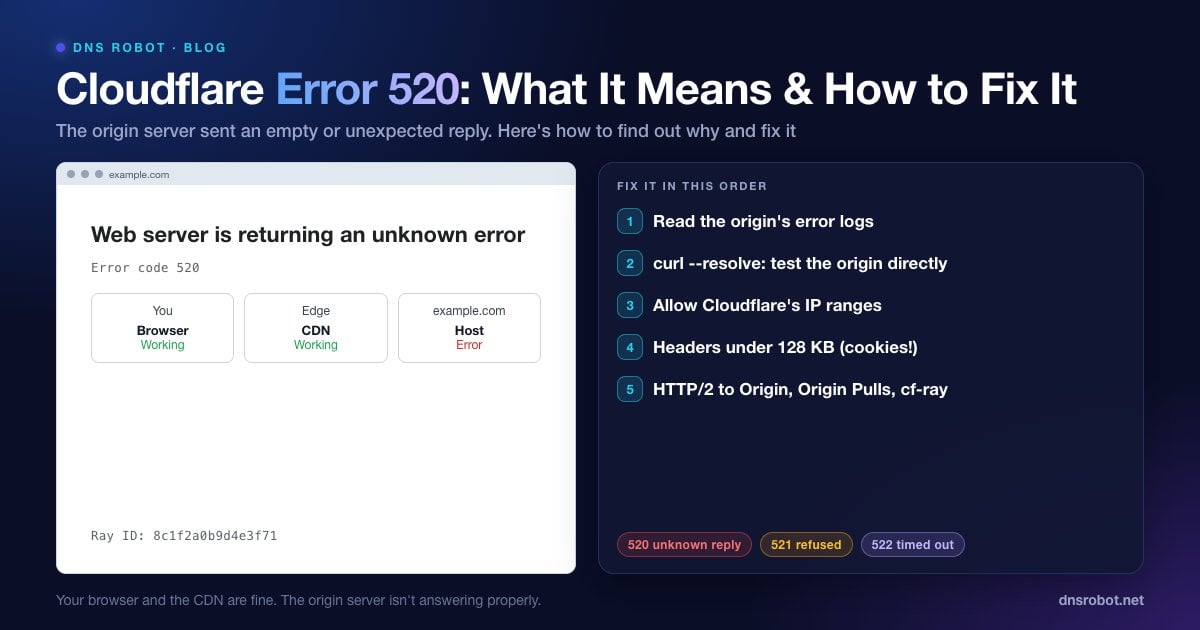
Error 520 is one of Cloudflare's own status codes. The page says "Web server is returning an unknown error" with Error code 520, a Ray ID, and three boxes: your browser (working), Cloudflare (working) and the host (error).
Cloudflare's documentation defines it as: "the origin server returns an empty, unknown, or unexpected response to Cloudflare." In other words, Cloudflare connected to the website's real server (the origin), but what came back wasn't a valid HTTP response it could pass on: no status code, an empty reply, a reset connection, or something it couldn't parse.
520 is a catch-all. Cloudflare uses more specific codes when it can tell what went wrong (refused connection, timeout, SSL failure), so a 520 means the origin answered in a way Cloudflare couldn't classify.
Error 520 vs 521, 522, 523, 524, 525 and 526
Cloudflare's 52x codes all describe a problem between Cloudflare and the origin. The number tells you where to look:
| Code | Page text | What happened |
|---|---|---|
| 520 | Web server is returning an unknown error | Empty, unknown or unexpected response from the origin |
| 521 | Web server is down | The origin refused the connection |
| 522 | Connection timed out | Cloudflare couldn't complete a connection to the origin |
| 523 | Origin is unreachable | No route to the origin (check the origin IP in DNS) |
| 524 | A timeout occurred | Connected, but the origin didn't answer in time |
| 525 | SSL handshake failed | The HTTPS handshake with the origin failed |
| 526 | Invalid SSL certificate | The origin's certificate isn't valid for Full (strict) mode |
If the page shows a plain 502 or 504 instead, see 502 Bad Gateway and 504 Gateway Timeout. For 521 and 522, check from outside whether the origin's port 443 or 80 accepts connections with the Port Checker. For 525 and 526, the SSL Checker shows the origin certificate, and ERR_SSL_VERSION_OR_CIPHER_MISMATCH covers TLS version and cipher problems.
Advertisement
What Causes a 520 Error?
Cloudflare lists these causes in its troubleshooting documentation:
The origin server crashes or is misconfigured, for example a PHP or Node process that dies mid-request.
A firewall or security plugin blocks Cloudflare's IPs at the origin, so connections are cut instead of answered.
Response headers exceed 128 KB, often because of too many or too large cookies.
Empty or malformed responses with no HTTP status code or body.
Missing response headers, or an origin that doesn't return proper HTTP error responses.
An incorrect HTTP/2 configuration at the origin when HTTP/2 to Origin is enabled.
Authenticated Origin Pulls enabled in Cloudflare while the origin isn't set up for it.
If You're a Visitor
You can't fix the website's server, but two things are worth trying. Reload after a minute, since a 520 caused by a crash or a restart can clear by itself. And clear the site's cookies: when the cause is oversized headers built from cookies, deleting that site's cookies (icon at the left of the address bar → Cookies and site data) can fix it for you.
If it keeps failing, let the site owner know and include the Ray ID from the bottom of the error page, which lets them find your exact request in Cloudflare.
Advertisement
Fix 1: Read the Origin Server's Error Logs
Cloudflare's first recommendation is to look at the origin's logs for the time of the error. Crashes, out-of-memory kills and connection resets show up there:
sudo tail -n 50 /var/log/nginx/error.log      # or /var/log/apache2/error.log
journalctl -u your-app --since "15 min ago"     # app service logs
pm2 logs --lines 50                             # Node apps under PM2
dmesg -T | grep -i "killed process" # out-of-memory killsFix 2: Test the Origin Without Cloudflare
Request the page straight from the origin, bypassing Cloudflare, and look at the raw response. With curl you can point the hostname at the origin IP for a single request:
# Replace 203.0.113.10 with your origin server's IP
curl -sv --resolve example.com:443:203.0.113.10 https://example.com/broken-page -o /dev/null

# Look for: a normal "HTTP/1.1 200" (or HTTP/2 200) status line and headers.
# "Empty reply from server" or "Connection reset by peer" here reproduces the 520.
Cloudflare also suggests a temporary workaround: set the DNS record to DNS only (grey cloud) or pause Cloudflare, so visitors reach the origin directly while you investigate. Remember that this exposes your origin IP. DNS Robot's DNS Lookup shows which IPs the world currently sees for your domain, and the HTTP Headers tool shows the server: cloudflare and cf-ray headers when traffic goes through Cloudflare.
Advertisement
Fix 3: Allow Cloudflare's IP Ranges at the Origin
All visitor traffic reaches your origin from Cloudflare's IP ranges, so a firewall, fail2ban jail or security plugin that rate-limits or blocks "suspicious" IPs can end up blocking Cloudflare itself. Allow the ranges published at https://www.cloudflare.com/ips/ in your firewall and security plugins, and make sure your web server reads the real visitor IP from the CF-Connecting-IP header so rate limits apply to visitors, not to Cloudflare.
Fix 4: Keep Response Headers Under 128 KB
Cloudflare rejects origin responses whose headers exceed 128 KB, and cookies are the usual reason. Check how many Set-Cookie headers a page sends and how large they are. Remove cookies you no longer need, keep session cookies small, and avoid apps or plugins that write large data into cookies.
Advertisement
Fix 5: Check HTTP/2 to Origin and Authenticated Origin Pulls
HTTP/2 to Origin: if it's enabled in Cloudflare (under Speed settings) but the origin's HTTP/2 setup is broken, responses can fail with a 520. Cloudflare suggests checking the origin's HTTP/2 configuration, or turning HTTP/2 to Origin off to confirm.
Authenticated Origin Pulls: if this is on in Cloudflare, the origin must be configured to accept Cloudflare's client certificate. If it isn't, turn the feature off or finish the origin setup.
Fix 6: What to Send Cloudflare Support
If the origin looks healthy and the 520 continues, Cloudflare asks for:
The full URLs where the error happens.
The cf-ray ID from the error page.
The output of
http://yourdomain.com/cdn-cgi/trace.Two HAR files (DevTools → Network → export), one with Cloudflare enabled and one with it disabled.
See whether a site is behind Cloudflare
DNS Robot's HTTP Headers checker shows the status code, the server header and the cf-ray ID for any URL, so you can confirm a 520 and whether Cloudflare is in front of the site.
Try HTTP Headers CheckerAdvertisement
Frequently Asked Questions
It's a Cloudflare error meaning the website's origin server returned an empty, unknown or unexpected response to Cloudflare. Your browser and Cloudflare are working; the origin server isn't answering properly.