502 Bad Gateway: What It Means & How to Fix It
Advertisement
What Is a 502 Bad Gateway Error?
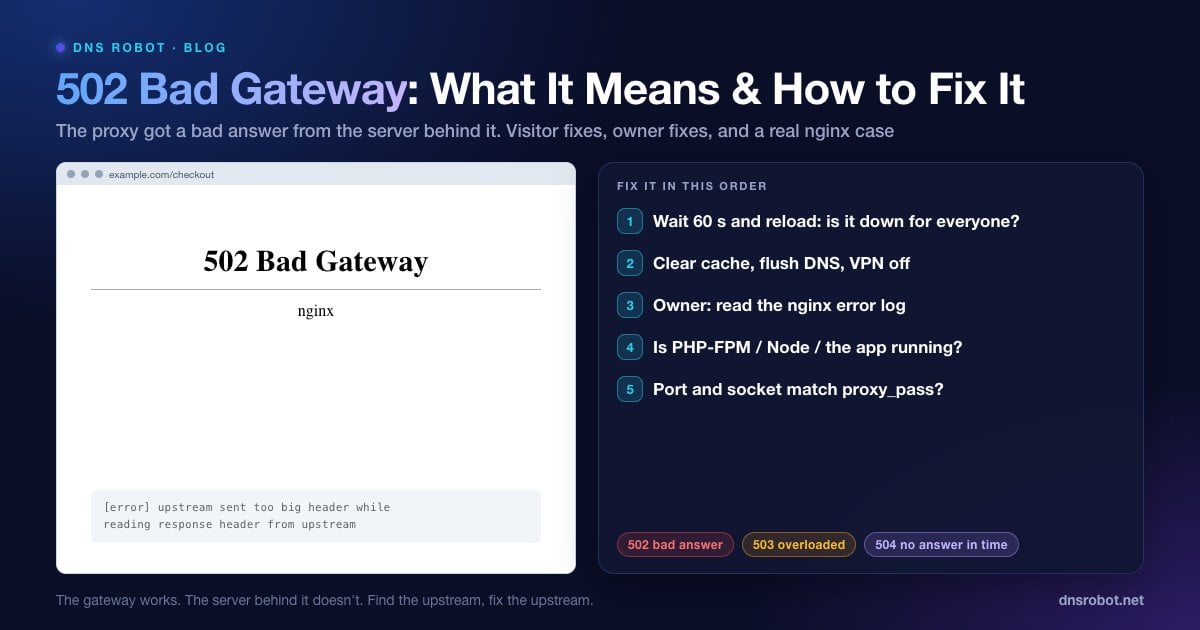
502 Bad Gateway is an HTTP status code that means the server answering you is acting as a gateway or proxy, and it got an invalid response from the server behind it. The HTTP standard (RFC 9110, section 15.6.3) defines it exactly that way: the server, "while acting as a gateway or proxy, received an invalid response from an inbound server it accessed while attempting to fulfill the request."
Most modern websites have at least two layers. A front server, such as nginx, Apache, Cloudflare or a cloud load balancer, accepts your connection, then passes the request to an upstream application such as PHP-FPM, a Node.js app, Python's Gunicorn or a container. When that upstream is down, crashes, or answers with something the proxy can't use, the proxy has nothing to give you, so it returns 502.
The important point is that the gateway itself is working. It received your request and responded. The fault is one step further back.
The Many Faces of a 502 Error
The status code is the same everywhere, but the page you see depends on which proxy produced it:
| Where it comes from | What the page says |
|---|---|
| nginx | 502 Bad Gateway, with nginx (and sometimes a version) underneath |
| Apache (mod_proxy) | Proxy Error. The proxy server received an invalid response from an upstream server. |
| Cloudflare | Error 502 Bad gateway, with Browser / Cloudflare / Host status boxes |
| Microsoft IIS (ARR / ASP.NET Core) | HTTP Error 502.3 - Bad Gateway, or HTTP Error 502.5 - Process Failure |
| Google services | 502. That's an error. The server encountered a temporary error… |
| Browsers / apps | HTTP Error 502, 502 Proxy Error, Bad Gateway: The proxy server received an invalid response |
Whichever version you see, the name of the proxy in the footer is a useful clue: it tells the site owner which layer to investigate.
Advertisement
502 vs 500 vs 503 vs 504: What's the Difference?
The 5xx codes all mean "server problem", but each one points at a different layer:
| Code | Name | What it means | Typical cause |
|---|---|---|---|
| 500 | Internal Server Error | The application itself failed while handling the request | Code bug, PHP fatal error, bad config |
| 502 | Bad Gateway | The proxy got an invalid response, or none it could use, from the upstream | App down, crashed, wrong port or socket, too-big headers |
| 503 | Service Unavailable | The server is temporarily refusing requests | Overload, maintenance mode, rate limits |
| 504 | Gateway Timeout | The proxy waited for the upstream and gave up | Slow database query, long-running script, timeout too low |
A quick rule: 502 = the upstream gave a bad answer (or hung up), 504 = the upstream gave no answer in time. Our guides to the neighbours cover them in depth: 500 Internal Server Error, 503 Service Unavailable and 504 Gateway Timeout.
What Causes a 502 Bad Gateway?
The upstream app isn't running. PHP-FPM, Node, Gunicorn or the container crashed, failed to start after a deploy, or is restarting.
The proxy points to the wrong place.
proxy_passorfastcgi_passuses the wrong port, an old PHP socket path after an upgrade, orlocalhostinside a Docker container.The app crashes on some requests. One page triggers an out-of-memory kill or an unhandled exception, and the connection closes before a response.
All workers are busy. PHP-FPM hit
pm.max_children, so new requests have nowhere to go.The response headers are too big. Large cookies or big security headers overflow nginx's
proxy_buffer_size.Keep-alive mismatch behind a load balancer. The app closes idle connections sooner than the load balancer expects, so the balancer sends a request into a connection that is closing.
A firewall or network change between proxy and origin. For example, a CDN can no longer reach an origin whose IP address or firewall rules changed.
Advertisement
How to Fix a 502 Error as a Visitor
You can't repair someone else's server, but these steps confirm the problem is really on their side and clear the rare local causes:
Wait 30 to 60 seconds and reload (Ctrl + R, or Cmd + R on a Mac). Many 502s last only as long as a deploy or a restart.
Check whether it's down for everyone. DNS Robot's HTTP Headers tool requests the page from our servers and shows the exact status code. If we get a 502 too, it's the site, not you. A Ping Test shows whether the server machine responds at all.
Hard-reload and clear the cache. Ctrl + Shift + R (Mac: Cmd + Shift + R) bypasses the cached copy, in case a stale error page is being shown to you.
Flush your DNS if the site recently moved hosts, so you reach the new server. Here's how to flush DNS on every system.
Turn off VPNs and proxies. Your own proxy can be the "gateway" that fails, especially on work networks.
Try another browser or your phone on mobile data. If it works there, clear cookies for that site.
How to Fix a 502 Bad Gateway on Your Server
Server-side, a 502 is one of the easier errors to fix, because the proxy almost always writes down exactly what went wrong. Work through these four checks in order.
Advertisement
1. Read the Proxy's Error Log
Reproduce the 502, then read the last lines of the error log on the proxy server:
| Log message | What it means |
|---|---|
| connect() failed (111: Connection refused) while connecting to upstream | Nothing listens on the upstream port: the app is down or on another port |
| connect() to unix:/run/php/php8.x-fpm.sock failed (2: No such file or directory) | The PHP-FPM socket doesn't exist, usually a PHP version change |
| connect() to unix:… failed (13: Permission denied) | nginx can't access the socket: fix listen.owner / listen.group |
| upstream prematurely closed connection while reading response header | The app crashed or closed the connection mid-request |
| upstream sent too big header while reading response header from upstream | Response headers are larger than proxy_buffer_size |
| no live upstreams while connecting to upstream | Every server in the upstream block is marked as failed |
# nginx
sudo tail -n 50 /var/log/nginx/error.log

# Apache
sudo tail -n 50 /var/log/apache2/error.log    # Debian/Ubuntu
sudo tail -n 50 /var/log/httpd/error_log      # RHEL/Alma/Rocky
These nginx messages cover the vast majority of 502s, and each points to the fix:
2. Check the Upstream App Is Running
# PHP-FPM (adjust the version)
sudo systemctl status php8.3-fpm
sudo journalctl -u php8.3-fpm -n 50

# Node.js under PM2
pm2 status
pm2 logs --lines 50

# Docker
docker ps -a          # look for containers that keep restarting
docker logs --tail 50 <container>

# Was it killed for using too much memory?
dmesg -T | grep -i "killed process"
If the service is stopped, start it and find out why it stopped: a failed deploy, a syntax error in the new release, or the out-of-memory killer. In PHP-FPM's log, server reached pm.max_children setting means every worker was busy. Raise pm.max_children only if the server has the RAM for it, otherwise find the slow requests that tie workers up.
3. Make Sure proxy_pass Points to the Right Port or Socket
Compare what nginx is told to talk to with what is actually listening:
# What is nginx proxying to?
grep -rn "proxy_pass\|fastcgi_pass" /etc/nginx/sites-enabled/

# What is actually listening?
sudo ss -tlnp            # TCP ports and their processes
ls -l /run/php/ # PHP-FPM socket filesTwo classic mismatches: after upgrading PHP, the socket becomes php8.3-fpm.sock while nginx still points to php8.1-fpm.sock; and inside Docker, proxy_pass http://localhost:3000 points at the nginx container itself rather than the app, so use the Compose service name (http://app:3000). After any change, run sudo nginx -t and sudo systemctl reload nginx.
4. A Real Example: How dnsrobot.net Served a 502
This happened to us on 30 September 2026. After we published a batch of new blog posts, exactly one of them returned 502 Bad Gateway through nginx 1.24, while every other page worked. The Next.js app behind nginx returned that same page with 200 OK when we requested it directly on port 3000. So the app was fine and the gateway was failing.
The nginx error log had the answer in one line: upstream sent too big header while reading response header from upstream. That page's response headers came to 4,087 bytes, mostly a long Content-Security-Policy header plus preload Link headers. nginx reads the first part of the response, including all headers, into a buffer set by proxy_buffer_size, which by default is one memory page: 4 KB on our server. That left only 9 bytes of room, and the full header block, status line included, overflowed it.
The fix was three lines in the location block that proxies to the app:
location / {
    proxy_pass http://127.0.0.1:3000;
    proxy_buffer_size 16k;        # room for large headers (was the 4k default)
    proxy_buffers 4 32k;
    proxy_busy_buffers_size 64k;
}After nginx -t and a reload, the page returned 200. The lesson: if only some pages return 502 while the rest of the site works, look for a size limit, such as large headers or big cookies on those pages, before you suspect the app.
Node.js Behind a Load Balancer: Random 502s
If you run Node.js behind AWS Application Load Balancer or a similar balancer and see occasional 502s with no errors in your app logs, check keep-alive timeouts. Node's HTTP server closes idle keep-alive connections after 5 seconds by default (server.keepAliveTimeout, in Node.js 26 and earlier), while an AWS ALB keeps idle connections open for 60 seconds. Sometimes the balancer reuses a connection just as Node closes it, and that request comes back as a 502.
The fix is to keep the app's timeout longer than the balancer's:
const server = app.listen(3000)
// Must be longer than the load balancer's idle timeout (ALB default: 60s)
server.keepAliveTimeout = 65_000
server.headersTimeout = 66_000 // keep slightly above keepAliveTimeout
502 Bad Gateway on Cloudflare
Behind Cloudflare, first look at who made the error page:
Cloudflare-branded page (Browser ✓ / Cloudflare ✓ / Host ✗): Cloudflare is working but couldn't get a valid response from your origin server. Check that the origin is up, listening on 443/80, and not blocking Cloudflare's IP ranges in its firewall. Test the origin directly with the Port Checker.
Plain, unbranded 502 page: if it doesn't mention cloudflare (for example, it names nginx or Apache), your own origin server generated the 502. Use the server-side steps above. A blank page with only "cloudflare" at the bottom comes from Cloudflare itself, for example during brief traffic rerouting or when the origin sends broken gzip content.
Origin IP changed? If you moved hosts, update the A record in Cloudflare's DNS. A DNS Lookup shows what the world currently sees.
Advertisement
Does a 502 Error Hurt SEO?
A short outage doesn't. Google's documentation says 5xx server errors make its crawlers temporarily slow down crawling. Pages that are already indexed stay in the index at first, but if the errors persist, Google eventually drops those URLs.
So a 502 lasting a few minutes during a deploy is harmless. A 502 on important pages that lasts days, or one that appears intermittently for weeks, can reduce crawling and cost rankings. Monitor your key URLs, and check the Crawl stats report in Search Console after any outage.
Is the site returning 502 for everyone?
DNS Robot's HTTP Headers checker requests any URL from our servers and shows the exact status code, the server software and every response header. It's the fastest way to confirm a 502.
Try HTTP Headers CheckerAdvertisement
Frequently Asked Questions
It means the server you reached is a gateway or proxy, such as nginx, Cloudflare or a load balancer, and it got an invalid response from the application server behind it. The proxy works; the app behind it is down, crashed, unreachable, or sent a response the proxy couldn't use.