What Is an Invisible Character?
An invisible character is a Unicode character that shows up as blank space, or as nothing at all, but still counts as text. Apps that refuse an empty name or an empty message accept it, because to the software the field is not empty. That is why people search for blank text, an empty character or invisible text to copy and paste.
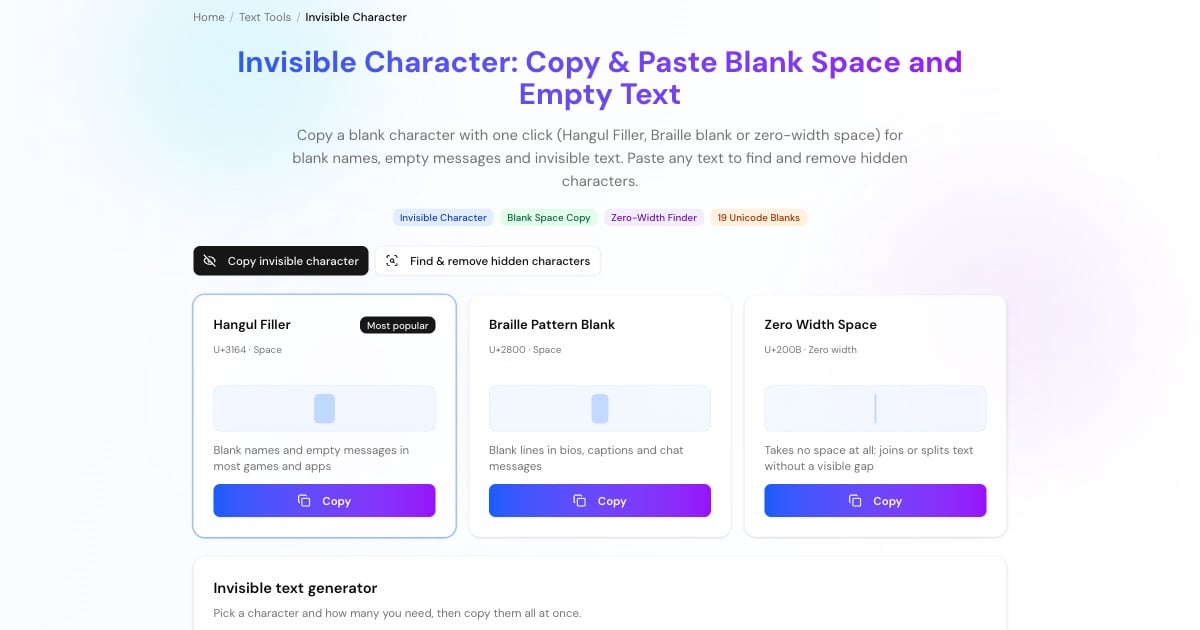
The most popular one is the Hangul Filler (U+3164, ㅤ). It belongs to the Korean alphabet, where it fills an empty slot in a syllable, and most fonts draw it as a blank the width of a letter. The Braille Pattern Blank (U+2800) is a braille cell with no dots raised. The Zero Width Space (U+200B) takes up no room at all.
This tool gives you all of them. Copy the one you need from the buttons above, generate up to 1,000 at once, or switch to Find & remove hidden characters to see which invisible characters are hiding in text you pasted from somewhere else. Everything runs in your browser; nothing you paste is uploaded.
How to Copy and Paste an Invisible Character
Copying a blank character takes two taps. Because you cannot see what you copied, the tool highlights the blank area so you can tell the character is there.
Click Copy on the Hangul Filler card at the top of the page. It is the invisible character that works in the most places.
Paste into the name field, chat box or bio with Ctrl+V (Cmd+V on a Mac), or long-press and choose Paste on a phone.
If an app strips the character or says the name is empty, try the Braille Pattern Blank or the Halfwidth Hangul Filler from the table.
Use the invisible text generator to copy up to 1,000 blank characters at once, for example to reach a minimum name length.
Advertisement
Which Invisible Character Should You Use?
Invisible characters fall into a few groups, and the right one depends on where you paste it. These are the six that matter most.
A Korean letter that renders as a blank. Apps treat it as a letter, not as a space, so it survives the trimming that removes ordinary spaces. The usual choice for blank names and empty messages.
A braille cell with no dots. It is a symbol rather than whitespace, so it keeps empty lines in bios, captions and posts that would otherwise collapse.
Takes no space at all. Use it to let long words or URLs wrap, or to break up a word so it is not turned into a link or a mention.
U+200D glues emoji into one picture (👨👩👧 is three emoji joined by it); U+200C stops letters from joining in scripts such as Persian and Hindi.
Looks like a normal space but stops a line break, keeping "10 km" or "Mr. Smith" together. Written as in HTML.
A full-width space from Chinese, Japanese and Korean typography, as wide as one CJK character.
Blank Names and Empty Messages in Games and Apps
Most games and apps check that a name or message is not empty, and many remove leading and trailing spaces first. A name made of ordinary spaces is trimmed to nothing and rejected. A Hangul Filler or Braille Pattern Blank is not a space as far as the software is concerned, so it gets through and still looks empty.
Each platform sets its own rules and changes its filters over time, so test a character before you rely on it, especially when a rename costs in-game currency.
Blank game names: the Hangul Filler is the usual pick for blank or spaced-out names in mobile games such as Free Fire and PUBG Mobile. Put it between words to add extra spacing.
Empty chat messages: send a single Hangul Filler or Braille Pattern Blank in WhatsApp, Telegram or Messenger. The app sees text, the reader sees a blank bubble.
Line breaks in bios and captions: put a Braille Pattern Blank on an otherwise empty line to keep the spacing that Instagram or TikTok would remove.
Blank folder names on Windows: rename a desktop folder and type Alt+255 on the numeric keypad; Windows inserts a no-break space and the folder shows no name.
Keeping words together: a no-break space between a number and its unit stops a line break in the middle.
Advertisement
Invisible Text vs Blank Space vs Zero-Width Characters
All of these look empty, but software treats them differently. Knowing the difference explains why one character works in an app and another does not.
Blank letters and symbols
Hangul Filler, Halfwidth Hangul Filler and Braille Pattern Blank. They have a visible width and are classed as letters or symbols, not whitespace, so trimming functions such as JavaScript's trim() leave them alone.
Unicode spaces
No-break, en, em, thin, hair and ideographic spaces. They are whitespace with different widths, and most trim functions remove them, which is why they rarely work for blank names.
Zero-width characters
Zero width space, joiner, non-joiner, word joiner and the byte order mark (U+FEFF). They take no space and are mostly invisible formatting controls, which is also why they cause hard-to-find bugs.
How to Find and Remove Invisible Characters
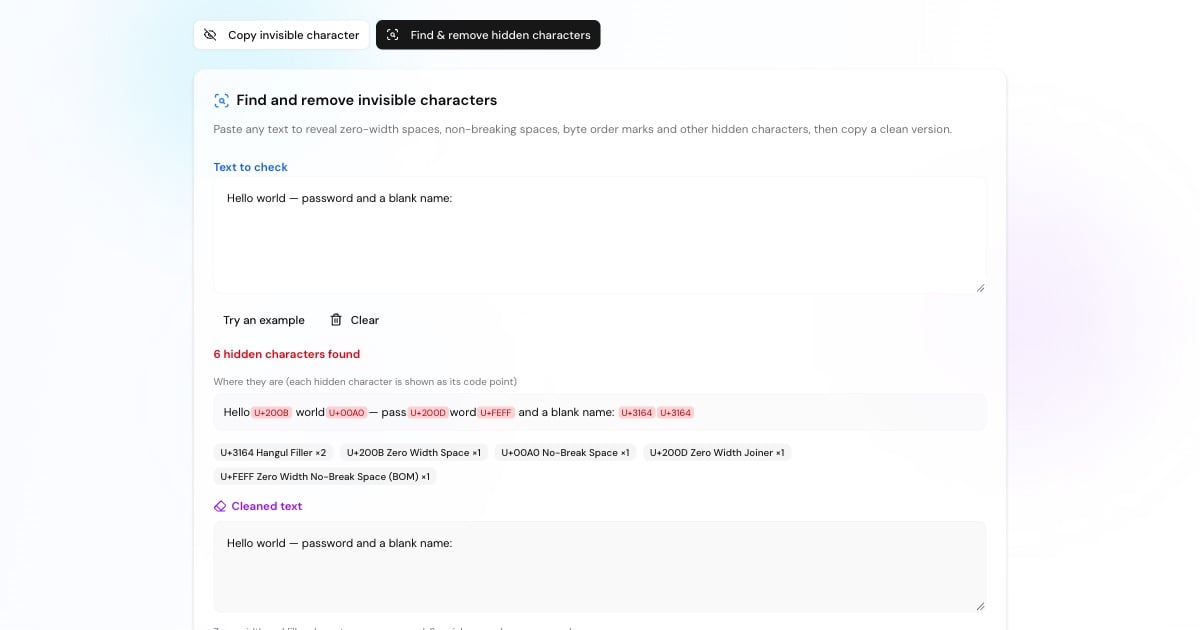
Hidden characters cause trouble when they end up somewhere they were not meant to be. Text copied from web pages, PDFs, Word documents, spreadsheets and chat apps often carries zero-width spaces, no-break spaces or a byte order mark. In 2025 users also reported narrow no-break spaces (U+202F) in some AI chatbot answers.
Switch to the Find & remove hidden characters tab and paste your text. Every hidden character is shown as its code point (for example U+200B) in the spot where it sits, with a count of each kind. One click gives you a clean copy: zero-width and filler characters are removed, and special spaces become ordinary spaces.
Code that will not compile: errors such as "illegal character U+200B" or a JSON parser failing on the first byte (a byte order mark).
Passwords and usernames that do not match: a zero-width space copied along with a password makes it a different password.
Broken links and searches: a hidden character inside a URL, email address or search term makes it fail even though it looks correct.
Messy data imports: spreadsheets and CSV files that start with a byte order mark, or contain no-break spaces that break number parsing.
Advertisement
Invisible Characters in HTML, JavaScript and Python
Developers can write invisible characters as escape codes instead of pasting them, which keeps the source readable. To see the raw bytes, paste the character into the Binary Translator: the Hangul Filler is three bytes in UTF-8, 11100011 10000101 10100100.
ㅤ <!-- Hangul Filler -->
⠀ <!-- Braille Pattern Blank -->
​ <!-- Zero Width Space -->
<!-- No-Break Space -->const HIDDEN = /[\u00AD\u200B-\u200F\u2060-\u2064\uFEFF\u115F\u3164\uFFA0\u2800]/g
text.match(HIDDEN) // list them
const clean = text.replace(HIDDEN, '')import re
HIDDEN = re.compile('[\u00ad\u200b-\u200f\u2060-\u2064\ufeff\u115f\u3164\uffa0\u2800]')
clean = HIDDEN.sub('', text)grep -nP '[\x{200B}-\x{200F}\x{FEFF}]' file.txtMore Text and Unicode Tools
Invisible characters are one corner of Unicode. These tools cover the rest of everyday text conversion.
Translate text to binary and back, with hex, decimal and octal output.
Turn text into tiny, bold, italic and other Unicode font styles.
Convert text to Morse code and back, with audio playback.
Create strong random passwords without hidden characters.