What Is a MAC Address Lookup?
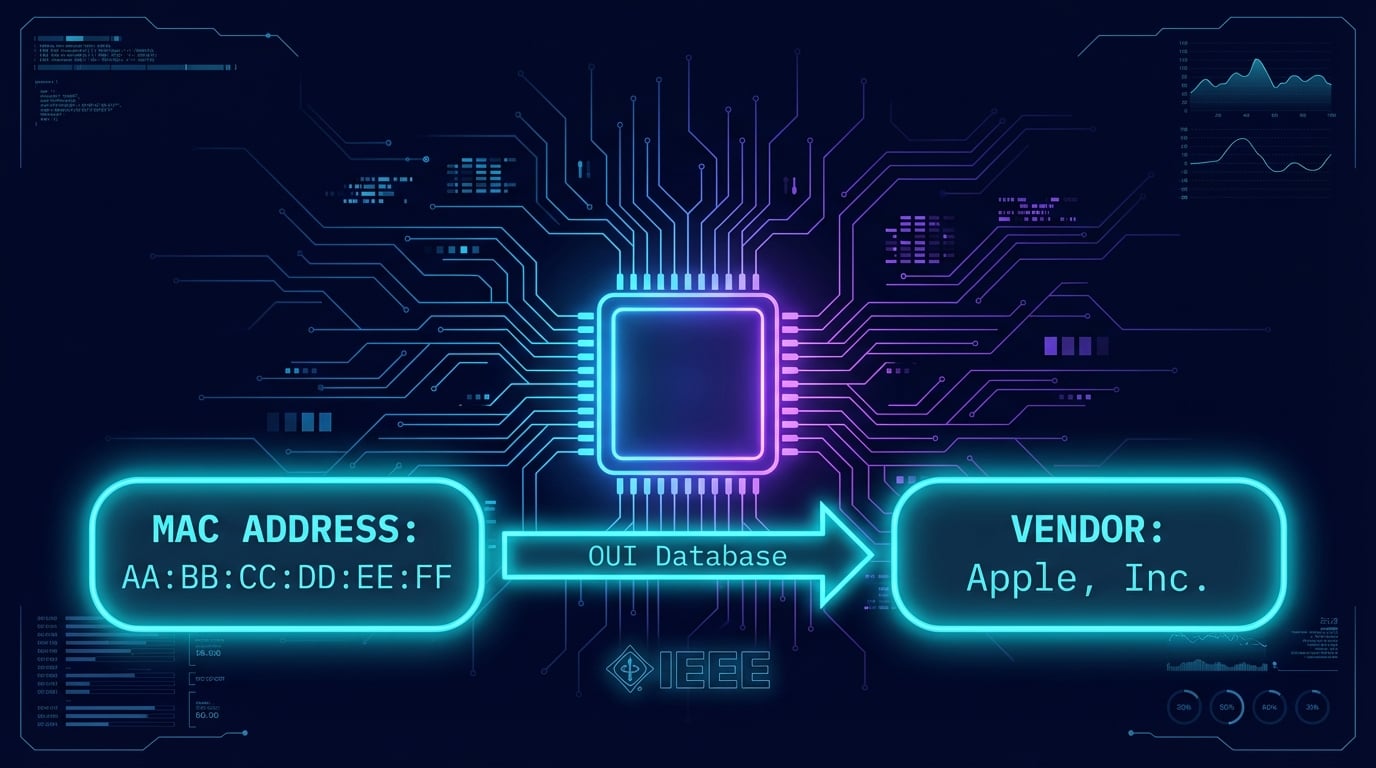
A MAC address lookup is the process of identifying the manufacturer or vendor of a network device by examining its MAC (Media Access Control) address. Every network interface card (NIC) — whether in a laptop, smartphone, router, or IoT device — is assigned a unique 48-bit MAC address at the factory. The first three bytes of this address form the OUI (Organizationally Unique Identifier), which reveals who manufactured the hardware.
The same check goes by several names: a MAC vendor lookup, MAC address finder, MAC address checker, MAC address identifier, OUI lookup, or simply a MAC address search. They all query the same MAC address database (the IEEE registry) and answer the same question: which company made the network interface behind this address?
The IEEE (Institute of Electrical and Electronics Engineers) maintains the official registry of OUI assignments. When a hardware manufacturer wants to produce network devices, they register with the IEEE and receive one or more unique OUI prefixes. This system ensures that every legitimately manufactured network device has a globally unique MAC address that can be traced back to its vendor.
Our free MAC address vendor lookup tool queries this OUI database to instantly identify the manufacturer behind any MAC address. Whether you're performing network inventory, investigating unknown devices on your network, or verifying hardware authenticity, a MAC address lookup provides the starting point for device identification. You can also use our IP Lookup tool to identify devices by IP address, or DNS Lookup to resolve domain names associated with network devices.
Advertisement
How MAC Address Lookup Works
Our MAC address lookup tool follows a simple four-step process to identify the vendor behind any MAC address. The entire lookup completes in milliseconds, providing instant results from the IEEE OUI database.
Enter MAC Address
Input the MAC address in any format — colon-separated, dash-separated, dot notation (Cisco), or plain hex. The tool automatically normalizes all formats.
Extract OUI (First 3 Bytes)
The first 24 bits (3 bytes) of the MAC address are extracted as the OUI prefix. For example, from AA:BB:CC:DD:EE:FF, the OUI is AA:BB:CC.
Query IEEE OUI Database
The OUI prefix is looked up against the IEEE registration authority database containing 58,776 assignments across the MA-L, MA-M, MA-S and IAB registries.
Vendor Information Returned
The matched vendor/manufacturer name is displayed along with format conversions, unicast/multicast flag, and universal/local administration bit status.
Advertisement
Bulk MAC Address Lookup: Check a Whole Network at Once
Auditing a network one address at a time is slow. The Bulk Lookup tab takes up to 500 MAC addresses at once, in any notation, and you don't need to clean the list first: paste the raw output of a command or an exported table and the tool finds every MAC address in it, removes duplicates, and returns the vendor, IEEE prefix, country and type of each one. Randomized (private) and multicast addresses are flagged instead of being reported as "unknown", and the whole table exports to CSV.
Windows
List every device your PC has talked to on the local network:
arp -amacOS and Linux
macOS drops leading zeros (0:1a:2b:…); the tool pads them back:
arp -a · ip neighRouter or controller
Copy the DHCP client list from your router's admin page (see our router login guide), or a CSV export from UniFi, Omada or a firewall.
Open Bulk Lookup — a typical home network resolves to a handful of vendors (your router maker, Apple, Samsung, Espressif smart plugs, Amazon Echo devices), so an unfamiliar vendor in the list is the device worth investigating.
OUI Lookup by Vendor: Every MAC Prefix a Manufacturer Owns
A normal lookup goes from address to vendor. The Search by Vendor tab goes the other way: type a company name and it lists every prefix (OUI) the IEEE registered to it, which is what you need to write a firewall or DHCP rule for a device class, to spot a brand in packet captures, or to check whether a prefix really belongs to the company a device claims to be. Large manufacturers own far more than one prefix, so checking a single "known" OUI misses most of their devices.
Prefixes that identify common devices on a home network
| Vendor | Typical devices | Prefixes | Examples |
|---|---|---|---|
| Raspberry Pi | Raspberry Pi boards (Pi 3, 4, 5, Zero) | 10 | B8:27:EB, DC:A6:32, E4:5F:01, D8:3A:DD |
| Espressif | ESP32 / ESP8266 chips in smart plugs, bulbs and other IoT gadgets | 366 | 00:4B:12, 00:70:07, 00:FB:4A, 04:83:08 |
| Amazon | Echo speakers, Fire TV, Kindle, Ring and Blink cameras | 218 | 00:71:47, 00:86:21, 00:BB:3A, 00:F3:61 |
| Nest speakers and thermostats, Chromecast | 112 | 00:1A:11, 00:F6:20, 04:00:6E, 04:C8:B0 | |
| TP-Link | Routers, Deco mesh units, Kasa and Tapo plugs and cameras | 269 | 00:0A:EB, 00:14:78, 00:19:E0, 00:1D:0F |
| Ubiquiti | UniFi access points, switches and gateways | 49 | 00:15:6D, 00:27:22, 04:18:D6, 0C:EA:14 |
| Apple | Mac, iPad and Apple TV hardware addresses (iPhones show a private Wi-Fi address by default) | 1,573 | 00:03:93, 00:05:02, 00:0A:27, 00:0A:95 |
Largest MAC address block holders
Ranked by full MA-L blocks (16.7 million addresses each) in the IEEE registry, synced October 14, 2026. Each organization also appears under its exact registered name, so "Huawei Technologies" and "Huawei Device" are separate registrants.
| # | Organization | Country | MA-L blocks |
|---|---|---|---|
| 1 | Apple, Inc. | US | 1,573 |
| 2 | HUAWEI TECHNOLOGIES CO.,LTD | CN | 1,417 |
| 3 | Cisco Systems, Inc | US | 1,258 |
| 4 | Samsung Electronics Co.,Ltd | KR | 913 |
| 5 | Huawei Device Co., Ltd. | CN | 670 |
| 6 | Intel Corporate | MY | 666 |
| 7 | zte corporation | CN | 502 |
| 8 | Texas Instruments | US | 401 |
| 9 | Espressif Inc. | CN | 351 |
| 10 | Commscope | US | 347 |
Understanding Your MAC Address Lookup Results
When you perform a MAC address vendor lookup, the results include several key pieces of information about the network hardware. Here's what each field means:
Vendor / Manufacturer Name
The organization registered with the IEEE as the OUI owner. This identifies who manufactured the network interface — e.g., Apple, Samsung, Intel, Cisco, TP-Link.
OUI Prefix
The first 3 bytes (6 hex characters) of the MAC address that identify the vendor. A single manufacturer may own multiple OUI prefixes due to high device production volume.
Unicast / Multicast Flag
The least significant bit of the first byte. Unicast (0) means the address targets a single device. Multicast (1) means it targets a group of devices on the network.
Universal / Local Admin Flag
The second bit of the first byte. Universally administered (0) means the address was assigned by the manufacturer. Locally administered (1) means it was set by software (randomized or spoofed).
What Does "Unknown Vendor" Mean?
If the lookup returns "Unknown Vendor," the OUI prefix wasn't found in the IEEE registry. This commonly happens with MAC address randomization — a privacy feature enabled by default on iOS 14+, Android 10+, and Windows 10/11. Randomized addresses use locally administered bits, meaning they aren't tied to any vendor. It can also occur with private OUI assignments or very recently registered prefixes.
MAC Address Formats Explained
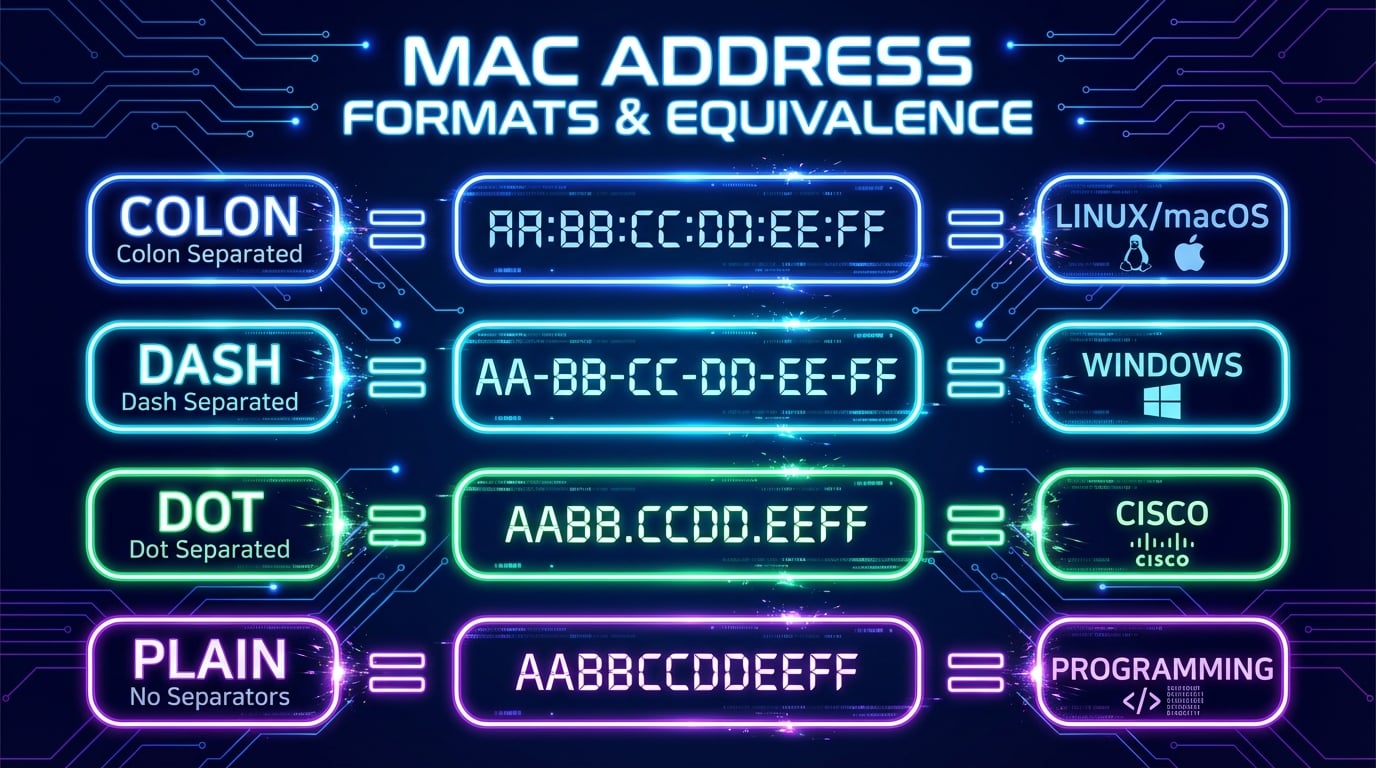
MAC addresses can be written in four different formats depending on the operating system or network equipment. Our MAC address lookup tool accepts all formats and automatically converts between them.
| Format | Example | Used By |
|---|---|---|
| Colon-separated | AA:BB:CC:DD:EE:FF | Linux, macOS |
| Dash-separated | AA-BB-CC-DD-EE-FF | Windows |
| Dot-separated | AABB.CCDD.EEFF | Cisco IOS |
| Plain (no separator) | AABBCCDDEEFF | Programming, APIs |
All four formats represent the same 48-bit address. Our tool normalizes the input by stripping all separators before performing the OUI lookup, so you can paste any format directly from your terminal or network management tool.
Advertisement
Common Uses for MAC Address Lookup
MAC address lookups are essential for network administrators, security professionals, and IT teams. Here are the most common use cases for identifying device vendors by MAC address:
Network Device Identification
Identify unknown devices on your network by matching their MAC addresses to manufacturers. Useful for distinguishing laptops from IoT devices, printers, and network equipment.
Security Auditing
Detect unauthorized devices by checking if their vendor matches expected hardware. A MAC from an unexpected manufacturer may indicate a rogue device or intrusion attempt.
Network Inventory
Build comprehensive asset inventories by categorizing devices by manufacturer. Track hardware across your organization for lifecycle management and procurement planning.
Troubleshooting
Diagnose network issues by identifying device types. Knowing the manufacturer helps determine firmware versions, known bugs, and vendor-specific configuration requirements.
Vendor Verification
Verify that hardware is genuine by confirming its OUI matches the claimed manufacturer. Counterfeit network equipment often uses incorrect or unregistered OUI prefixes.
Access Control Lists
Configure MAC-based access control on network switches and wireless access points. Understanding vendor prefixes helps define allow/deny rules for device categories.
MAC Address Structure Explained
A MAC address is a 48-bit (6-byte) identifier structured into two halves. Understanding this structure helps you interpret OUI lookup results and identify special-purpose addresses.
OUI — Bytes 1-3 (Vendor ID)
The first 3 bytes are the Organizationally Unique Identifier assigned by the IEEE. This portion identifies the manufacturer. The IEEE charges approximately $3,000 per OUI registration, and over 40,000 full OUIs (MA-L blocks) are currently assigned.
NIC-Specific — Bytes 4-6 (Device ID)
The last 3 bytes are assigned by the manufacturer to uniquely identify each device. With 24 bits, each OUI allows up to 16.7 million unique device addresses. Manufacturers with high production volumes (Apple, Samsung) hold multiple OUI registrations.
48-Bit MAC Address Structure
Advertisement
How to Find Your MAC Address
Before you can look up the vendor of a MAC address, you need to find it on your device. Here are the commands and steps for each major platform (our full guide, What Is a MAC Address?, covers every device, the address format and private MACs):
Windows
Open Command Prompt and run:
ipconfig /allLook for "Physical Address" under your network adapter. Alternatively, run getmac for a quick list of all MAC addresses.
macOS
Open Terminal and run:
ifconfig en0 | grep etherOr go to System Settings > Network > Advanced > Hardware. Use en0 for Wi-Fi, en1 for Ethernet.
Linux
Open a terminal and run:
ip link showLook for the link/ether line under your interface. The legacy command ifconfig also works on most distributions.
Mobile (iOS / Android)
Navigate to device settings:
Note: Modern mobile devices show a randomized MAC by default. The real hardware address may differ from the per-network randomized address.

MAC Address Vendor Lookup: What the OUI Database Reveals
A MAC address vendor lookup matches the prefix of your address against the IEEE's official registries. Our OUI lookup runs against a locally-hosted copy of all four IEEE registries — MA-L (24-bit), MA-M (28-bit), MA-S (36-bit), and legacy IAB blocks — currently 57,890 assignments, refreshed directly from IEEE data (last update: July 2026). Because longer prefixes are checked first, devices registered under small MA-S blocks resolve to the correct niche manufacturer instead of a generic block holder.
One important caveat: a vendor lookup only works on hardware (universally administered) addresses. If you look up the WiFi MAC your phone shows to a network, you'll often get a randomized, locally-administered address — iOS, Android, and Windows generate these per-network for privacy, and they deliberately contain no manufacturer information. Our tool detects this case automatically and tells you, instead of returning a misleading "unknown vendor". For the real vendor, use the hardware MAC printed in the device's About/Status settings, or create test addresses with the MAC address generator.
Advertisement
Can You Trace a MAC Address to a Device, Owner, or Location?
No — a MAC address cannot be traced to a physical location or a person's identity. MAC addresses only exist within the local network segment: the moment traffic crosses a router, the source MAC is stripped and replaced with the router's own. What a MAC address lookup does reveal is the hardware manufacturer — which is often enough to figure out what a device is, just not where it is or who owns it.
What a MAC lookup CAN tell you
- The manufacturer — via the IEEE-registered OUI prefix.
- The likely device type — "Espressif" is almost always a smart plug or bulb, "AzureWave" a console or smart-TV module, "Raspberry Pi Foundation" a hobby server.
- Which gadget on your Wi-Fi is which — match addresses from your router's client list.
- Whether the address is randomized — private MACs (second hex digit 2, 6, A, E) carry no vendor at all.
What it CANNOT tell you
- Physical location — MACs never leave the local network, so there is nothing to geolocate.
- The owner's name or identity — the OUI identifies the maker, not the user.
- Remote tracking — you cannot follow a MAC address across the internet.
- Account or ISP records — only the network operator (or law enforcement with legal process) can link a MAC to a person.
How to identify an unknown device on your Wi-Fi
- 1
Open your router's admin panel (usually 192.168.1.1) and find the connected devices or DHCP client list.
- 2
Copy the MAC address of the entry you don't recognize.
- 3
Paste it into the MAC address lookup at the top of this page.
- 4
The vendor result usually gives it away — a smart-home chipmaker, a TV module, a printer brand.
- 5
Vendor unknown and the address looks randomized? Toggle your devices off one at a time and watch which entry disappears.
For internet-facing identification — who is behind a public address, which ISP, what location — you want an IP lookup instead: IP addresses do cross the internet and carry routable, geolocatable information.
Related Network & DNS Tools
Explore our other free network diagnostic and DNS tools to complement your MAC address lookups:
Find IP address location, ISP, and ASN details
Query all DNS record types for any domain
Look up domain registration and owner details
Check PTR records and reverse DNS resolution
Discover all subdomains of any domain
Test if ports are open on any host
Check if an IP is listed on blacklists
Analyze HTTP response and security headers
Frequently Asked Questions
What is a MAC address lookup?
A MAC address lookup identifies the manufacturer or vendor of a network device by examining the first three bytes (OUI) of its 48-bit MAC address. The IEEE assigns unique OUI prefixes to hardware manufacturers, making it possible to determine who made a network adapter, router, or IoT device from its MAC address.
What is an OUI in MAC addresses?
OUI stands for Organizationally Unique Identifier. It's the first 3 bytes (24 bits) of a MAC address, assigned by the IEEE to hardware manufacturers. For example, the OUI 00:1A:11 is assigned to Google. Nearly 59,000 assignments exist across the IEEE registries, and our database is rebuilt directly from IEEE data.
Why does my MAC address show "Randomized / Private MAC" or no vendor?
Modern phones and laptops use MAC randomization for WiFi privacy: iOS, Android, and Windows generate a different locally-administered address for each network, and those addresses intentionally encode no manufacturer. You can spot them by the second hex digit — 2, 6, A, or E. To identify the real vendor, look up the device's hardware MAC from its settings (About Phone → Status on Android, Settings → General → About on iOS).
How do I find the vendor of a MAC address?
Enter any MAC address into the lookup tool above in any format — colon, dash, dot, or plain hex. The tool extracts the OUI prefix and queries the IEEE database to identify the vendor. Results are instant and free.
Why does my MAC address show "Unknown Vendor"?
This typically means the device uses MAC address randomization (iOS 14+, Android 10+, Windows 10/11), has a private OUI assignment, or the prefix was very recently registered. Locally administered addresses (second bit of first byte = 1) aren't tied to any vendor.
What MAC address formats does this tool support?
All four common formats: colon-separated (AA:BB:CC:DD:EE:FF for Linux/macOS), dash-separated (AA-BB-CC-DD-EE-FF for Windows), dot-separated (AABB.CCDD.EEFF for Cisco IOS), and plain hex (AABBCCDDEEFF for programming). All are automatically normalized.
Can I identify a device from its MAC address?
Partially, yes. The lookup reveals the manufacturer, which usually narrows down what the device is — "Espressif" is almost always a smart-home gadget, "AzureWave" a console or smart-TV module. To pin down the exact device, match the MAC against your router's connected-devices list. Randomized private MACs reveal no manufacturer by design.
Is it possible to trace a MAC address?
Not beyond the local network. MAC addresses are stripped at every router hop, so they never travel across the internet and can't be traced to a location or person remotely. On a network you control, an admin can see which port or access point a MAC is connected to — that's the practical limit of tracing.
What is a MAC vendor?
A MAC vendor is the organization the IEEE registered a block of MAC addresses to, usually the company that made the network chip or device, such as Apple, Cisco, Espressif or Raspberry Pi. The vendor is encoded in the first 24 to 36 bits of every hardware MAC address. Note that it names the maker of the network interface, which can differ from the brand on the box: many smart TVs and appliances report the Wi-Fi module maker, such as AzureWave or Murata.
How do I find all MAC address prefixes for a manufacturer?
Use the Search by Vendor tab and type the company name. It lists every prefix the IEEE registered to that organization. For example, Raspberry Pi owns 10 blocks including B8:27:EB, DC:A6:32, E4:5F:01 and 2C:CF:67, while Apple holds 1,573 MA-L blocks. You can copy the full list or click any prefix to look it up.
Is a MAC address the same as an IP address?
No. A MAC address is a 48-bit hardware identifier assigned at the factory (Layer 2), while an IP address is a logical network address (Layer 3). MAC addresses identify devices on a local network; IP addresses route traffic across the internet. Use our IP Lookup tool for IP-based identification.
Can MAC addresses be spoofed or changed?
Yes. MAC addresses can be changed in software on all major operating systems, even though the hardware address remains the same. This is used for privacy, testing, and bypassing MAC-based access controls. Spoofed addresses are indistinguishable from real ones on the network.
What is MAC address randomization?
A privacy feature in iOS 14+, Android 10+, and Windows 10/11 that generates random, locally administered MAC addresses instead of using the real hardware address. This prevents tracking across Wi-Fi networks. Randomized MACs have the locally administered bit set (bit 1 of byte 1 = 1).
How many MAC address vendors are registered?
The IEEE registries list nearly 59,000 assignments, over 40,000 of them full MA-L blocks. The largest holders own hundreds or thousands: Apple holds 1,573 MA-L blocks, Huawei 1,417, Cisco 1,258 and Samsung 913. MA-M and MA-S blocks serve organizations that need fewer addresses.
Is this MAC address lookup tool free?
Yes, completely free with no registration. Look up a single MAC address, paste up to 500 at once in Bulk Lookup, or list every prefix a company owns with Search by Vendor, with one-click copy and CSV export.
How do I find the owner of a MAC address?
You can't identify an owner from the address alone — the OUI identifies the device's manufacturer, not the person using it. On your own network, the router's client list may show a device hostname like "Sarahs-iPhone". Beyond that, linking a MAC to an individual requires the network operator's records — available only to the operator or law enforcement.
Can I look up multiple MAC addresses at once?
Yes. Open the Bulk Lookup tab and paste up to 500 MAC addresses in any format, one per line or mixed with other text. You can paste raw arp -a output from Windows, macOS or Linux, a DHCP lease table or a router's client list; the tool finds every MAC address, removes duplicates and returns the vendor, prefix, country and type of each, with a CSV export.
How often is the MAC vendor database updated?
The IEEE publishes new assignments every day. Our database is rebuilt from the four official IEEE registry files (MA-L, MA-M, MA-S and IAB), and the date of the last sync is shown under the tool. The October 2026 refresh added 887 new assignments, including new Apple, Huawei and AMD prefixes.