What Is RGB to Pantone Conversion?
RGB to Pantone conversion finds the nearest Pantone Matching System (PMS) ink for a colour defined as red, green and blue light. RGB is how cameras capture, screens display and design software stores colour: three channels from 0 to 255. Pantone colours are physical inks mixed to a recipe and matched against a printed swatch. Because light and ink have different gamuts, the conversion is a nearest-neighbour search rather than a formula, and a good converter tells you how near the neighbour is.
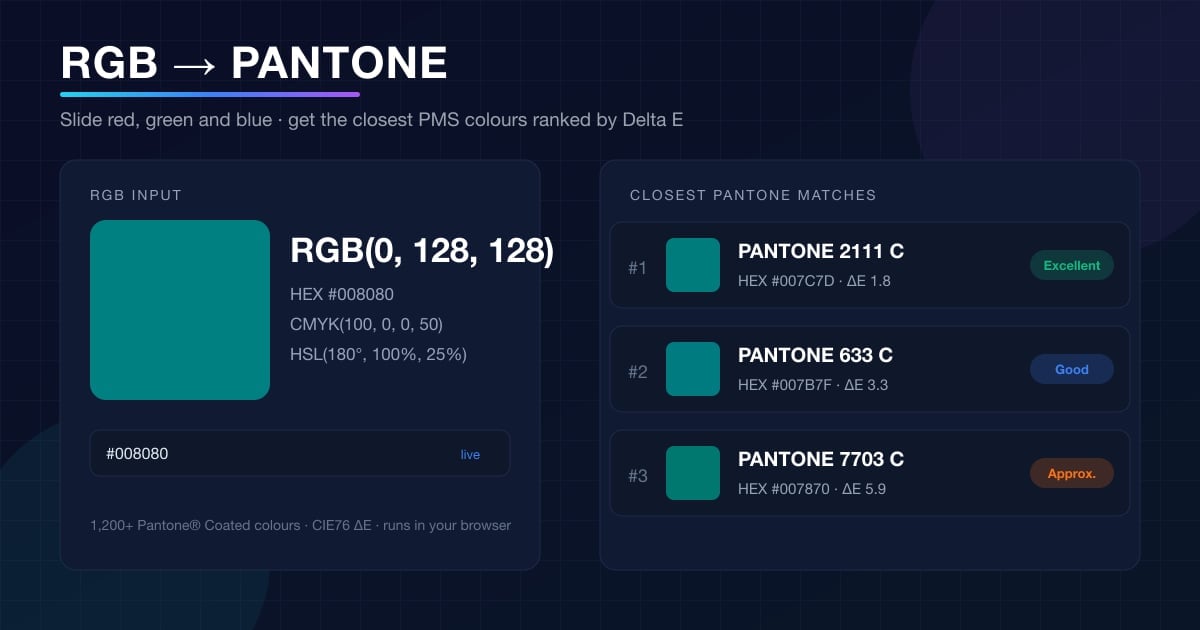
This RGB to PMS converter transforms your triplet into CIELAB, the colour space designed around human perception, and computes the Delta E distance to each of the 1,213 Pantone Coated colours. Matches are ranked and labelled from Exact to Approximate, so teal RGB(0, 128, 128) comes back as an excellent PANTONE 2111 C while pure blue RGB(0, 0, 255) is flagged as out of gamut.
Use it whenever a colour sampled from a photo, a UI, a video frame or a design file has to become a printed ink: logos, packaging, uniforms, signage and merchandise.
How to Convert RGB to Pantone
1. Set the RGB values
Drag the red, green and blue sliders or type 0 to 255 in each box. You can also paste a HEX code or click the swatch to open the colour picker. The preview and the HEX, CMYK and HSL readouts update live.
2. Read the ranked matches
The nearest Pantone Coated colours appear instantly with a Delta E score and a rating: Exact, Excellent, Good, Fair or Approximate. Slide the match count from 1 to 20.
3. Compare swatches
Your colour sits stacked on the Pantone colour in every result so the shift is visible, alongside the Pantone's own RGB, HEX and CMYK values.
4. Copy or share
Copy one Pantone name, copy every match as text for a brand guide, or share the link; the URL carries your values (?rgb=0,128,128).
Advertisement
RGB Light vs Pantone Ink
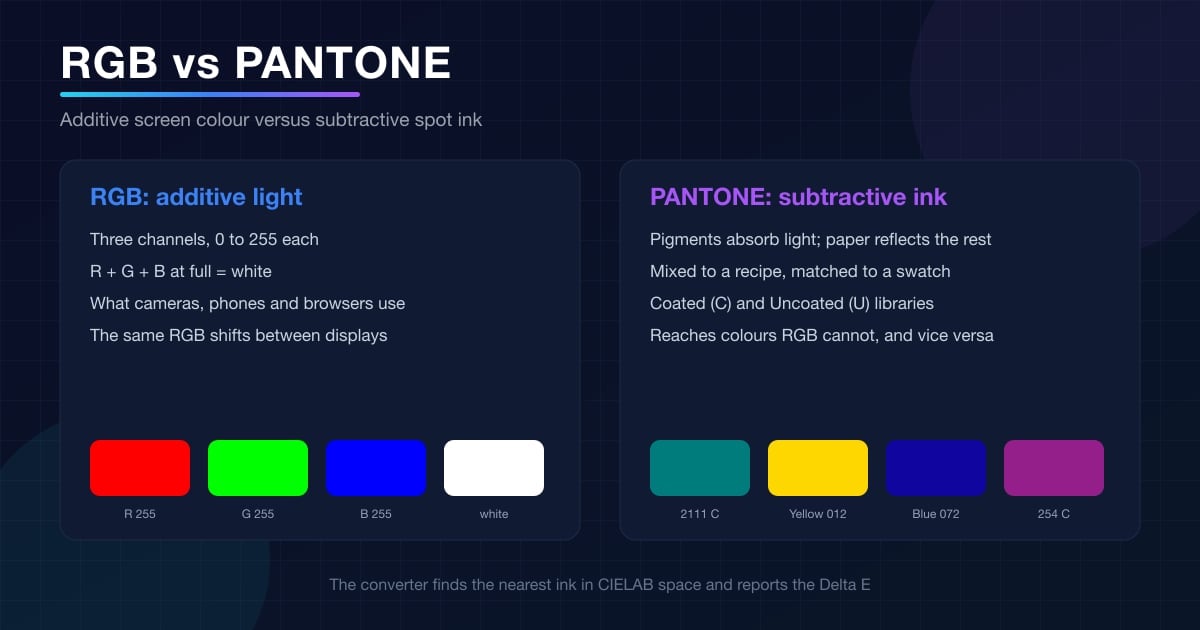
Why some RGB colours convert perfectly and others only approximately comes down to how each system makes colour:
RGB: additive
Red, green and blue light add up; all three at 255 make white and all at 0 make black. This is how every screen works.
RGB: what devices capture
Cameras, scanners and screenshots all produce RGB, so most colours you want to print start life as an RGB triplet.
RGB: device-dependent
RGB(0, 128, 128) is rendered differently by every panel and profile, which is why print needs an absolute reference.
Pantone: subtractive ink
Pigments absorb wavelengths and the paper reflects the rest. Each Pantone colour is mixed from base inks to a fixed recipe.
Pantone: one code, one colour
PANTONE 2111 C means the same swatch to a printer in Berlin or Bangalore. Brand guides specify Pantone for exactly that reason.
Pantone: a different gamut
Inks reach oranges, deep greens and metallics that sRGB cannot display, but cannot reach pure sRGB blue or red. Delta E shows which side of the gap you are on.
Common RGB to Pantone Conversions
Frequently converted RGB colours and their nearest Pantone Coated match, produced by the same Delta E matcher as the tool. Click a row to load it. The pure primaries at the bottom show how far saturated screen colours sit from any printable ink.
| Colour | RGB | Closest Pantone | Pantone RGB | ΔE | Match |
|---|---|---|---|---|---|
| Brand red | 228, 0, 43 | PANTONE 185 C | 228, 0, 43 | 0.0 | Exact |
| Orange | 255, 165, 0 | PANTONE 137 C | 255, 163, 0 | 1.2 | Excellent |
| Gold | 255, 215, 0 | PANTONE Yellow 012 C | 255, 215, 0 | 0.0 | Exact |
| Teal | 0, 128, 128 | PANTONE 2111 C | 0, 124, 125 | 1.8 | Excellent |
| Pink | 255, 192, 203 | PANTONE 182 C | 250, 187, 203 | 3.1 | Good |
| Mid gray | 128, 128, 128 | PANTONE Cool Gray 9 C | 117, 120, 123 | 3.9 | Fair |
| Navy | 0, 0, 128 | PANTONE Reflex Blue C | 0, 20, 137 | 6.9 | Approximate |
| Purple | 128, 0, 128 | PANTONE 254 C | 148, 30, 138 | 7.5 | Approximate |
| Green | 0, 128, 0 | PANTONE 363 C | 44, 140, 44 | 10.7 | Approximate |
| Sky blue | 29, 161, 242 | PANTONE 299 C | 0, 151, 219 | 8.3 | Approximate |
| Pure red | 255, 0, 0 | PANTONE 2002 C | 250, 67, 22 | 14.1 | Approximate |
| Pure blue | 0, 0, 255 | PANTONE Blue 072 C | 16, 6, 159 | 44.2 | Approximate |
Advertisement
Pantone to RGB: Look Up Any PMS Code
Going the other way is just as common: the brand guide says PANTONE 2111 C and the app needs RGB values. Open the Pantone → RGB tab, type the number or name, and copy the RGB, HEX or CMYK. The codes people look up most, from the database:
Understanding Delta E Colour Distance
Delta E scale
Indistinguishable to the eye
Visible only side by side
Slight shift, fine for most print
Noticeable, check a swatch first
A different colour; adjust the source
How the matcher works
Your RGB triplet is linearised, converted to XYZ under a D65 white point and then to CIELAB, where L* is lightness, a* runs green to red and b* runs blue to yellow. Each Pantone colour is stored the same way.
The CIE76 Delta E is the straight-line distance between the two LAB points. Because the space is perceptually uniform, a ΔE of 2 represents the same visible step for a grey as for a saturated orange, which raw RGB differences cannot promise.
For brand-critical colours, aim for a Delta E under 2 and confirm against a physical Pantone guide under the lighting the print will live in.
Advertisement
When You Need a Pantone Number for an RGB Colour
Brand guidelines
Fix the logo colour as a Pantone code so every supplier prints the same shade, then publish the RGB and HEX beside it.
Colour sampled from a photo
Eyedropper an RGB value from a product shot or a competitor's packaging and find the ink that reproduces it.
Screen design to print
UI palettes, presentations and video frames are RGB; brochures, business cards and packaging need Pantone.
Apparel and merchandise
Screen printers, embroiderers and promotional suppliers quote inks and threads by Pantone number.
Packaging and labels
Spot inks hold a colour across cardboard, foil and plastic where CMYK process printing shifts.
Auditing a palette
Check which RGB colours are printable: anything with a Delta E above 5 needs a print-safe alternative.
Related Colour & Design Tools
HEX to Pantone Converter
Paste a HEX code and find the nearest Pantone colours, or look up a Pantone code's HEX
CMYK to Pantone Converter
Convert process-ink percentages to the closest Pantone spot colour
QR Code Generator
Brand-coloured QR codes with logo overlay for print materials
Small Text Generator
Unicode font styles for social bios and captions
Text to Binary Converter
Convert text to binary and back with ASCII and UTF-8 support
Password Generator
Strong random passwords with entropy analysis
Advertisement
Frequently Asked Questions
How do I convert RGB to Pantone?
Move the red, green and blue sliders or type the three values (0 to 255), or click the swatch to use the colour picker. The converter maps the colour into CIELAB and measures the Delta E distance to all 1,213 Pantone Coated colours, then lists the nearest matches with a quality rating and a copy button.
Does every RGB colour have a Pantone equivalent?
No. RGB describes emitted light and can reach saturated colours that no ink can print, while Pantone inks reach some oranges, greens and metallics that sRGB cannot show. The converter always returns the closest Pantone colours and shows the Delta E so you know when a match is only approximate.
What is the Pantone colour for RGB(0, 128, 128)?
Teal RGB(0, 128, 128) matches PANTONE 2111 C at a Delta E of 1.8, an excellent match. By contrast pure blue RGB(0, 0, 255) is far outside the Pantone gamut; the nearest, PANTONE Blue 072 C, is 44.2 Delta E away.
How do I convert Pantone to RGB?
Open the Pantone → RGB tab and type the code or name, for example 2111 C, Process Blue or Cool Gray 9. The tool lists the matching Pantone Coated colours with their RGB, HEX and CMYK values and a copy button for the RGB triplet.
What does the Delta E value mean?
Delta E (ΔE) is the perceived distance between two colours in CIELAB space. Under 1 is invisible, 1 to 2 is excellent, 2 to 3.5 is good, 3.5 to 5 is fair, and above 5 is a visibly different colour. The converter uses the CIE76 formula.
Why not just compare the RGB numbers?
The eye is not equally sensitive to red, green and blue, so two colours with the same numeric RGB difference can look very different. CIELAB spaces colours by perception, which is why Delta E in LAB is the industry method for matching spot inks.
Can I paste a HEX code instead of RGB values?
Yes. There is a HEX field under the sliders; paste #008080 and the sliders jump to 0, 128, 128. HEX is the same RGB triplet written in hexadecimal.
Coated or Uncoated Pantone colours?
This tool matches against the Pantone Coated (C) library, which is what most brand guidelines reference. The same number printed on uncoated stock (U) looks duller, so check a physical guide for the paper you will use.
Which RGB values does Pantone publish?
Pantone publishes official sRGB equivalents for each Coated colour so designers can use them on screen. The Pantone → RGB tab returns those values; they are a screen approximation of the ink.
Is the RGB to Pantone converter free?
Yes, free and unlimited with no signup. All matching runs in your browser; no colour data leaves your device. Pantone® is a trademark of Pantone LLC and the values are approximations for reference.