Web Security Best Practices: A Layer-by-Layer Guide (2026)
Advertisement
What Web Security Best Practices Actually Mean
Web security best practices are the set of controls that keep a website or web application from being taken over, defaced, used to attack its own visitors, or quietly drained of data. They are not one product or one setting. They are a stack of decisions that starts at the domain registrar and runs through DNS, TLS, the HTTP headers your server sends, the code that handles logins and input, the third-party packages you build on, the server itself, and finally the logs that tell you something went wrong.
The reason to think in layers is that attackers do. Verizon's 2026 Data Breach Investigations Report found that 31% of breaches now start with an exploited software vulnerability, which for the first time beat stolen credentials as the most common way in, and that 48% of all breaches involve ransomware. A single missing patch, a leaked API key, or an admin page without rate limiting is enough. None of the controls in this guide is exotic; the sites that get breached are usually the ones that skipped the basics on one layer while polishing another.
This guide is organised from the outside in. Each practice tells you why it matters, exactly what to configure, and how to verify it with a command or a free tool, because the most common failure we see in HTTP header checks and SSL checks is not a bad decision but a setting someone believed was on and never confirmed.
The Web Security Stack: Six Layers to Protect
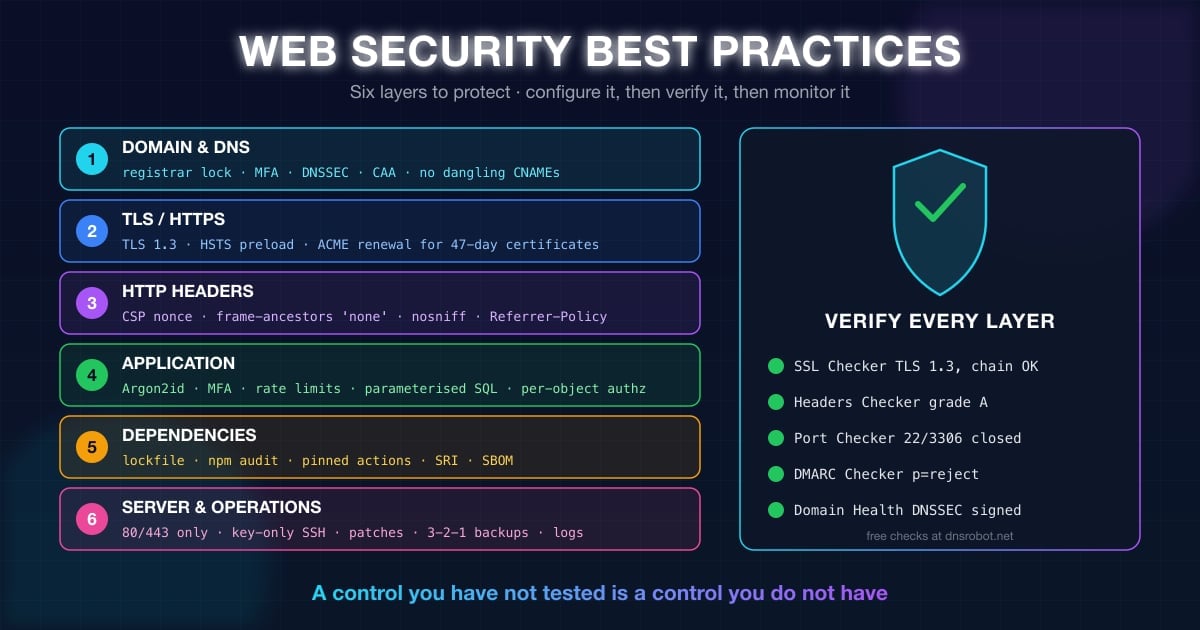
Every attack on a website lands on one of six layers. The table below is the map for the rest of this guide: what lives on each layer, how it typically gets attacked, and which free check confirms your defence is actually in place.
| Layer | What attackers do here | Core practices | Verify with |
|---|---|---|---|
| 1. Domain and DNS | Hijack the domain, change nameservers, take over dangling subdomains, obtain rogue certificates | Registrar lock, MFA, DNSSEC, CAA, audit of stale records | WHOIS Lookup, DNS Lookup, Subdomain Finder |
| 2. Transport (TLS) | Downgrade to HTTP, strip encryption, exploit old ciphers, expired certificates | TLS 1.2+, HSTS with preload, automated renewal | SSL Checker |
| 3. HTTP headers | Inject scripts (XSS), frame the site for clickjacking, sniff content types, leak referrers | CSP, frame-ancestors, nosniff, Referrer-Policy, Permissions-Policy | HTTP Headers Checker |
| 4. Application | Credential stuffing, injection, broken access control, CSRF, insecure uploads | Argon2id + MFA + rate limits, parameterised queries, server-side authorisation, SameSite cookies | Code review, OWASP ZAP, Password Strength Tester |
| 5. Dependencies | Poisoned packages, known CVEs in libraries, compromised CI pipelines | Lockfiles, audits, pinned versions, SBOM, least-privilege tokens | npm audit, Dependabot, Trivy |
| 6. Server and operations | Open ports, default credentials, missing patches, no backups, no logs | Firewall, key-only SSH, patching, 3-2-1 backups, central logging | Port Checker, IP Blacklist Checker, Domain Health |
Advertisement
Layer 1: Lock Down the Domain and DNS
Everything else in this guide assumes you still control your domain. If an attacker can log into your registrar or change your nameservers, they can point your traffic anywhere, obtain a valid certificate for your name, and read every email sent to you, and none of your application code will ever run. Domain and DNS security is therefore the first web security best practice, and it is almost entirely configuration.
Start with a WHOIS lookup on your own domain and confirm three things: the status codes include clientTransferProhibited, the expiry date is more than a year away, and the registrar is one you actually have an account with. It is surprisingly common for a business domain to sit in an ex-contractor's registrar account. Our WHOIS lookup guide explains every status code you will see.
Registrar Lock, MFA and Expiry Alerts
Enable registrar lock (also called transfer lock) so the domain cannot be moved to another registrar without you explicitly unlocking it, and turn on multi-factor authentication on the registrar account itself. Registrar accounts are a favourite phishing target precisely because one login controls everything downstream. Use a hardware key or an authenticator app rather than SMS wherever the registrar allows it.
Set the domain to auto-renew with a payment method that will not expire, and add a calendar alert 60 days before the expiry date anyway. Expired domains are picked up by drop-catchers within hours, and the buyer inherits your email, your traffic and any OAuth logins that trust your domain.
Registry lock (a manual, out-of-band lock at the registry level) is worth the extra fee for a domain a business depends on; it stops even a compromised registrar account from changing nameservers.
Separate the roles. The person who pays for the domain, the account that owns it, and the DNS provider should each be documented and not tied to one employee's mailbox.
Turn on WHOIS privacy so your contact details are not a phishing map, and keep a monitored role address such as
domains@on the account.
Sign the Zone with DNSSEC
DNSSEC signs your DNS zone so a resolver can detect forged answers. Without it, an attacker who can poison a resolver's cache can send your visitors to a fake server while their browser still shows your domain name. Most managed DNS providers (Cloudflare, Route 53, Google Cloud DNS, and many registrars) turn it on with one switch; the only manual step is publishing the DS record at your registrar. Verify it with dig, or with the DNSSEC check inside Domain Health:
dig +dnssec +short yourdomain.com A
# A signed zone returns the record AND an RRSIG line:
# 203.0.113.10
# A 13 2 3600 20261015000000 20260924000000 34505 yourdomain.com. Kx3f...==

dig +short yourdomain.com DS
# A DS record at the parent zone proves the chain of trust is complete
# 34505 13 2 6A1B...C9
Restrict Certificate Issuance with CAA
A CAA record (RFC 8659) tells certificate authorities which of them may issue certificates for your domain. Every public CA is required to check it before issuing, so a CAA record closes the door on an attacker who has tricked some other CA's domain validation. Three records cover the common cases: who may issue, who may issue wildcards, and where to report a refused request:
yourdomain.com.  CAA 0 issue "letsencrypt.org"
yourdomain.com.  CAA 0 issuewild ";"
yourdomain.com. CAA 0 iodef "mailto:security@yourdomain.com"Audit Stale Records: Subdomain Takeover
A subdomain takeover happens when a DNS record still points at a service you stopped using: a CNAME to a deleted GitHub Pages site, an Azure app, an S3 bucket or a SaaS vendor's hostname. Anyone can register the abandoned target and then serve content on old-app.yourdomain.com under your name, complete with a valid certificate. It is one of the most common findings in bug-bounty programs because nobody remembers the record exists.
Run your domain through the Subdomain Finder, which reads certificate-transparency logs, so you see every hostname a certificate was ever issued for. Then resolve each one with a DNS lookup and delete any record whose target returns NXDOMAIN or a provider's "no such app" page. Repeat quarterly, and make deleting the DNS record part of decommissioning any service.
Layer 2: HTTPS and TLS Done Properly
HTTPS is no longer a best practice; it is the baseline, and browsers mark plain HTTP pages as "Not secure". The practices that still separate a secure site from a merely encrypted one are the TLS versions you accept, whether HTTP can ever be used to reach you at all, and whether renewal is automated well enough to survive the certificate-lifetime cuts that started in March 2026.
Advertisement
TLS 1.2 Minimum, TLS 1.3 Preferred
TLS 1.0 and 1.1 were formally deprecated by RFC 8996 in 2021 and no current browser negotiates them. Disable them on the server, prefer TLS 1.3 (which drops every known-weak cipher and completes the handshake in one round trip), and keep TLS 1.2 only with AEAD cipher suites such as ECDHE-ECDSA-AES128-GCM-SHA256 or ECDHE-RSA-CHACHA20-POLY1305.
Two lines matter when you test from outside: the negotiated protocol, and Verify return code: 0, which means the full certificate chain validated. A missing intermediate certificate is the most common cause of "works in Chrome, fails in curl and on Android" reports; our guide to the SSL certificate chain shows how to fix it, and the SSL Checker flags an incomplete chain directly. Here is the check run against dnsrobot.net:
echo | openssl s_client -connect dnsrobot.net:443 -servername dnsrobot.net 2>/dev/null \
  | grep -E 'Protocol|Cipher|Verify return'

# Protocol  : TLSv1.3
# Cipher    : TLS_AES_256_GCM_SHA384
# Verify return code: 0 (ok)

# Confirm the old versions are refused:
openssl s_client -connect dnsrobot.net:443 -tls1_1 2>&1 | grep -iE 'alert|no protocols'HSTS: Never Let a Browser Use HTTP Again
Redirecting HTTP to HTTPS is not enough on its own. The very first request a visitor makes to http://yourdomain.com still travels in plain text, and an attacker on the same network can answer it before your redirect does. HTTP Strict Transport Security (RFC 6797) fixes this: once a browser has seen the header, it rewrites every future http:// URL for your domain to https:// before sending anything.
Use a max-age of at least one year (31536000 seconds), add includeSubDomains once every subdomain serves HTTPS, and then submit the domain at hstspreload.org so it ships hard-coded in Chrome, Firefox, Safari and Edge. Preloading closes the first-visit gap entirely. Verify the header with the HTTP Headers Checker, which grades HSTS as part of its A-to-F security score.
Strict-Transport-Security: max-age=31536000; includeSubDomains; preload47-Day Certificates: Automate Renewal Now
The CA/Browser Forum's ballot SC-081 is cutting the maximum lifetime of every public TLS certificate in stages. The first cut took effect on 15 March 2026, so any certificate you buy or renew today is already limited to 200 days, and by 2029 a certificate will need replacing roughly every six weeks:
| Effective date | Maximum certificate validity | Domain validation reuse |
|---|---|---|
| Before 15 March 2026 | 398 days | 398 days |
| 15 March 2026 | 200 days | 200 days |
| 15 March 2027 | 100 days | 100 days |
| 15 March 2029 | 47 days | 10 days |
Manual renewal does not survive this schedule. The best practice is fully automated issuance through ACME: Let's Encrypt or Google Trust Services via certbot, acme.sh, Caddy, or the automatic certificates built into Cloudflare, Vercel, Netlify and most hosting panels. Test the renewal path before you need it (certbot renew --dry-run for certbot); the failure to look for is a CAA record or firewall rule added since the last renewal that now blocks validation. Whatever you use, monitor the expiry date from the outside as well: the SSL Checker shows days remaining, and an expired certificate turns every visit into a full-page browser warning.
Layer 3: HTTP Security Headers
Security headers are instructions your server gives the browser about what it may and may not do with your pages: which scripts can run, whether the page can be framed, whether the browser may guess content types, and what it should tell other sites about where a visitor came from. They cost nothing, apply to every page at once, and block whole classes of attack. They are also the layer most sites get partly wrong, which is why the HTTP Headers Checker grades them. Here is what dnsrobot.net sends, trimmed to the security headers:
curl -sI https://dnsrobot.net/ | grep -iE 'strict-transport|content-security|x-frame|x-content-type|referrer-policy|permissions-policy'

strict-transport-security: max-age=31536000; includeSubDomains; preload
content-security-policy: default-src 'self'; script-src 'self' ... https://*.googletagmanager.com; frame-ancestors 'none'; base-uri 'self'; form-action 'self'
x-frame-options: DENY
x-content-type-options: nosniff
referrer-policy: strict-origin-when-cross-origin
permissions-policy: camera=(self), microphone=(), geolocation=(), payment=(), usb=()
The Seven Headers Every Site Should Send
These are the values to aim for on a typical site. The first five are the ones that move your grade; the last two are cheap additions once the others are in place.
| Header | Recommended value | What it prevents |
|---|---|---|
Strict-Transport-Security | max-age=31536000; includeSubDomains; preload | Protocol downgrade, cookie theft over HTTP |
Content-Security-Policy | Nonce-based script-src with 'strict-dynamic'; object-src 'none'; base-uri 'none'; frame-ancestors 'none' | Cross-site scripting (XSS), data injection, clickjacking |
X-Content-Type-Options | nosniff | MIME sniffing that turns an upload into executable script |
Referrer-Policy | strict-origin-when-cross-origin | Leaking full URLs (tokens, search terms) to third parties |
Permissions-Policy | camera=(), microphone=(), geolocation=(), payment=() | Third-party scripts silently using powerful browser APIs |
X-Frame-Options | DENY (legacy fallback for frame-ancestors) | Clickjacking in browsers without CSP Level 2 |
Cross-Origin-Opener-Policy | same-origin | Cross-window attacks through window.opener |
Content Security Policy Without Breaking the Site
A Content Security Policy is the single most effective defence against XSS because it stops injected scripts from running even when an injection bug exists. The catch is that a strict policy breaks any inline script or third-party tag you forgot about. The modern approach, recommended by Google and documented on MDN, is a nonce-based policy: the server generates a random nonce per response, puts it on every script tag it intentionally renders, and the browser refuses everything else.
'strict-dynamic' is what makes the policy practical: a nonced script may load further scripts (analytics, tag managers, widgets) without each one being allowlisted, while the https: and 'unsafe-inline' tokens are ignored by modern browsers and only serve as fallbacks for old ones. Roll out with Content-Security-Policy-Report-Only first, watch the violation reports for a week, then switch to enforcing. Frameworks such as Next.js, Rails and Django have first-party nonce support; static sites can use hash-based script-src instead.
Content-Security-Policy:
  script-src 'nonce-r4nd0m1z3dV4lu3' 'strict-dynamic' https: 'unsafe-inline';
  object-src 'none';
  base-uri 'none';
  frame-ancestors 'none';
  form-action 'self';
  report-to csp-endpoint

<!-- Only scripts carrying the nonce run; strict-dynamic lets them load their own dependencies -->
<script nonce="r4nd0m1z3dV4lu3" src="/app.js"></script>Clickjacking: frame-ancestors and X-Frame-Options
Clickjacking loads your site invisibly inside an attacker's page and tricks the visitor into clicking a button they cannot see. frame-ancestors 'none' in CSP (or 'self' if you embed your own pages) prevents it in every current browser, and X-Frame-Options: DENY covers older ones. If you deliberately offer an embeddable widget, exempt only that path and only for the origins that need it; our X-Frame-Options guide walks through the exact server rules and the "refused to connect" errors you will hit while testing.
nosniff, Referrer-Policy, Permissions-Policy and COOP
X-Content-Type-Options: nosniff stops the browser from second-guessing a Content-Type, which is what turns a user-uploaded "image" containing HTML into an executable page. Referrer-Policy: strict-origin-when-cross-origin (the default in current browsers, but set it explicitly) sends only your origin to other sites, so password-reset tokens and search queries in URLs stay private. Permissions-Policy disables browser features you do not use, so a compromised third-party script cannot open the camera or read location. Cross-Origin-Opener-Policy: same-origin cuts the window.opener link to pages you open, which blocks a class of cross-window attacks.
Headers to remove matter too: Server and X-Powered-By advertise exact software versions to vulnerability scanners, and X-XSS-Protection is deprecated and can introduce bugs in old browsers, so set it to 0 or drop it. The CMS Detector shows what a scanner learns about your stack from headers alone.
Layer 4: Authentication That Survives Credential Stuffing
Attackers rarely guess passwords one at a time. They replay billions of email-and-password pairs leaked from other sites (credential stuffing) and phish the rest. Authentication best practice therefore has three parts: store passwords so a database leak is not a password leak, make a stolen password useless on its own, and make brute force too slow to matter. OWASP ranks Authentication Failures at A07 in the OWASP Top 10:2025.
Advertisement
Hash Passwords with Argon2id or bcrypt
Never store a password, and never store a fast hash of one. MD5, SHA-1 and even SHA-256 are designed to be quick, so a leaked table of them can be tested at billions of guesses per second on a single GPU. Use a slow, memory-hard password hashing function with a unique salt per password. The OWASP Password Storage Cheat Sheet recommends, in order:
Argon2id with at least 19 MiB of memory, 2 iterations and 1 degree of parallelism (or 46 MiB with 1 iteration).
scrypt with N = 2^17, r = 8, p = 1 where Argon2 is unavailable.
bcrypt with a work factor of 10 or more (mind its 72-byte input limit; pre-hashing longer passwords needs care).
PBKDF2-HMAC-SHA256 with 600,000 iterations only where FIPS compliance forces it.
// Node.js with the argon2 package
import argon2 from "argon2";

const hash = await argon2.hash(password, {
  type: argon2.argon2id,
  memoryCost: 19456, // KiB = 19 MiB
  timeCost: 2,
  parallelism: 1,
});

// Later, on login:
const ok = await argon2.verify(hash, submittedPassword);Password Rules That Actually Help (NIST SP 800-63B)
The composition rules most sites still enforce (one uppercase, one symbol, change every 90 days) produce predictable passwords like Summer2026! and push people to reuse them. Current NIST SP 800-63B guidance replaces them with rules that measure what matters:
Minimum 8 characters when MFA is also required, and at least 15 characters for a password used on its own; allow at least 64.
No composition rules and no forced periodic rotation; require a change only when there is evidence of compromise.
Check every new password against a breach list (the Have I Been Pwned range API lets you do this without sending the password) and reject known-leaked ones.
Allow paste and password managers, accept spaces and Unicode, and show a strength meter based on entropy rather than rules.
Our Password Strength Tester shows how these measures differ from the old rules: it estimates crack time from entropy and pattern detection and checks the password against breach data, which is far more useful feedback than a red "needs a symbol" message.
MFA and Passkeys
Multi-factor authentication turns a stolen password into a dead end. Offer it to everyone and require it for admin, finance and support roles. Rank the options by phishing resistance: passkeys and FIDO2 security keys cannot be phished because the credential is bound to your real origin; authenticator apps (TOTP) are good; SMS codes are better than nothing but can be intercepted through SIM swapping. Passkeys are supported in every current browser and operating system and remove the password entirely, which also removes credential stuffing as a category.
Protect the recovery path as carefully as the login: recovery codes stored hashed, email resets with single-use tokens that expire within 15 minutes, and no security questions.
Rate Limiting, Lockout and Bot Defence
Rate limit the login, registration, password-reset and MFA endpoints per IP and per account, and return 429 Too Many Requests with a Retry-After header once the limit is hit (our guide to HTTP error 429 covers how clients should react). Combine it with an escalating delay or temporary lock after repeated failures on a single account, and a CAPTCHA or proof-of-work challenge for endpoints that see distributed attacks. Log every failed login with the source IP so the pattern of a credential-stuffing run is visible in minutes rather than months.
# nginx: 5 login attempts per minute per client IP
limit_req_zone $binary_remote_addr zone=login:10m rate=5r/m;

location = /api/login {
    limit_req zone=login burst=4 nodelay;
    limit_req_status 429;
    proxy_pass http://app;
}Sessions, Cookies and CSRF
After login the session cookie is the user, so it deserves the same protection as the password. Three cookie attributes and one naming prefix do most of the work:
Securemeans the cookie is never sent over plain HTTP, so it cannot be sniffed on public Wi-Fi.HttpOnlymakes it invisible to JavaScript, so an XSS bug cannot read it.SameSite=Lax(orStrictfor admin panels) keeps it off cross-site POST requests, which neutralises most CSRF attacks.The
__Host-prefix makes the browser refuse the cookie unless it isSecure, hasPath=/and noDomainattribute, so a subdomain cannot overwrite it.
Set-Cookie: __Host-session=9f1c7e2a...; Path=/; Secure; HttpOnly; SameSite=Lax; Max-Age=28800CSRF: A Second Line Behind SameSite
Cross-site request forgery (CSRF) tricks a logged-in browser into sending a state-changing request to your site from another page. SameSite cookies stop the common case, but keep a second defence on every non-GET request: a per-session anti-CSRF token in a hidden field or custom header, or a check that the Origin (or Sec-Fetch-Site) header matches your own origin. Most frameworks (Django, Rails, Laravel, Next.js server actions) do this by default; the mistake is turning it off for an API endpoint and then calling that endpoint from a browser.
Session IDs, Rotation and JWTs
Generate session IDs with at least 128 bits of randomness, rotate the ID on login and on any privilege change to defeat session fixation, expire sessions after inactivity, and give users a "log out everywhere" button that invalidates them server-side. For JWTs, keep them short-lived (minutes, with a refresh token that can be revoked), never store them in localStorage where any script can read them, and treat a leaked signing key as a full breach because every token it ever signed is now forgeable.
Injection and XSS: Validate Input, Encode Output
Injection (A05:2025) and cross-site scripting are the same mistake in different places: data from a user is handed to an interpreter (SQL, the shell, an LDAP query, an HTML page) as if it were code. The fix is also the same everywhere: keep data and code separate, and never build a command by string concatenation.
Advertisement
Parameterised Queries, Not String Building
For SQL, use prepared statements or an ORM that generates them; the database then treats the input as a value that can never change the query's structure. The same rule applies to shell commands (pass an argument array, never a string), to NoSQL filters (reject operator objects such as {"$gt": ""} in user input), and to file paths (resolve the path and confirm it stays under the intended directory).
// Vulnerable: the input becomes part of the query text
const rows = await db.query(`SELECT * FROM users WHERE email = '${email}'`);

// Safe: the driver sends the value separately from the query
const rows = await db.query("SELECT * FROM users WHERE email = $1", [email]);

// Python / psycopg: same idea
cur.execute("SELECT * FROM users WHERE email = %s", (email,))
Output Encoding Stops XSS
Cross-site scripting happens when user-controlled text is written into a page without encoding for the context it lands in. Modern templating engines (React and JSX, Vue, Jinja2, Blade, ERB) encode by default; XSS today usually comes from the escape hatches: dangerouslySetInnerHTML, v-html, |safe, innerHTML, and building URLs or inline event handlers from user data. Encode for the exact context, and sanitise rich HTML with a purpose-built library such as DOMPurify rather than a regex.
| Where the data lands | Encode as | Example |
|---|---|---|
| HTML body | HTML entities | < becomes <, " becomes " |
| HTML attribute | Attribute-quoted entities | Always quote the attribute; encode " and ' |
| JavaScript | Do not inject into script text; pass data through data- attributes or a JSON <script type="application/json"> block | </script> inside a string becomes \u003c/script\u003e |
| URL parameter | Percent-encoding | encodeURIComponent(value) |
| CSS value | Avoid entirely; pick class names from an allowlist | Never interpolate user input into style |
SSRF, File Uploads and Deserialisation
Server-side request forgery (SSRF): if your server fetches a URL supplied by a user (webhooks, image proxies, link previews), an attacker can point it at internal services or the cloud metadata endpoint 169.254.169.254 and read credentials. Resolve the hostname first, reject private and link-local ranges, disable redirects, and put fetchers on a network segment that cannot reach anything internal.
File uploads: validate the type by inspecting the content, not the extension or the client's Content-Type; enforce a size limit; store files outside the web root or in object storage under a random name you generate; and serve them from a separate origin with nosniff and Content-Disposition: attachment where possible. Never let an upload land anywhere the web server will execute it.
Deserialisation and mass assignment: never deserialise untrusted data with a format that can instantiate arbitrary classes (Java native serialisation, Python pickle, PHP unserialize, YAML with custom tags); use JSON with a schema. Bind request bodies to an explicit allowlist of fields so a user cannot POST "role": "admin" into a model that happens to have that column.
Broken Access Control: The Number-One Risk
Broken Access Control has held the top spot in the OWASP Top 10 since 2021 and keeps it as A01:2025. It is not a single bug but a habit: checking who someone is (authentication) and forgetting to check what they may touch (authorisation) on every request. The classic form is the insecure direct object reference: GET /api/invoices/1042 works for the invoice's owner, and also for anyone who changes the number.
Deny by default. Every route requires an explicit rule granting access; a missing rule means 403, not 200.
Enforce on the server, per object. Hiding a button in the UI is not access control. Every read and write must confirm the current user owns or is permitted the specific record, including in bulk endpoints, exports and background jobs.
Use unguessable IDs where it helps (UUIDs), but never rely on them: obscurity is not authorisation.
Lock down CORS.
Access-Control-Allow-Origin: *with credentials, or reflecting whateverOriginthe request sends, hands your API to any website the user visits.Disable directory listing, block
.git,.env, backup and config files at the web-server level, and keep admin panels off the public internet or behind MFA and IP allowlists.Rate limit and log authorisation failures. A burst of 403s from one session is an enumeration attack in progress.
// Express: ownership check on every object access
app.get("/api/invoices/:id", requireAuth, async (req, res) => {
  const invoice = await Invoice.findById(req.params.id);
  if (!invoice || invoice.ownerId !== req.user.id) {
    return res.status(404).end(); // 404, not 403: don't confirm the record exists
  }
  res.json(invoice);
});Layer 5: Dependencies and the Software Supply Chain
A typical web application ships perhaps 5% code you wrote and 95% code you downloaded. That is why Software Supply Chain Failures debuts at A03 in the 2025 OWASP Top 10, and why vulnerability exploitation overtook stolen credentials in the 2026 DBIR. In September 2025 a single phished maintainer put crypto-stealing malware into chalk, debug and 16 other npm packages that together see over two billion downloads a week; every project that installed an unpinned version during the window pulled it in automatically.
Commit a lockfile (
package-lock.json,yarn.lock,pnpm-lock.yaml,poetry.lock,go.sum) and install withnpm ciin CI so builds are reproducible and a new upstream release cannot slip in unreviewed.Scan continuously:
npm audit,pip-audit,bundler-audit, GitHub Dependabot or Renovate for updates, and a container scanner such as Trivy or Grype for the OS layer.Delay non-security upgrades by a few days (Renovate's
minimumReleaseAge) so a poisoned release is usually pulled before you adopt it, but apply security patches immediately.Pin third-party actions and scripts to a commit SHA in CI, and use Subresource Integrity (
integrity="sha384-...") on any script you load from a public CDN.Give CI the least privilege: read-only tokens where possible, short-lived OIDC credentials instead of long-lived secrets, and publishing rights limited to a release job.
Generate an SBOM (CycloneDX or SPDX) at build time so you can answer "are we affected?" in minutes when the next Log4Shell-class CVE lands.
# Reproducible install + audit in CI
npm ci --ignore-scripts
npm audit --audit-level=high

# Pin a GitHub Action to a commit, not a floating tag
# uses: actions/checkout@v4                 <- can change underneath you
# uses: actions/checkout@<full-commit-sha>  # v4.2.2

# Subresource Integrity for a CDN script (hash from: openssl dgst -sha384 -binary lib.min.js | openssl base64 -A)
<script src="https://cdn.example.com/lib.min.js"
        integrity="sha384-<base64-hash>"
crossorigin="anonymous"></script>If you run WordPress or another CMS, the same rules apply to plugins and themes, which are where most CMS compromises start. Keep core and every plugin updated, delete the ones you do not use, and check what a scanner can learn about your versions with the CMS Detector.
Layer 6: Server Hardening (Ports, Patches, Secrets, Backups)
The application layer does not matter if the server underneath accepts password logins on SSH, runs a database on a public port, or has not been patched since it was built. Server best practices are boring, and they are where ransomware gets in.
Close Every Port You Do Not Serve
A public web server needs ports 80 and 443 open, and SSH from your own IP range. Databases (3306, 5432, 27017), Redis (6379), Elasticsearch (9200), admin panels and metrics endpoints should bind to localhost or a private network only. Check from outside with the Port Checker after every change, because that is the view an attacker gets, and cloud security groups are easy to misread.
# Ubuntu: default-deny firewall, allow only web + SSH from your office range
sudo ufw default deny incoming
sudo ufw default allow outgoing
sudo ufw allow 80/tcp
sudo ufw allow 443/tcp
sudo ufw allow from 203.0.113.0/24 to any port 22 proto tcp
sudo ufw enable

# SSH: keys only, no root password login
sudo sed -i 's/^#\?PasswordAuthentication.*/PasswordAuthentication no/' /etc/ssh/sshd_config
sudo sed -i 's/^#\?PermitRootLogin.*/PermitRootLogin prohibit-password/' /etc/ssh/sshd_config
sudo systemctl reload ssh
Patch on a Schedule, Keep Secrets Out of Code
Enable unattended security updates for the operating system, subscribe to the security lists for your runtime and framework, and treat a critical CVE in anything internet-facing as a same-day job. Run services as unprivileged users, in containers or with systemd sandboxing, so a compromised process cannot read the whole machine.
Secrets (database passwords, API keys, signing keys) never belong in the repository, in a Docker image layer, or in client-side JavaScript. Load them from environment variables injected at deploy time or from a secrets manager, rotate them when someone with access leaves, and scan the repository history with a tool such as gitleaks, because a key committed once is compromised forever even after the commit is removed.
Backups That Survive Ransomware, and a CDN in Front
Follow the 3-2-1 rule: three copies, on two different media, one off-site, and make at least one copy immutable or offline so ransomware that reaches the server cannot encrypt the backups too. Encrypt backups, include the database and the uploads directory, and, critically, test a restore on a schedule. A backup nobody has restored from is a hope, not a plan. Recovery time is what decides whether an incident is an outage or a company-ending event.
Put a CDN or WAF (Cloudflare, Fastly, AWS CloudFront with WAF, or your host's equivalent) in front of the origin. It absorbs volumetric DDoS, applies managed rules for common injection payloads and bad bots, hides your origin IP, and gives you a place to enforce rate limits and geo rules without touching the application. Then restrict the origin's firewall so only the CDN's IP ranges can reach port 443 directly; otherwise attackers simply go around it. The Hosting Checker shows whether a site's real origin is exposed behind its CDN.
Email Authentication: SPF, DKIM and DMARC
Web security includes the email that carries your password resets, invoices and support replies. Without SPF, DKIM and DMARC, anyone can send mail as billing@yourdomain.com, and since February 2024 Google and Yahoo have required all three from bulk senders. The full set is three DNS TXT records:
yourdomain.com.                    TXT  "v=spf1 include:_spf.google.com -all"
google._domainkey.yourdomain.com.  TXT  "v=DKIM1; k=rsa; p=MIIBIjANBgkq..."
_dmarc.yourdomain.com. TXT "v=DMARC1; p=reject; rua=mailto:dmarc@yourdomain.com; adkim=s; aspf=s"Start DMARC at p=none to collect reports, move to p=quarantine and then p=reject once every legitimate sender (marketing platform, helpdesk, CRM) passes alignment. Add MTA-STS and TLS-RPT records to force encrypted delivery to your mail servers, and publish a null MX (MX 0 .) on domains that never send mail so they cannot be spoofed at all. Verify each record with the SPF Checker, DKIM Checker and DMARC Checker, and check your sending IPs against blocklists with the IP Blacklist Checker if deliverability drops.
Log, Monitor and Plan for the Breach
Two of the ten OWASP 2025 categories are about what happens after a mistake: Security Logging and Alerting Failures (A09) and the new Mishandling of Exceptional Conditions (A10). The typical breach still goes undetected for months because the evidence was never recorded, or was recorded and nobody looked.
Log security events with context: every login success and failure, MFA changes, password resets, permission changes, access-control denials, input-validation failures and admin actions, each with timestamp, user ID, source IP and user agent.
Never log secrets: passwords, session tokens, full card numbers, API keys. Mask them at the logging layer, not in each call site.
Ship logs off the server to a central store (CloudWatch, Loki, Elastic, a SIEM) with retention of at least 90 days, so an attacker with root cannot erase their tracks.
Alert on patterns, not single events: 50 failed logins in a minute, a 403 spike from one session, a new admin created outside business hours, a certificate issued for your domain that you did not request.
Fail closed: when a downstream check (auth service, rate limiter, WAF) errors out, deny the request. A10 exists because so many systems grant access when the check that should have blocked it throws an exception.
Monitor from outside: uptime, certificate expiry, DNS changes, blocklist listings and header regressions. The Domain Health check bundles the DNS, SSL, email-auth and header checks into one score you can re-run after each deploy.
Write the Incident Response Plan Before You Need It
Decide in advance who is on call, how to rotate every credential, how to take the site to read-only, where the clean backups are, and which regulator or customers must be notified and within how many hours (72 under GDPR). Run a tabletop exercise once a year. Teams with a rehearsed plan recover in days; teams without one improvise for weeks.
Test It: Scanners, Pen Tests and Continuous Checks
Every control above can be verified, and the verification should be automated wherever possible so it does not decay. A reasonable ladder, from free and instant to periodic and paid:
| Check | Tool | How often |
|---|---|---|
| TLS configuration, chain, expiry | SSL Checker, SSL Labs, testssl.sh | After every certificate or server change; expiry daily |
| Security headers and CSP | HTTP Headers Checker, MDN HTTP Observatory | After every deploy (put it in CI) |
| Open ports | Port Checker, nmap | After every firewall or cloud change |
| DNS, DNSSEC, email auth | Domain Health, DMARC Checker | Monthly, and after any DNS edit |
| Stale subdomains | Subdomain Finder | Quarterly and at every decommission |
| Known-vulnerable dependencies | npm audit, Dependabot, Trivy | Every build |
| Code-level flaws (SAST) | Semgrep, CodeQL | Every pull request |
| Runtime web vulnerabilities (DAST) | OWASP ZAP, Nuclei | Weekly against staging |
| Authorisation and business logic | Manual penetration test or bug-bounty program | Annually, and after major features |
Scanners are good at injection, headers and outdated components and bad at authorisation and business logic, so budget for at least one human test per year on anything that handles money or personal data. Fix by exposure: anything an unauthenticated user can exploit from the internet comes first.
The Web Security Checklist
Copy this into your project's README or ticket tracker. Each line is one of the practices above, phrased so it can be marked done or not done; the last column is the proof.
| Layer | Practice | Done when |
|---|---|---|
| Domain | Registrar lock and MFA on the registrar account; auto-renew on | WHOIS shows clientTransferProhibited; expiry more than 12 months away |
| DNS | DNSSEC signed; CAA record listing only your CAs | dig +dnssec returns RRSIG; DS record present at the parent |
| DNS | No dangling CNAME or A records | Every hostname from the Subdomain Finder resolves to something you control |
| TLS | TLS 1.2+ only, TLS 1.3 preferred, full chain served | SSL Checker: chain complete, TLS 1.0/1.1 refused |
| TLS | HSTS with one-year max-age, includeSubDomains, preloaded | Listed on hstspreload.org |
| TLS | Renewal automated via ACME; expiry monitored | certbot renew --dry-run passes; alert set at 14 days |
| Headers | CSP (nonce-based), frame-ancestors, nosniff, Referrer-Policy, Permissions-Policy | HTTP Headers Checker grade A |
| Auth | Argon2id or bcrypt hashing; NIST password rules; breach-list check | One hash takes 100 to 250 ms; no composition rules |
| Auth | MFA offered to all, required for admins; passkeys supported | Admin login impossible without a second factor |
| Auth | Login, reset and MFA endpoints rate limited per IP and per account | Sixth attempt in a minute returns 429 |
| Sessions | __Host- cookie with Secure, HttpOnly, SameSite; ID rotated on login | Cookie attributes visible in DevTools; old session invalid after login |
| Input | Parameterised queries everywhere; output encoded per context; uploads validated by content | No string-built queries in a code search; XSS payloads render as text |
| Access control | Deny-by-default routing; per-object ownership checks; strict CORS | Replaying another user's IDs returns 404 or 403 |
| Dependencies | Lockfile committed; npm ci; audit in CI; actions pinned to SHA; SRI on CDN scripts | Build fails on a high-severity CVE |
| Server | Only 80 and 443 public; SSH keys only; unattended security updates; secrets in env or vault | Port Checker shows 22, 3306 and 6379 closed from the internet |
| Backups | 3-2-1 with one immutable copy; restore tested | Last successful restore test dated within 90 days |
SPF -all, DKIM, DMARC p=reject, MTA-STS | DMARC Checker passes; aggregate reports arriving | |
| Monitoring | Auth and authorisation events logged centrally; alerts on patterns; external uptime, cert and DNS monitoring | Test alert fired and received |
| Response | Written incident plan; security.txt published; tabletop exercise run | Plan reviewed within the last 12 months |
How This Maps to the OWASP Top 10:2025
The OWASP Top 10 is the most-cited list of web application risks, and its 2025 edition reshuffled the order and introduced two new categories. If a client, auditor or compliance framework asks how you address it, this is the crosswalk to the practices in this guide:
| OWASP Top 10:2025 | Practices in this guide |
|---|---|
| A01 Broken Access Control | Deny by default, per-object checks, strict CORS, admin lockdown |
| A02 Security Misconfiguration | Security headers, HSTS, closed ports, removed version headers, directory listing off |
| A03 Software Supply Chain Failures (new) | Lockfiles, audits, pinned actions, SRI, SBOM, least-privilege CI |
| A04 Cryptographic Failures | TLS 1.2+ and 1.3, HSTS, Argon2id, secrets management, encrypted backups |
| A05 Injection | Parameterised queries, output encoding, CSP, upload validation |
| A06 Insecure Design | Threat model per layer, fail-closed defaults, rate limiting by design |
| A07 Authentication Failures | NIST password rules, breach checks, MFA and passkeys, session rotation |
| A08 Software or Data Integrity Failures | SRI, signed and pinned dependencies, safe deserialisation |
| A09 Security Logging and Alerting Failures | Central logging, pattern alerts, external monitoring |
| A10 Mishandling of Exceptional Conditions (new) | Fail closed, uniform error responses, no stack traces to users |
Check your site's security headers in seconds
DNS Robot's free HTTP Headers Checker fetches any URL and grades its security headers from A to F: HSTS, Content-Security-Policy, X-Frame-Options, X-Content-Type-Options, Referrer-Policy and Permissions-Policy, with the exact value it found and what is missing. No sign-up.
Try HTTP Headers CheckerAdvertisement
Web Security Best Practices FAQ
Force HTTPS with modern TLS and HSTS, send strict security headers (especially a Content Security Policy), hash passwords with Argon2id behind MFA and rate limiting, use parameterised queries and output encoding, enforce access control on the server for every object, keep dependencies patched and pinned, close unused ports, and log security events centrally. Lock the domain and DNS first, because everything else depends on still controlling your name.