Cloudflare DNS Servers: 1.1.1.1 IPs, IPv6 & Setup Guide
Advertisement
What Is Cloudflare DNS?
Cloudflare DNS usually means 1.1.1.1, the free public DNS resolver Cloudflare launched on 1 April 2018. A resolver is the server your device asks to turn a name like github.com into an IP address. Your ISP gives you one by default; 1.1.1.1 is an alternative you can switch to on most routers and on any computer or phone.
The name also covers a second, separate product: Cloudflare's authoritative DNS, the service that hosts the DNS records for a domain (the zone you edit in the Cloudflare dashboard). That's for website owners, and it has nothing to do with which resolver you use at home. This guide covers the resolver first; the hosting side has its own section near the end.
The 1.1.1.1 address itself belongs to APNIC, the regional internet registry for Asia-Pacific. Cloudflare runs the resolver on it under a research agreement with APNIC Labs, which is why such a memorable address was available.
Cloudflare DNS Server Addresses (IPv4 and IPv6)
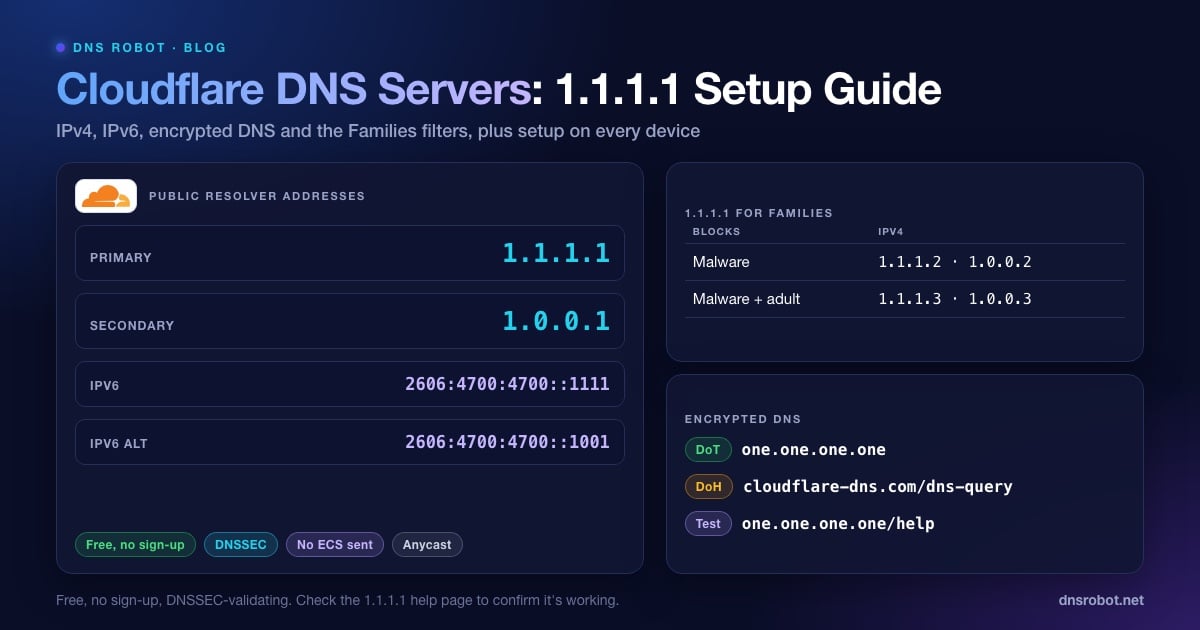
These are the addresses to type into any DNS settings field. Use both: the second one is the fallback if your device can't reach the first.
| Setting | IPv4 | IPv6 |
|---|---|---|
| Preferred / primary DNS | 1.1.1.1 | 2606:4700:4700::1111 |
| Alternate / secondary DNS | 1.0.0.1 | 2606:4700:4700::1001 |
# Ask 1.1.1.1 directly (works on macOS, Linux and Windows with BIND tools)
dig @1.1.1.1 dnsrobot.net A +short

# Which Cloudflare data centre answered?
dig @1.1.1.1 id.server CH TXT +short
# "nag01"

# Windows built-in equivalent
nslookup dnsrobot.net 1.1.1.1
Both pairs reach the same service over anycast: hundreds of Cloudflare data centres announce the same addresses, and your query goes to whichever is nearest on the network. You can see which one answered you with dig @1.1.1.1 id.server CH TXT. From our test machine in India it returned "nag01", a Cloudflare site in Nagpur.
If your network has IPv6, add the IPv6 pair too. Otherwise your device can still send IPv6 lookups to your ISP's resolver and bypass 1.1.1.1 without you noticing.
Advertisement
1.1.1.1 for Families: Malware and Adult Content Filters
The plain 1.1.1.1 resolver doesn't block anything. Cloudflare runs two filtered versions under different addresses, called 1.1.1.1 for Families. They're free too, and switching is only a matter of entering different numbers.
| Variant | Blocks | IPv4 | IPv6 | DoH / DoT hostname |
|---|---|---|---|---|
| 1.1.1.1 | Nothing | 1.1.1.1, 1.0.0.1 | 2606:4700:4700::1111, ::1001 | cloudflare-dns.com / one.one.one.one |
| Families: malware | Malware and phishing | 1.1.1.2, 1.0.0.2 | 2606:4700:4700::1112, ::1002 | security.cloudflare-dns.com |
| Families: malware + adult | Malware, phishing and adult content | 1.1.1.3, 1.0.0.3 | 2606:4700:4700::1113, ::1003 | family.cloudflare-dns.com |
A blocked domain answers with 0.0.0.0 (or :: for IPv6), so the page simply fails to load. You can check it with Cloudflare's test domains: dig @1.1.1.2 malware.testcategory.com and dig @1.1.1.3 nudity.testcategory.com both returned 0.0.0.0 in our test, while the same names resolve normally through 1.1.1.1.
DNS over HTTPS and DNS over TLS Endpoints
Classic DNS travels in plain text over port 53, so anyone on the path, including your ISP, can read every name you look up. Cloudflare also answers over two encrypted protocols:
DNS over HTTPS (DoH):
https://cloudflare-dns.com/dns-query. It runs on port 443 and looks like ordinary web traffic. Firefox, Chrome and Edge reach the same resolver through their own hostnames (such asmozilla.cloudflare-dns.com) when you pick Cloudflare in their secure DNS setting.DNS over TLS (DoT): hostname
one.one.one.oneon port 853. This is what Android's Private DNS setting uses.Filtered versions: swap the hostname for
security.cloudflare-dns.com(malware) orfamily.cloudflare-dns.com(malware + adult), for both DoH and DoT.
# DoH with the JSON format: no special client needed
curl -s -H 'accept: application/dns-json' \
  'https://cloudflare-dns.com/dns-query?name=dnsrobot.net&type=A'
# {"Status":0, ... "Answer":[{"name":"dnsrobot.net","type":1,"TTL":300,"data":"172.67.150.248"}, ...]}Advertisement
Is Cloudflare DNS Private? What It Logs
Privacy is 1.1.1.1's main selling point, and Cloudflare publishes its commitments in its 1.1.1.1 privacy policy. In short:
Your full IP address is never written to disk. Cloudflare truncates it (the last octet for IPv4, the last 80 bits for IPv6), and deletes even the truncated version within 25 hours.
Resolver logs are deleted within 25 hours. Only aggregated statistics, the kind shown on Cloudflare Radar, are kept longer.
Cloudflare doesn't sell resolver data or use it to target ads. APNIC gets query data for its research, but never the IP addresses behind the queries.
1.1.1.1 doesn't send EDNS Client Subnet (part of your IP) to websites' DNS servers. Google Public DNS does.
One of the Big Four accounting firms audited these commitments; Cloudflare published the results in 2020.
That makes 1.1.1.1 more private than a typical ISP resolver, which may keep lookups and use them for ads or hand them over on request. It isn't anonymous, though: Cloudflare still sees each query as it answers it. If you need more than that, look at encrypted DNS through a VPN, or Private DNS on your phone.
Cloudflare vs Google vs Quad9: Our Speed Test
On most public benchmarks 1.1.1.1 is one of the fastest resolvers in the world, but the number that matters is the one from your network. We ran the same test on 4 October 2026 from two places in India: a Jio home connection in Andhra Pradesh, and our web server in a Navi Mumbai data centre. Each resolver got 15 lookups of a popular name (cached) and 15 lookups of brand-new names it had never seen (uncached). The table shows the median.
| Resolver | Home line: cached | Home line: uncached | Data centre: cached | Data centre: uncached |
|---|---|---|---|---|
| Cloudflare 1.1.1.1 | 26 ms | 148 ms | 3 ms | 71 ms |
| Cloudflare 1.0.0.1 | 26 ms | 146 ms | 2 ms | 136 ms |
| Google 8.8.8.8 | 53 ms | 116 ms | 3 ms | 64 ms |
| Google 8.8.4.4 | 31 ms | 121 ms | 3 ms | 64 ms |
| Quad9 9.9.9.9 | 37 ms | 330 ms | 2 ms | 269 ms |
For a global view, DNSPerf's resolver ranking (last 30 days, read on 4 October 2026) puts 1.1.1.1 at an average of 13.63 ms, Google at 19.47 ms and Quad9 at 21.62 ms. Our own numbers from India tell a more mixed story.
Three things stand out. From the data centre, every resolver answered cached names in 2–3 ms, because all three have a site nearby. On the home line, Cloudflare answered cached names fastest (26 ms against 31–53 ms for Google). For names nobody had looked up yet, Google was quicker on both networks, and Quad9 was slowest.
The lesson: there's no universal winner. Cached answers depend on how close the provider's nearest data centre is to your ISP, and uncached ones depend on how fast the provider reaches the website's own DNS servers. Test from your own connection before you switch.
Advertisement
How to Set Up Cloudflare DNS (1.1.1.1)
Change it on the router if you can: every device on your Wi-Fi then uses 1.1.1.1 without further setup. Change it on a single device when you can't reach the router, or when the device leaves home (laptops, phones).
On Your Router
Open your router's admin page. It's usually at 192.168.1.1 or 192.168.0.1; our router login guide lists the default address and password for 25+ brands and ISPs.
Find the DNS settings, usually under Internet, WAN or DHCP.
Switch from automatic or ISP DNS to manual, then enter 1.1.1.1 and 1.0.0.1. Add 2606:4700:4700::1111 and 2606:4700:4700::1001 in the IPv6 section if there is one.
Save, then restart the router or reconnect your devices so they pick up the new settings.
On Windows 11 and 10
Open Settings → Network & internet, then choose Wi-Fi or Ethernet and click your connection.
Next to DNS server assignment, click Edit and choose Manual.
Turn on IPv4 and enter 1.1.1.1 as preferred and 1.0.0.1 as alternate. On Windows 11 you can set DNS over HTTPS to On (automatic template).
Turn on IPv6 and enter 2606:4700:4700::1111 and 2606:4700:4700::1001, then save.
Windows 10 has no separate DNS option in Settings. Press Win + R, run
ncpa.cpl, right-click your adapter and open Properties → Internet Protocol Version 4 (TCP/IPv4) → Properties → Use the following DNS server addresses. The PowerShell below works on both versions.
# PowerShell (run as administrator): set 1.1.1.1 on the active adapter
$if = (Get-NetAdapter | Where-Object Status -eq 'Up' | Select-Object -First 1).Name
Set-DnsClientServerAddress -InterfaceAlias $if -ServerAddresses 1.1.1.1,1.0.0.1,2606:4700:4700::1111,2606:4700:4700::1001

# Clear the old cached answers
ipconfig /flushdns
On macOS
Open System Settings → Network, choose Wi-Fi (or Ethernet) and click Details next to your network.
Open the DNS tab, click + and add 1.1.1.1, 1.0.0.1, 2606:4700:4700::1111 and 2606:4700:4700::1001.
Remove any older entries you don't want, then click OK.
# Terminal alternative (use "Ethernet" instead of Wi-Fi if wired)
networksetup -setdnsservers Wi-Fi 1.1.1.1 1.0.0.1 2606:4700:4700::1111 2606:4700:4700::1001

# Flush the macOS DNS cache
sudo dscacheutil -flushcache; sudo killall -HUP mDNSResponder
On Android and iPhone
Android 9 or later: go to Settings → Network & internet → Private DNS (under Advanced on some phones), choose Private DNS provider hostname and enter one.one.one.one. This encrypts lookups and works on mobile data too.
iPhone and iPad: go to Settings → Wi-Fi, tap the (i) next to your network, then Configure DNS → Manual. Delete the existing servers and add 1.1.1.1 and 1.0.0.1. This only applies to that Wi-Fi network.
Encrypted DNS on any network, including mobile data: install Cloudflare's free 1.1.1.1 app on iOS or Android. It starts in WARP mode, which also routes your other traffic through Cloudflare; switch it to plain 1.1.1.1 (DNS only) mode if you only want encrypted DNS.
How to Check You're Using 1.1.1.1
The quickest check is Cloudflare's own test page, one.one.one.one/help. It shows whether your lookups reach 1.1.1.1, whether they're encrypted (DoH or DoT), and which data centre answered.
From a terminal, ask Cloudflare who you are. Without the @1.1.1.1 part, the query goes to whatever resolver your device actually uses:
# Returns your public IP only if the query really reached Cloudflare
dig whoami.cloudflare CH TXT +short
# "49.37.131.46"

# Windows: with 1.1.1.1 set on this PC, the Server line shows 1.1.1.1 (or one.one.one.one)
nslookup example.com

# DNSSEC check: a deliberately broken domain must fail with SERVFAIL
dig dnssec-failed.org | grep statusIf whoami.cloudflare returns nothing, or nslookup still shows your ISP's resolver, something is overriding your setting: a VPN, a browser's own secure DNS setting, or the router handing out its own address. If you changed DNS on the router rather than the device, nslookup naming the router is normal and some routers don't pass the whoami query on, so rely on the help page. After any change, flush your DNS cache so old answers don't hide the result.
Advertisement
Cloudflare DNS for Your Domain (Nameservers and Proxy)
If you own a website, "Cloudflare DNS" means hosting your domain's DNS records on Cloudflare. It's free on every plan. You add the domain to Cloudflare, then change the nameservers at your registrar to the two Cloudflare gives you. Cloudflare's standard nameservers follow the pattern name.ns.cloudflare.com, where the name is a first name. dnsrobot.net itself runs this way: its nameservers are sofia.ns.cloudflare.com and terin.ns.cloudflare.com, which you can confirm with our NS Lookup.
Each A, AAAA or CNAME record has a proxy toggle:
Proxied (orange cloud): lookups return Cloudflare's IP addresses rather than your server's, and web traffic passes through Cloudflare's CDN and firewall. That's why a lookup of dnsrobot.net shows
172.67.150.248and104.21.0.129, not our server. Proxied records always use an automatic TTL of 300 seconds.DNS only (grey cloud): Cloudflare simply answers with your record as entered. Use this for mail servers, SSH, game servers and anything else that isn't HTTP or HTTPS.
Every other record type, including MX and TXT, can't be proxied. Cloudflare always serves these DNS only, exactly as you enter them.
Cloudflare DNS Not Working? Common Causes
When sites stop loading after a switch to 1.1.1.1, the cause is usually one of these:
Your network intercepts DNS. Some ISPs, hotels and office firewalls redirect every query on port 53 to their own resolver, whatever you configure. If
dig @1.1.1.1 whoami.cloudflare CH TXTcomes back empty instead of showing your IP, that's what's happening. Encrypted DNS (DoH or DoT) gets around it where it's allowed.Equipment or ISPs that misuse 1.1.1.1. Before the resolver launched in 2018, some ISP routers and Cisco Wi-Fi captive portals used 1.1.1.1 as an internal address, and some ISPs blackholed or filtered it. On those networks 1.1.1.1 never reaches Cloudflare. If 1.0.0.1 works and 1.1.1.1 doesn't, that's the likely cause.
A rare Cloudflare outage. On 14 July 2025 a configuration error took 1.1.1.1 offline worldwide for 62 minutes, and on 27 June 2024 a BGP hijack made it unreachable from some networks for several hours. If you can't afford even that, use another provider such as 8.8.8.8 as your secondary.
A domain with broken DNSSEC. 1.1.1.1 validates signatures, so a domain with a DNSSEC mistake fails with SERVFAIL here, while a resolver that doesn't validate may still answer. That's the domain owner's problem to fix.
Stale answers. After switching, your device and browser keep old cached answers until their TTL runs out. Flush the cache, then test again.
If nothing resolves at all, work through our guide to DNS server not responding. And if a website shows a Cloudflare error page rather than a DNS error, that's the site's proxy, not your resolver; see Cloudflare error 520.
Is 1.1.1.1 actually faster for you?
Run DNS Robot's DNS Speed Test from your own browser. It times Cloudflare, Google and Quad9 with uncached DNS-over-HTTPS lookups and ranks them by median response time on your network.
Try DNS Speed TestAdvertisement
Frequently Asked Questions
Cloudflare's public DNS servers are 1.1.1.1 and 1.0.0.1 for IPv4, and 2606:4700:4700::1111 and 2606:4700:4700::1001 for IPv6. Use the first as primary and the second as secondary.