ERR_CONNECTION_RESET: What It Means & How to Fix It
Advertisement
What Is ERR_CONNECTION_RESET?
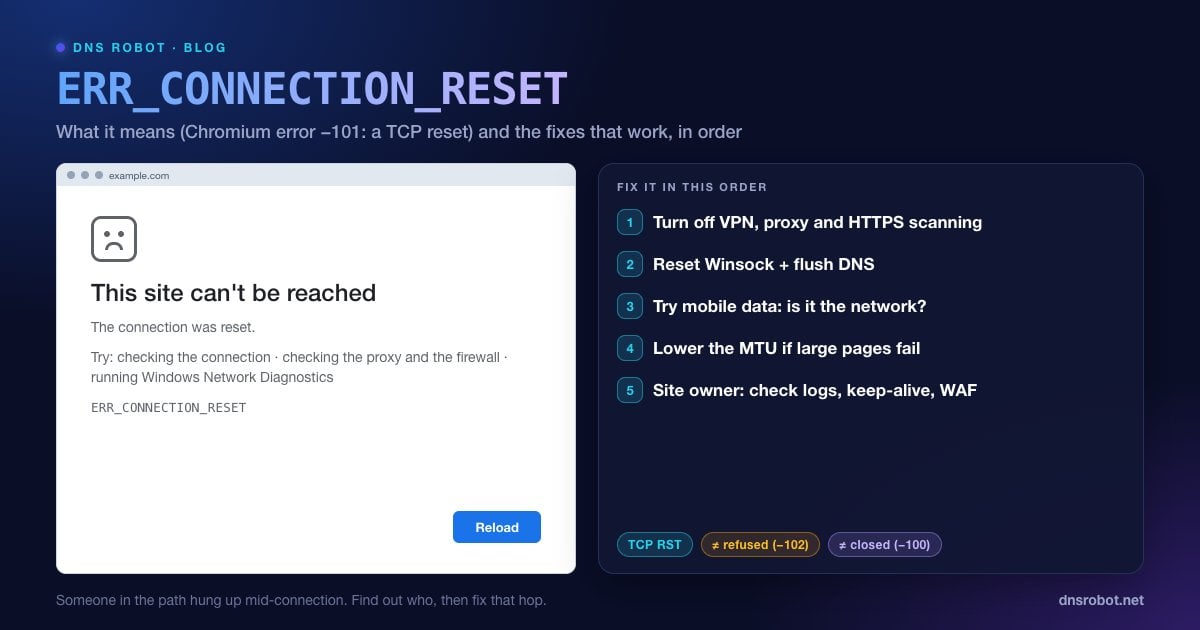
ERR_CONNECTION_RESET is the error Chrome, Edge, Brave and other Chromium browsers show when a connection to a website was open and then forcibly cut. The page reads "This site can't be reached. The connection was reset." Inside Chromium it is net error -101, and the source code describes it in one line: a connection was reset, "corresponding to a TCP RST".
A TCP reset (RST) is the network's hang-up button. A normal connection ends politely with a FIN packet after the data is delivered. A reset ends it instantly, with no goodbye, and whatever was half-loaded is thrown away. Your browser got as far as reaching the server: DNS worked and the connection was established. Then something in the path decided to kill it.
That "something" is the whole puzzle. It can be your own computer (antivirus, VPN, a broken network stack), your router or ISP, a firewall in front of the site, or the web server process itself. The fixes below are ordered to find out which, fastest first.
How This Error Looks in Other Browsers
The wording changes from browser to browser, but they are all reporting the same TCP reset.
| Browser | What you see |
|---|---|
| Google Chrome | This site can't be reached. The connection was reset. ERR_CONNECTION_RESET |
| Microsoft Edge | Hmmm… can't reach this page. The connection was reset. ERR_CONNECTION_RESET |
| Mozilla Firefox | The connection was reset. The connection to the server was reset while the page was loading. |
| Safari (Mac, iPhone) | Safari can't open the page because the network connection was lost. |
| DevTools console | net::ERR_CONNECTION_RESET (sometimes shown as net::ERR_CONNECTION_RESET 200 (OK)) |
If Firefox shows PR_CONNECT_RESET_ERROR on a "Secure Connection Failed" page instead, the reset happened during the HTTPS handshake. The causes overlap heavily with this guide, especially antivirus HTTPS scanning and network filtering.
Our PR_CONNECT_RESET_ERROR guide covers the Firefox-specific fixes, such as its separate proxy setting and Troubleshoot Mode.
Advertisement
What Causes ERR_CONNECTION_RESET?
Every reset has a sender. Working out who sent it tells you who can fix it.
| Cause | Who sends the reset | Who can fix it |
|---|---|---|
| VPN or proxy that drops the connection | VPN client or proxy server | You |
| Antivirus or firewall scanning HTTPS | Security software on your PC | You |
| Corrupted Winsock catalog or network settings (Windows) | Your own operating system | You |
| MTU mismatch (large packets don't fit the path) | Indirect: a router along the path drops big packets | You or your ISP |
| ISP or workplace filtering that blocks the site | A filtering box in the network | Network admin, or a different network |
| Firewall, WAF or rate limiter blocking your IP | Security layer in front of the website | Site owner |
| Web server or app crashed or restarted mid-request | The server's operating system | Site owner |
The first five are on your side and you can usually fix them in minutes. The last two are on the website's side: no amount of cache clearing will help, and the only fix is for the owner to resolve it, or for you to wait.
Step 1: Is It You or the Website?
Spend 60 seconds on this before changing any settings. It tells you which half of this guide applies to you.
Try another network. Turn Wi-Fi off on your phone and open the same page on mobile data. If it loads, the reset is happening on your device or your home/work network.
Try another site. If every HTTPS site resets, suspect your VPN, proxy or antivirus. If only one site does, suspect filtering or that site's server.
Test the server from outside. DNS Robot's Port Checker connects to the site's port 443 from our servers. If the port is open for us but resets for you, the problem is between you and the site.
Trace the route. A traceroute shows each network hop between DNS Robot and the server, which helps you tell a dead server apart from a broken path.
Advertisement
Fix 1: Reload, Then Try an Incognito Window
A single reset is often a one-off: a router rebooting, a server restarting during a deploy, a Wi-Fi handoff. Press Ctrl + R (Mac: Cmd + R) after a few seconds.
If it keeps happening, open the page in an Incognito window (Ctrl + Shift + N, Mac Cmd + Shift + N). Incognito runs without your extensions and without saved cookies. If the page loads there, an extension or a corrupted cookie is to blame: disable extensions one by one, or clear that site's data from the icon at the left of the address bar → Site settings → Delete data.
Fix 2: Turn Off Your VPN and Check Proxy Settings
VPNs and proxies sit in the middle of every connection, and when their server is overloaded, blocked, or has an idle timer that is too short, they reset connections. Disconnect the VPN completely (don't just switch servers) and reload.
If Chrome shows ERR_TUNNEL_CONNECTION_FAILED instead, the proxy itself is refusing the connection. See ERR_TUNNEL_CONNECTION_FAILED.
Windows 11: Settings → Network & internet → Proxy. Leave Automatically detect settings on, and under Manual proxy setup click Set up (or Edit) and turn Use a proxy server off.
macOS: System Settings → Network → select Wi-Fi or Ethernet → Details… → Proxies. Turn off every proxy you didn't set up on purpose.
Chrome itself uses the system proxy, so there is nothing separate to change in the browser.
# Windows also has a separate system-service proxy (WinHTTP).
# Run in an elevated Command Prompt or PowerShell:
netsh winhttp show proxy
netsh winhttp reset proxyAdvertisement
Fix 3: Pause Antivirus HTTPS Scanning or Firewall
Many antivirus suites decrypt and inspect your HTTPS traffic. The feature has names like HTTPS scanning, Web Shield, SSL/TLS protocol filtering or Scan encrypted connections. When the scanner can't handle a site's certificate or protocol, it resets the connection rather than let it through.
To test, turn the HTTPS-scanning option off, not the whole antivirus, and reload. If the page loads, either keep scanning off for that site (most products allow an exclusion) or update the antivirus. Third-party firewalls can do the same thing, so test with them paused too.
Fix 4: Reset the Windows Network Stack (Winsock)
Windows keeps a catalog of network components called Winsock. VPN clients, old antivirus products and some malware add entries to it, and a damaged catalog produces resets on every site. Resetting Winsock and the TCP/IP stack puts both back to defaults. Open Command Prompt as administrator and run:
netsh winsock reset
netsh int ip reset
ipconfig /release
ipconfig /renew
ipconfig /flushdns

:: Restart the PC afterwards. The Winsock reset needs a reboot to apply.
On Windows 11 there is also a one-click version: Settings → Network & internet → Advanced network settings → Network reset. It removes and reinstalls every network adapter and restarts the PC, so you will need to reconnect to Wi-Fi and reinstall any VPN afterwards.
Advertisement
Fix 5: Flush DNS and Try a Different DNS Resolver
DNS doesn't send resets itself, but some ISP and workplace resolvers point blocked domains at a filtering server that resets the connection. A stale cached address can also send you to a server that no longer hosts the site. Flush the cache first. Our flush DNS guide has the command for every system:
# Windows
ipconfig /flushdns

# macOS
sudo dscacheutil -flushcache; sudo killall -HUP mDNSResponder

# Chrome's own cache: open chrome://net-internals/#dns and click "Clear host cache"
Then compare what your network returns with a neutral answer. Run the domain through DNS Robot's DNS Lookup: if the IP addresses there differ from the ones your computer resolves (nslookup example.com), your resolver is redirecting you. Switch to a public resolver like Cloudflare (1.1.1.1) or Google (8.8.8.8). Our DNS Speed Test shows which one is fastest from where you are.
Fix 6: Lower the MTU If Big Pages Fail and Small Ones Load
A classic pattern: simple pages load, but large pages, file downloads or logins reset. That points to an MTU problem. Packets are too big for one link in the path (common with VPNs, PPPoE DSL and some mobile hotspots), and a device that should report the problem silently drops them instead, so the connection stalls and then fails.
Find the largest packet that gets through without fragmenting. 1472 bytes of data plus 28 bytes of headers equals the standard 1500 MTU:
:: Windows: -f = don't fragment, -l = payload size
ping example.com -f -l 1472
:: "Packet needs to be fragmented but DF set" = too big. Lower it until replies come back.

:: Then set MTU = (largest working size + 28), e.g. 1400:
netsh interface ipv4 show subinterfaces
netsh interface ipv4 set subinterface "Wi-Fi" mtu=1400 store=persistent

# macOS: -D = don't fragment, -s = payload size
ping -D -s 1472 example.comFix 7: Flush Chrome's Socket Pools and Reset Chrome
Chrome reuses open connections to load pages faster. If one of those pooled connections went stale, for example after you switched networks or a VPN dropped, Chrome may try it again and get reset. Open chrome://net-internals/#sockets and click Flush socket pools, then reload.
Still failing only in Chrome while Firefox works? Go to chrome://settings/reset → Restore settings to their original defaults. This disables extensions and clears temporary data, but keeps bookmarks, history and saved passwords.
Fix ERR_CONNECTION_RESET on Android and iPhone
Phones hit this error for the same reasons, plus one extra: a Private DNS setting on Android that points to a filtering or unreachable server.
Android, Private DNS: Settings → Network & internet → Private DNS → set it to Automatic (on Samsung: Settings → Connections → More connection settings → Private DNS). Our guide to Private DNS on Android explains what each option does.
Android, reset network settings: Settings → System → Reset options → Reset Bluetooth & Wi-Fi, plus Reset Mobile Network Settings if mobile data is affected (on Samsung: Settings → General management → Reset → Reset Wi-Fi and Bluetooth settings).
iPhone and iPad: Settings → General → Transfer or Reset iPhone → Reset → Reset Network Settings. This forgets saved Wi-Fi networks and passwords, and removes VPN settings that weren't installed by a configuration profile.
Both: turn off any VPN or ad-blocking app (many work as a local VPN), switch between Wi-Fi and mobile data, and update the browser app.
For Website Owners: Find What Is Resetting Your Visitors
If visitors report ERR_CONNECTION_RESET and your site fails from several networks, the reset is coming from your stack. Work from the outside in:
Reproduce it from outside. Run
curl -v https://yourdomain.comfrom a machine outside your network, or test port 443 with the Port Checker. Note whether the reset comes before the TLS handshake, during it, or after the request was sent.Check your security layer. Rate limiters, fail2ban, CrowdSec and cloud WAFs can reject banned IPs with a TCP reset (for example an iptables
REJECT --reject-with tcp-resetrule). Check whether the reporting user's IP is banned before anything else.Look for crashes and restarts. A process that dies mid-request takes its open connections with it. Check
journalctl -u your-service,pm2 logs, ordmesg -T | grep -i "killed process"for the Linux out-of-memory killer.Check TLS. Serve TLS 1.2 and 1.3 with a complete certificate chain. Old protocol settings or a broken chain can end the handshake abruptly in some clients. The SSL Checker shows your certificate chain and expiry, and HTTP Headers shows what a real request gets back.
Check the CDN. If you're behind Cloudflare or another CDN, read its security event log for the visitor's IP or country before you touch the origin server.
# Is the visitor's IP banned by fail2ban?
sudo fail2ban-client status              # list jails
sudo fail2ban-client status sshd         # banned IPs in one jail
sudo fail2ban-client set sshd unbanip 203.0.113.7

# Did the OOM killer end your app?
dmesg -T | grep -i "killed process"ERR_CONNECTION_RESET vs Refused vs Timed Out vs Closed
These four errors look alike on screen but describe different things on the network, and each points to a different fix. The codes are Chromium's own net error numbers.
| Error | Code | What happened | Look at first |
|---|---|---|---|
| ERR_CONNECTION_REFUSED | -102 | The first connection attempt was rejected straight away | Is the server running? Is the port open? |
| ERR_CONNECTION_RESET | -101 | An open connection was cut with a TCP RST | VPN, proxy, antivirus, filtering, server crashes |
| ERR_CONNECTION_CLOSED | -100 | The other side hung up normally (TCP FIN) before sending a page | TLS setup, server limits, proxies |
| ERR_CONNECTION_TIMED_OUT | -118 | No answer came back at all | Firewall dropping packets, wrong IP, server offline |
Full guides for the neighbours: ERR_CONNECTION_REFUSED, ERR_CONNECTION_TIMED_OUT and ERR_CONNECTION_CLOSED. If your network is blocking secure DNS as well, see this network is blocking encrypted DNS traffic.
Is the website resetting everyone, or just you?
DNS Robot's free Port Checker connects to any domain's port 443 or 80 from our servers. If it's open for us but resets for you, the problem is your device or network, not the site.
Try Port CheckerAdvertisement
Frequently Asked Questions
It means your browser reached the website and opened a connection, then something sent a TCP reset (RST) packet that cut the connection off before the page finished loading. In Chromium it is net error -101. The reset can come from your VPN, proxy, antivirus, network filtering, or the web server itself.