Verizon DNS Servers: IP Addresses, Setup & Faster Alternatives
Advertisement
What Are Verizon DNS Servers?
Verizon DNS servers are the Domain Name System resolvers that Verizon assigns to its Fios, DSL, and 5G Home Internet customers. Every time you visit a website, your device queries these servers to translate domain names (like google.com) into IP addresses it can connect to.
Unlike providers such as Spectrum or Comcast that use a single pair of DNS servers nationwide, Verizon uses regional DNS servers — each metro area has its own dedicated servers. Your Verizon router is automatically configured to use the DNS servers closest to your location.
Verizon Fios serves over 7 million residential customers across the Northeastern and Mid-Atlantic United States. While the DNS servers are reliable, independent testing from DNSPerf shows that ISP DNS resolvers — including Verizon's — are consistently 2–5x slower than public DNS providers like Cloudflare and Google.
Verizon Fios DNS Server IP Addresses by Region
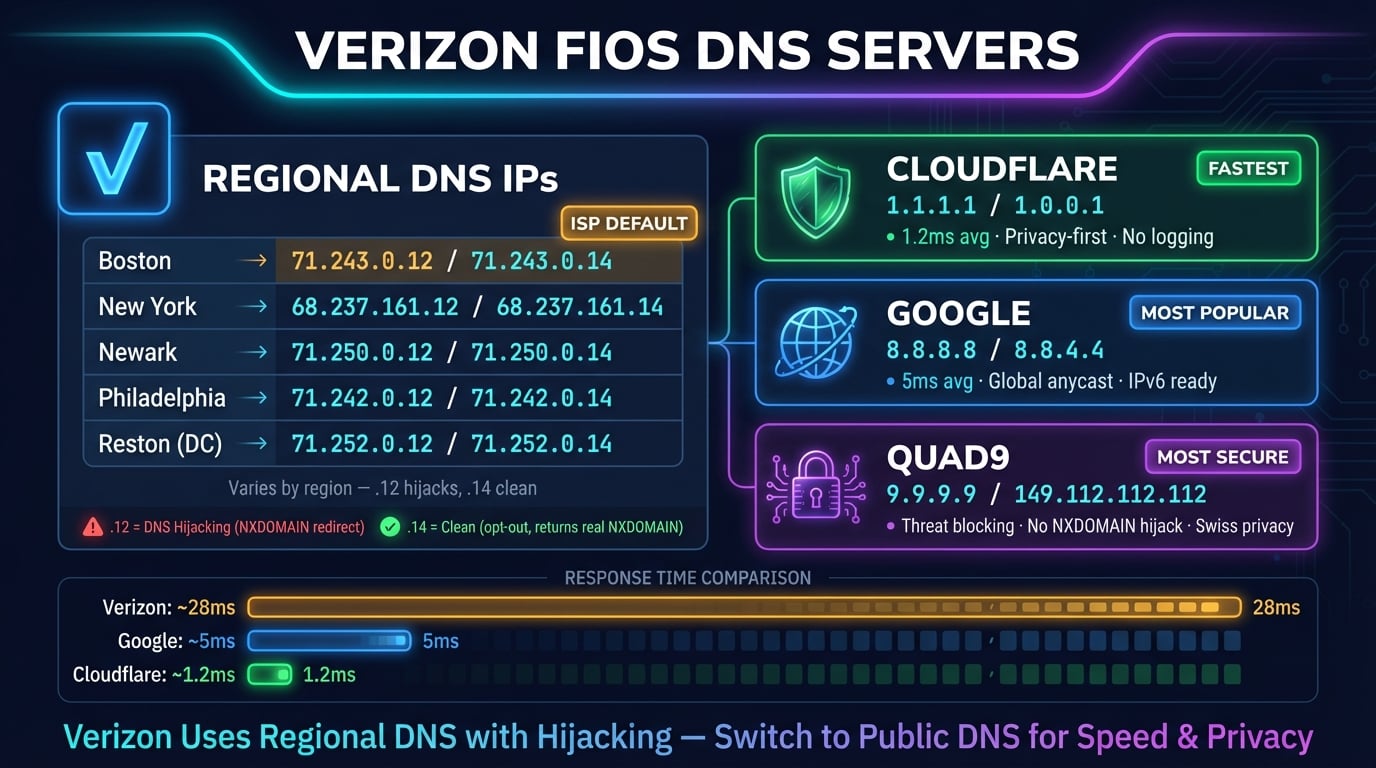
Verizon does not publish an official list of its DNS server IPs. The addresses below were gathered from Verizon Community forums, router admin pages, and network testing. Each region has two DNS servers — one ending in .12 (standard) and one ending in .14 (opt-out of DNS hijacking).
| Region | DNS Server (.14) | Hostname | Standard (.12) |
|---|---|---|---|
| Boston, MA | 71.243.0.14 | nsbost02.verizon.net | 71.243.0.12 |
| New York, NY | 68.237.161.14 | nsnyny02.verizon.net | 68.237.161.12 |
| Newark, NJ | 71.250.0.14 | nsnwrk02.verizon.net | 71.250.0.12 |
| Philadelphia, PA | 71.242.0.14 | nsphil02.verizon.net | 71.242.0.12 |
| Reston, VA | 71.252.0.14 | nsrest02.verizon.net | 71.252.0.12 |
The .14 addresses are recommended because they opt out of Verizon's DNS hijacking (more on that below). The .12 addresses are the standard servers that may redirect failed DNS queries to Verizon's search page.
To find the exact DNS servers assigned to your Fios connection, log in to your router at myfiosgateway.com or 192.168.1.1 and check the System Monitoring page.
Advertisement
Verizon DNS Hijacking: What It Is & How to Opt Out
Verizon's standard DNS servers (the .12 addresses) perform DNS hijacking — when you mistype a domain name or visit a non-existent domain, instead of returning a standard NXDOMAIN error, Verizon redirects you to their own search page. This page typically shows ads and sponsored results.
This behavior breaks certain applications that rely on NXDOMAIN responses, including email servers, security tools, and custom DNS setups. It can also interfere with split-horizon DNS configurations used by businesses.
Verizon offers an opt-out by using the .14 versions of their DNS servers. For example, instead of 71.252.0.12, use 71.252.0.14. This returns proper NXDOMAIN responses without redirecting to a search page.
# Test for DNS hijacking: query a non-existent domain
nslookup this-domain-does-not-exist-abc123.com

# If hijacked: returns a Verizon IP address (usually 92.242.x.x)
# If NOT hijacked: returns "** server can't find... NXDOMAIN"

# Using .14 DNS (opt-out):
nslookup this-domain-does-not-exist-abc123.com 71.252.0.14
# Should return: NXDOMAIN (correct behavior)Verizon Wireless (Mobile) DNS Servers
Verizon Wireless (mobile/cellular) uses different DNS infrastructure than Verizon Fios. The mobile DNS servers are not publicly documented and change dynamically based on your cell tower location.
On Verizon mobile, you cannot change DNS settings at the network level. However, you can override them:
Android — Use the built-in Private DNS feature: Settings → Network & Internet → Private DNS → enter
one.one.one.one(Cloudflare) ordns.google(Google). This encrypts all DNS queries via DNS-over-TLS and works on both Wi-Fi and cellular dataiPhone — Install the 1.1.1.1 app from Cloudflare or configure a DNS profile. iOS does not have a built-in per-network DNS override for cellular connections
Both platforms — Use a DNS-based app like Cloudflare WARP or NextDNS that routes all DNS traffic through their resolvers regardless of your network
Advertisement
Why Change Verizon's Default DNS?
Verizon Fios is one of the fastest ISPs in the US, but its DNS servers don't match that speed. Here's why switching to a public DNS provider makes a significant difference.
Faster DNS resolution — Verizon's DNS servers typically respond in 40–70ms. Cloudflare averages 11ms globally and Google averages 22ms. Since a single page load triggers 20–50 DNS queries, this latency adds up to hundreds of milliseconds per page
DNS hijacking by default — Verizon's .12 servers redirect failed queries to ad-supported search pages. Even the .14 opt-out servers are slower than public alternatives
Privacy concerns — Verizon can log and monetize your DNS query data. Cloudflare commits to deleting all logs within 24 hours and publishes annual KPMG audit reports to prove it
Outage resilience — Verizon DNS has experienced regional outages that left millions without working internet. Public DNS providers like Cloudflare and Google operate globally distributed anycast networks with 99.99%+ uptime
No IPv6 DNS — Verizon doesn't offer IPv6 DNS resolvers, forcing all queries over IPv4. Public DNS providers offer full IPv6 support
Security — Quad9 (9.9.9.9) blocks known malicious domains at the DNS level. Cloudflare for Families (1.1.1.3) adds malware and adult content filtering. Verizon's DNS offers none of these protections
Best DNS Servers for Verizon Fios Users
These are the best public DNS alternatives for Verizon customers. All are free and work with every Fios plan.
| Provider | Primary IPv4 | Secondary IPv4 | IPv6 Primary | Best For |
|---|---|---|---|---|
| Cloudflare | 1.1.1.1 | 1.0.0.1 | 2606:4700:4700::1111 | Speed + privacy |
| Google DNS | 8.8.8.8 | 8.8.4.4 | 2001:4860:4860::8888 | Reliability |
| Quad9 | 9.9.9.9 | 149.112.112.112 | 2620:fe::fe | Malware blocking |
| OpenDNS | 208.67.222.222 | 208.67.220.220 | 2620:119:35::35 | Parental controls |
| Cloudflare Families | 1.1.1.3 | 1.0.0.3 | 2606:4700:4700::1113 | Malware + content filter |
| Verizon Default | Regional (.14) | Regional (.14) | Not available | No setup needed |
For most Verizon Fios users, Cloudflare (1.1.1.1) is the best choice — it consistently scores the lowest latency in North America and has the strongest privacy commitment of any DNS provider. Google (8.8.8.8) is a close second with excellent reliability and global coverage. Full address lists and setup steps: our Cloudflare DNS servers guide and Google DNS servers guide.
If you want built-in security, Quad9 (9.9.9.9) blocks connections to known malicious domains using threat intelligence from over 25 security partners. For families, Cloudflare for Families (1.1.1.3) or OpenDNS FamilyShield filters both malware and adult content.
You can benchmark DNS performance from your specific location using GRC DNS Benchmark (Windows) or the dig command on Mac and Linux.
Advertisement
How to Change DNS on Verizon G3100 Router
The Verizon Fios Gateway G3100 is the most common router for Fios customers. Changing DNS on the router applies to every device on your network.
G3100 Firmware v3.x (Newer)
Step 1 — Open your browser and go to myfiosgateway.com or 192.168.1.1. Log in with username admin and the password printed on the back of your router
Step 2 — Click Advanced in the top-left navigation menu
Step 3 — In the left sidebar, click Network Settings → Network Connections
Step 4 — Click on Broadband Connection (Ethernet/Coax)
Step 5 — Scroll down to Settings and click it to expand
Step 6 — Find the IPv4 DNS dropdown. Change from "Obtain IPv4 DNS Address Automatically" to "Use the Following IPv4 DNS Addresses"
Step 7 — Enter your preferred DNS: Primary = 1.1.1.1, Secondary = 1.0.0.1 (Cloudflare)
Step 8 — Click Apply. The router will take 1–2 minutes to apply settings — do not close the browser during this time
G3100 Firmware v2.x (Older)
Step 1 — Go to myfiosgateway.com or 192.168.1.1 and log in
Step 2 — Click the Network box in the top-right area with the ">" arrow
Step 3 — Click Network Connections in the middle of the screen
Step 4 — Select Broadband Connection (Ethernet/Coax)
Step 5 — Click Settings to expand DNS options
Step 6 — Change DNS from automatic to manual and enter your preferred DNS addresses
Step 7 — Click Apply and wait for the settings to save
How to Change DNS on Verizon G1100 Router
The older Fios Quantum Gateway G1100 has a slightly different interface.
Step 1 — Navigate to myfiosgateway.com or 192.168.1.1 and log in (default password on the router sticker)
Step 2 — Click My Network from the top menu
Step 3 — Click Network Connections → Broadband Connection (Ethernet/Coax)
Step 4 — Click Settings to expand the configuration
Step 5 — Under DNS Server, change from Automatic to Manual
Step 6 — Enter your DNS addresses (e.g., 8.8.8.8 and 8.8.4.4 for Google DNS)
Step 7 — Click Apply
Advertisement
Change DNS on Windows (Verizon Connection)
If you use Fios TV and can't change DNS on the router, or if you want DNS settings per device, here's how to do it on Windows.
# PowerShell (Run as Administrator)
# Find your active network adapter
Get-NetAdapter | Where-Object {$_.Status -eq 'Up'}

# Set Cloudflare DNS on your adapter
Set-DnsClientServerAddress -InterfaceAlias 'Ethernet' -ServerAddresses '1.1.1.1','1.0.0.1'

# Set IPv6 DNS too
Set-DnsClientServerAddress -InterfaceAlias 'Ethernet' -ServerAddresses '2606:4700:4700::1111','2606:4700:4700::0064'

# Flush DNS cache
Clear-DnsClientCache

# Verify
Get-DnsClientServerAddress -InterfaceAlias 'Ethernet'
For the GUI method: Open Settings → Network & Internet → click your connection → Edit next to DNS server assignment → switch to Manual → enable IPv4 → enter 1.1.1.1 (Preferred) and 1.0.0.1 (Alternate) → Save.
Change DNS on Mac (Verizon Connection)
# Set Cloudflare DNS for Ethernet (Fios typically uses Ethernet)
networksetup -setdnsservers Ethernet 1.1.1.1 1.0.0.1

# Or for Wi-Fi connection
networksetup -setdnsservers Wi-Fi 1.1.1.1 1.0.0.1

# Flush DNS cache (macOS Ventura+)
sudo dscacheutil -flushcache && sudo killall -HUP mDNSResponder

# Verify DNS servers
networksetup -getdnsservers Ethernet

# Test lookup speed
dig @1.1.1.1 google.com +short +stats | grep 'Query time'
GUI method: System Settings → Network → select your connection → Details → DNS → click + → add 1.1.1.1 and 1.0.0.1 → remove Verizon entries → OK → Apply.
Change DNS on iPhone & Android (Verizon Wi-Fi)
When connected to your Verizon Fios Wi-Fi, you can override DNS on your phone without changing router settings.
iPhone / iPad
Step 1 — Open Settings → Wi-Fi → tap the (i) icon next to your Fios network
Step 2 — Scroll down and tap Configure DNS
Step 3 — Switch from Automatic to Manual
Step 4 — Delete the existing Verizon DNS entries
Step 5 — Tap Add Server and enter 1.1.1.1, then tap Add Server again and enter 1.0.0.1
Step 6 — Tap Save
Android (Private DNS — Works on All Networks)
Android 9+ has a system-wide Private DNS feature that encrypts your DNS queries and works on both Wi-Fi and cellular — ideal for Verizon users.
Step 1 — Open Settings → Network & Internet → Private DNS
Step 2 — Select Private DNS provider hostname
Step 3 — Enter one.one.one.one (Cloudflare) or dns.google (Google)
Step 4 — Tap Save
How to Verify Your DNS Settings Changed
After changing DNS, confirm the new servers are active.
# Windows — Check active DNS server
nslookup google.com
# "Server:" line should show 1.1.1.1, NOT a Verizon IP (71.x.x.x or 68.x.x.x)

# Mac/Linux — Compare DNS response times
echo '--- Cloudflare ---' && dig @1.1.1.1 google.com | grep 'Query time'
echo '--- Google ---' && dig @8.8.8.8 google.com | grep 'Query time'
echo '--- Verizon ---' && dig @71.252.0.14 google.com | grep 'Query time'

# Test for DNS hijacking
nslookup this-domain-does-not-exist-12345.com
# Correct: NXDOMAIN error
# Hijacked: Returns a Verizon IP address
You can also use DNS Robot's DNS Lookup tool to query any domain from multiple DNS servers and compare results. If your results differ from what public DNS returns, your DNS hasn't fully switched yet.
Tip: Visit 1.1.1.1/help in your browser for an instant Cloudflare DNS health check — it shows whether you're using Cloudflare DNS and if encrypted DNS (DoH/DoT) is active.
Common Verizon DNS Issues & Fixes
Verizon DNS servers occasionally experience problems. Here are the most common issues and proven solutions.
Verizon DNS Outage (Internet Seems Down)
During a Verizon DNS outage, your modem and router show solid lights (connection is fine) but no websites load. This happened during a major Verizon Fios outage reported by BleepingComputer where millions of users were affected.
Immediate fix — Change DNS to 1.1.1.1 or 8.8.8.8 on your device or router. This bypasses Verizon's broken DNS servers entirely
Check outage status — Visit Verizon's network status page or Downdetector for real-time reports
Permanent fix — Switch DNS on your router so you're never affected by Verizon DNS outages again
Slow DNS Resolution on Verizon
If websites take 2–5 seconds to start loading but download fast once they begin, slow DNS resolution is the likely cause. Verizon's DNS latency varies from 40ms in major metros to 70ms+ in suburban areas.
A single web page triggers 20–50 DNS lookups for the main domain, CDN assets, analytics, fonts, and third-party scripts. At 60ms per query vs Cloudflare's 11ms, that's a cumulative delay of 1–2.5 seconds per page load — enough for 53% of mobile users to abandon the page, according to Google's web performance research.
Before switching, run a free DNS speed test — it benchmarks Cloudflare, Google and Quad9 from your own Fios connection and ranks them by real measured latency, so you know exactly which resolver is fastest from your location.
DNS Hijacking Breaking Apps
Verizon's DNS hijacking on .12 servers can break applications that depend on NXDOMAIN responses. Common symptoms include email servers failing to validate domains, VPN split-tunnel configurations not working correctly, and development tools getting unexpected responses for test domains.
If you must stay on Verizon DNS, switch to the .14 addresses for your region. Otherwise, move to any public DNS — none of them perform DNS hijacking.
Check Your DNS Configuration
Use DNS Robot's free DNS Lookup tool to verify your DNS settings, check which servers are resolving your queries, and inspect A, AAAA, MX, and other DNS records.
Try DNS LookupAdvertisement
Frequently Asked Questions
Verizon uses regional DNS servers. Common addresses include 71.252.0.14 (Reston, VA), 68.237.161.14 (New York, NY), 71.250.0.14 (Newark, NJ), 71.242.0.14 (Philadelphia, PA), and 71.243.0.14 (Boston, MA). The .14 versions opt out of DNS hijacking.