What Is a DNS Server? How It Works, Types & Examples
Advertisement
What Is a DNS Server?
A DNS server is a server that answers questions about domain names. The most common question is "what is the IP address of this name?", and DNS servers answer it billions of times a day. Computers connect to each other by IP address (such as 142.250.183.4), but people remember names (such as google.com). DNS, the Domain Name System, is the directory that links the two, and DNS servers are the machines that store and look up its entries.
Every time you open a website, send an email or launch an app, your device first asks a DNS server where to go. If the DNS server is slow, everything feels slow. If it stops answering, the internet looks "down" even though your connection works, which is exactly what errors like DNS_PROBE_FINISHED_NXDOMAIN and DNS server not responding mean.
Input: a domain name and a record type, for example
dnsrobot.netandA(IPv4 address).Output: the record, for example
104.21.0.129, plus a TTL that says how long the answer can be cached.Protocol: classic DNS runs on port 53 over UDP (and TCP for large answers). Encrypted DNS uses port 853 (DoT) or 443 (DoH).
How a DNS Server Finds an IP Address, Step by Step
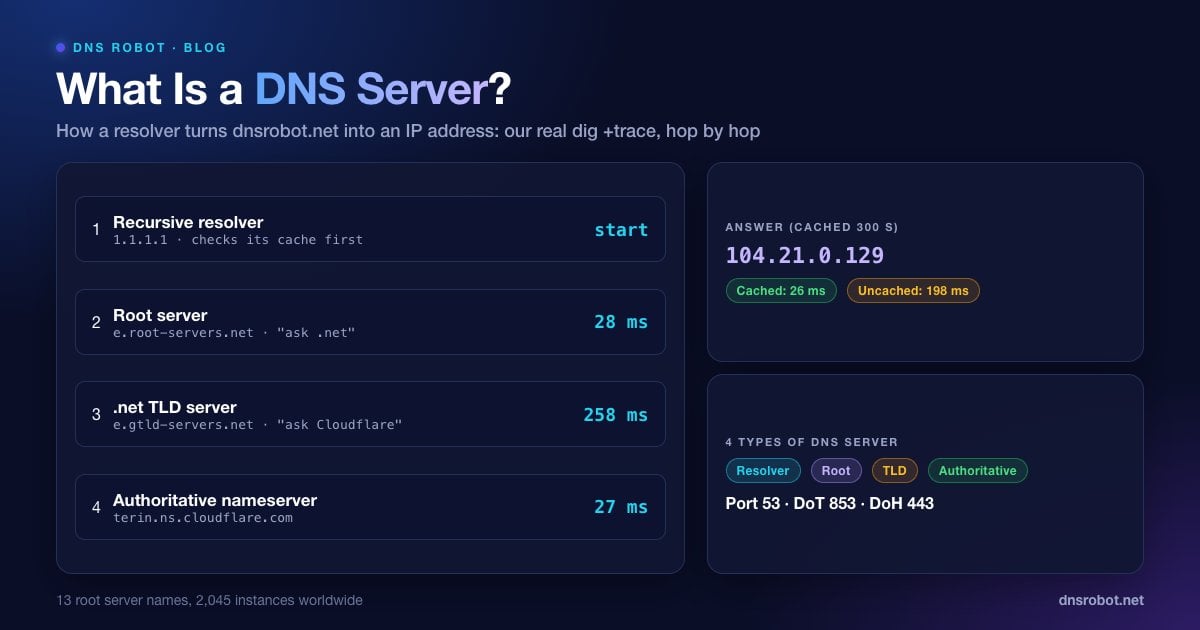
No single DNS server knows every name on the internet. Instead, a recursive resolver walks a hierarchy of servers, starting at the top. We ran the walk for our own domain with dig +trace, which makes each query itself the way a resolver would, from a home connection in India on 5 October 2026. These are the real steps and timings:
1. Your device asks its resolver. The browser checks its own cache, then the operating system's, then sends the question to the configured DNS server (for example, 1.1.1.1).
2. The resolver asks a root server where
.netnames live.e.root-servers.netanswered in 28 ms with the list of.netTLD servers.3. The resolver asks a .net TLD server who is responsible for
dnsrobot.net.e.gtld-servers.netanswered in 258 ms (the slowest hop, most likely a distant copy of that server) with Cloudflare's nameservers,sofia.ns.cloudflare.comandterin.ns.cloudflare.com.4. The resolver asks the authoritative nameserver.
terin.ns.cloudflare.comanswered in 27 ms with the A records104.21.0.129and172.67.150.248and a TTL of 300 seconds.5. The resolver caches the answer and returns it. For the next 300 seconds, anyone using that resolver gets the answer from cache without repeating steps 2 to 4.
# Watch the full walk yourself (macOS, Linux, or Windows with BIND tools)
dig +trace +nodnssec @1.1.1.1 dnsrobot.net A

# Trimmed output from our run on 5 October 2026
net.           172800 IN NS a.gtld-servers.net.
;; Received 834 bytes from 192.203.230.10#53(e.root-servers.net) in 28 ms
dnsrobot.net.  172800 IN NS sofia.ns.cloudflare.com.
dnsrobot.net.  172800 IN NS terin.ns.cloudflare.com.
;; Received 98 bytes from 192.12.94.30#53(e.gtld-servers.net) in 258 ms
dnsrobot.net.  300    IN A  104.21.0.129
dnsrobot.net.  300    IN A  172.67.150.248
;; Received 73 bytes from 2a06:98c1:50::ac40:21ec#53(terin.ns.cloudflare.com) in 27 msCaching is what makes this fast in practice. The same question sent to 1.1.1.1 took 198 ms the first time and 26 ms once the answer was cached. Root and TLD answers are cached for up to two days (the 172800-second TTL above), so most real lookups skip straight to step 4 or come entirely from cache.
Advertisement
The 4 Types of DNS Servers
The walk above touches four kinds of DNS server. Each has one job:
| Type | What it does | Example | Who runs it |
|---|---|---|---|
| Recursive resolver | Takes your question, asks the other servers on your behalf, caches answers | 1.1.1.1, 8.8.8.8, your ISP's resolver | ISPs, Cloudflare, Google, Quad9, companies |
| Root server | Points to the right top-level domain (.com, .net, .org, .uk…) | a.root-servers.net to m.root-servers.net | 12 organisations, 13 named servers |
| TLD server | Points to the nameservers of each domain under its TLD | a.gtld-servers.net (.com and .net) | Registries such as Verisign |
| Authoritative nameserver | Holds the domain's actual records and gives the final answer | sofia.ns.cloudflare.com | Your DNS host: Cloudflare, your registrar, your web host |
There are only 13 root server names (a to m), but each is an anycast address served from many places. On 5 October 2026 root-servers.org listed 2,045 root server instances run by 12 independent operators, so a root server is rarely far away.
Your home router usually adds a fifth role: a DNS forwarder. Devices on your Wi-Fi send their questions to the router (often 192.168.1.1), and the router passes them to your ISP's resolver and caches the answers.
DNS Server vs Nameserver vs DNS Record
These terms get mixed up constantly, and the difference matters when you're fixing something:
DNS server is the general term for any server that speaks DNS: resolvers, root, TLD and authoritative servers are all DNS servers.
Nameserver usually means an authoritative server for a domain, the ones listed in the domain's NS records (for example
ns1.yourhost.com). You change nameservers at your registrar when you move DNS hosting.DNS record is one entry stored on the authoritative nameserver: an A record (IPv4 address), AAAA (IPv6), MX (mail server), CNAME (alias), TXT (verification, SPF) and so on.
"DNS server" in your Wi-Fi or network settings means the recursive resolver your device should ask, such as 8.8.8.8.
Advertisement
How to Find Your DNS Server Address
Your device normally gets its DNS server automatically from the router via DHCP. To see which one it's using:
# Windows (Command Prompt): look for "DNS Servers"
ipconfig /all

# Windows: the first lines show the default server
nslookup example.com

# macOS: list the resolvers in use
scutil --dns | grep nameserver

# Linux with systemd-resolved
resolvectl status

# Other Linux
cat /etc/resolv.confOn Android, open Settings, Network & internet, Internet, tap the gear next to your Wi-Fi network and look under Network details (menu names vary by phone maker). Settings, Network & internet, Private DNS shows a hostname such as dns.google if one is set. On an iPhone, open Settings, Wi-Fi, tap the (i) next to the network and scroll to Configure DNS: Automatic means the phone uses the DNS server your router hands out.
If you see 192.168.x.x or 10.x.x.x, that's your router acting as a forwarder; the real resolver is set in the router's admin page (see our router login guide). On Linux, 127.0.0.53 is systemd-resolved's local stub, and resolvectl status shows the upstream servers behind it.
Popular Public DNS Servers
You don't have to use your ISP's resolver. These free public DNS servers work from any network:
| Provider | Primary | Secondary | Good to know |
|---|---|---|---|
| Cloudflare | 1.1.1.1 | 1.0.0.1 | Privacy-focused, very fast from cache. Full guide |
| Google Public DNS | 8.8.8.8 | 8.8.4.4 | No filtering, quick on uncached names. Full guide |
| Quad9 | 9.9.9.9 | 149.112.112.112 | Blocks known malicious domains |
| OpenDNS (Cisco) | 208.67.222.222 | 208.67.220.220 | FamilyShield (208.67.222.123) blocks adult sites |
| AdGuard DNS | 94.140.14.14 | 94.140.15.15 | Blocks ads, trackers and phishing by default |
ISPs also publish their own resolver addresses, which can be useful when you've changed DNS and want to switch back. We keep lists for Spectrum, Comcast Xfinity, AT&T and Verizon.
Advertisement
Should You Change Your DNS Server?
For most people the ISP's resolver works fine. Switching to a public DNS server is worth it when one of these applies:
Your ISP's DNS is slow or unreliable. Page loads that hang on "Resolving host" or frequent DNS errors are the classic sign.
You want filtering. Quad9 blocks malware domains, and AdGuard or the family versions of Cloudflare and OpenDNS block ads or adult content.
You want encrypted DNS. Public resolvers support DNS over HTTPS and DNS over TLS, which hide your lookups from the local network. See what Private DNS does.
Your ISP redirects failed lookups to ad pages, or blocks sites at the DNS level.
There are trade-offs. Some CDNs pick a server based on your resolver's location, so a resolver far from you can send you to a slower copy of a site. Corporate and school networks often need their own DNS to reach internal names. And a faster resolver only speeds up the lookup itself, typically tens of milliseconds per new site, not your download speed.
DNS Ports: 53, 853 and 443
Plain DNS uses port 53. Most queries go over UDP because a question and answer usually fit in one packet; lookups switch to TCP on port 53 when an answer is too large for UDP, and for zone transfers between nameservers.
| Protocol | Port | Encrypted | Where you'll see it |
|---|---|---|---|
| DNS over UDP/TCP | 53 | No | Default on almost every device and router |
| DNS over TLS (DoT) | 853 | Yes | Android Private DNS, some routers |
| DNS over HTTPS (DoH) | 443 | Yes | Chrome, Firefox, Edge, Windows 11 |
Advertisement
When a DNS Server Stops Working
DNS failures look like the internet is down: apps can't connect and browsers show errors, but pinging an IP address such as 1.1.1.1 still works. The common messages and their fixes:
DNS server not responding (Windows troubleshooter): the resolver didn't answer at all. Fix guide.
DNS_PROBE_FINISHED_NXDOMAIN (Chrome): the resolver said the name doesn't exist. Fix guide.
ERR_NAME_NOT_RESOLVED: the name couldn't be resolved, often a typo, a cached failure or a blocked resolver. Fix guide.
DNS server unavailable or no internet on Wi-Fi: often the router's forwarder. Fix guide.
The quickest general fixes are to flush your DNS cache, restart the router, and temporarily switch your device to a public resolver such as 1.1.1.1 or 8.8.8.8. If the site works after switching, the problem was your original DNS server.
Which DNS server is fastest for you?
Run DNS Robot's DNS Speed Test in your browser. It times Cloudflare, Google and Quad9 with uncached lookups on your own connection and ranks them by median response time.
Try DNS Speed TestAdvertisement
Frequently Asked Questions
It's the internet's address book. You give it a name like google.com, and it gives back the IP address your device needs to connect.