Was ist eine MAC-Adresse? So finden Sie sie auf jedem Gerät
Advertisement
Was ist eine MAC-Adresse?
Eine MAC-Adresse (Media Access Control Address) ist eine eindeutige Kennung, die einem Netzwerkadapter zugewiesen ist – dem WLAN-Chip in Ihrem Smartphone, dem Ethernet-Anschluss Ihres PCs oder der Funkkarte in einem Smart-TV. Sie wird auch physische Adresse oder Hardwareadresse genannt, weil der Hersteller sie bereits im Werk in den Adapter schreibt.
Jeder Netzwerkadapter hat seine eigene MAC-Adresse, ein Laptop kann also zwei davon besitzen: eine für WLAN und eine für Ethernet. Geräte im selben lokalen Netzwerk stellen einander Daten über ihre MAC-Adressen zu – Ihr Router erkennt an der MAC-Adresse, welches Gerät welches Paket bekommt. Das geschieht auf Schicht 2 (der Sicherungsschicht) des Netzwerkmodells, also unterhalb der IP-Adressen.
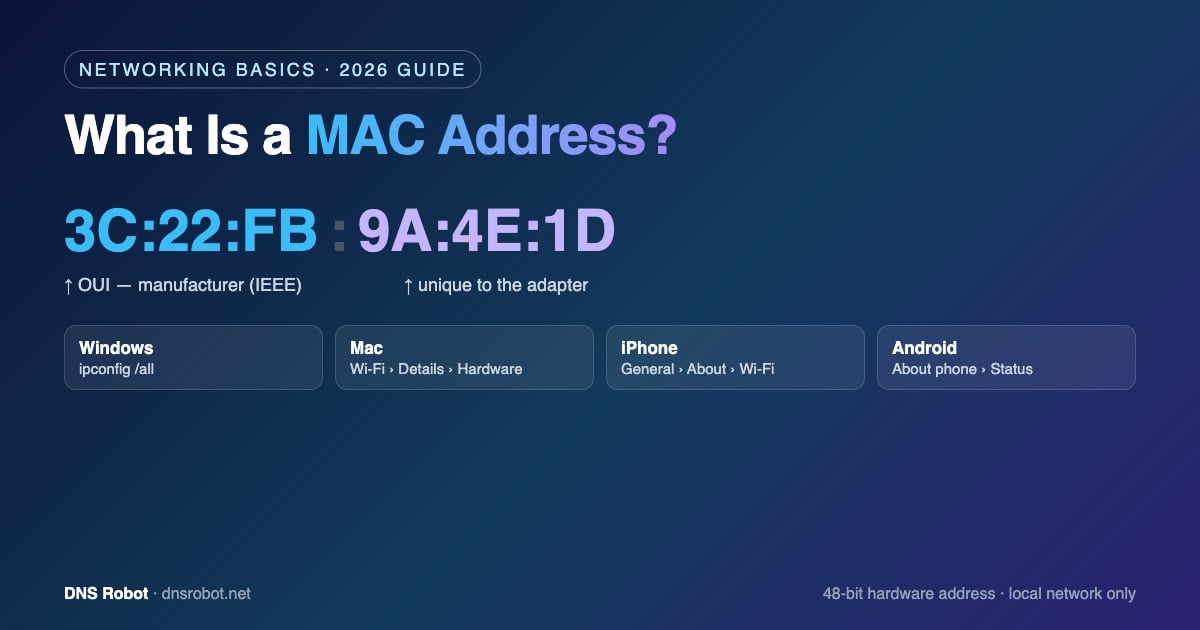
Eine MAC-Adresse sieht so aus: 3C:22:FB:9A:4E:1D – sechs Paare aus Hexadezimalziffern.
Das Format einer MAC-Adresse
Eine MAC-Adresse ist 48 Bit (6 Byte) lang und wird als 12 Hexadezimalzeichen (0–9 und A–F) geschrieben. Die Ziffern sind überall gleich; je nach Betriebssystem ändern sich nur die Trennzeichen:
| Schreibweise | Beispiel | Verwendet von |
|---|---|---|
| Doppelpunkte | 3c:22:fb:9a:4e:1d | macOS, Linux, iOS, Android |
| Bindestriche | 3C-22-FB-9A-4E-1D | Windows (ipconfig, getmac) |
| Punkte (Vierergruppen) | 3c22.fb9a.4e1d | Cisco-Netzwerkgeräte |
| Ohne Trennzeichen | 3C22FB9A4E1D | Manche Router und Datenbanken |
Groß- und Kleinschreibung spielen keine Rolle, 3C:22:FB und 3c:22:fb sind also identisch. Die Sonderadresse FF:FF:FF:FF:FF:FF ist die Broadcast-Adresse: Ein Frame an diese Adresse erreicht jedes Gerät im lokalen Netzwerk.
Advertisement
Was die Ziffern bedeuten: OUI und Geräte-ID
Eine MAC-Adresse besteht aus zwei Hälften:
Die ersten 3 Bytes – der OUI (Organizationally Unique Identifier). Das IEEE vergibt ihn an einen Hersteller.
3C:22:FBgehört zum Beispiel Apple – deshalb kann eine MAC-Adressen-Abfrage verraten, wer ein Gerät hergestellt hat.Die letzten 3 Bytes – der gerätespezifische Teil. Diesen Teil legt der Hersteller so fest, dass jeder Adapter aus seiner Produktion einzigartig ist.
Zwei Sonderbits im ersten Byte. Das niedrigstwertige Bit gibt an, ob die Adresse Unicast (0) oder Multicast (1) ist. Das zweitniedrigste Bit zeigt, ob sie universell administriert (0, vom Hersteller vergeben) oder lokal administriert (1, per Software gesetzt) ist.
So erkennen Sie eine per Software vergebene Adresse auf einen Blick: Ist das zweite Zeichen eine 2, 6, A oder E (wie in x2:, x6:, xA:, xE:), ist die Adresse lokal administriert – meist eine zufällige private MAC-Adresse oder eine manuell geänderte – und passt zu keinem Hersteller.
MAC-Adresse herausfinden: So geht’s auf jedem Gerät
Hier sehen Sie genau, wo Sie auf jedem System nachschauen müssen. Hat ein Gerät sowohl WLAN als auch Ethernet, lesen Sie die Adresse des Adapters ab, den Sie tatsächlich verwenden.
| Gerät | Wo Sie sie finden | Befehl |
|---|---|---|
| Windows 11 / 10 | Einstellungen › Netzwerk und Internet › WLAN (oder Ethernet) › Hardwareeigenschaften › Physische Adresse (MAC) | ipconfig /all oder getmac /v |
| Mac (macOS) | Systemeinstellungen › WLAN › Details neben Ihrem Netzwerk › Hardware › MAC-Adresse | ifconfig en0 | grep ether |
| Linux | Netzwerkeinstellungen › Ihre Verbindung › Details | ip link show (auf link/ether achten) |
| iPhone / iPad | Einstellungen › Allgemein › Info › WLAN-Adresse | — |
| Android | Einstellungen › Über das Telefon › Status (oder Hardwareinformationen) › WLAN-MAC-Adresse – die Bezeichnungen variieren je nach Hersteller (bei Samsung z. B. „Telefoninfo“) | — |
| Router | Die Weboberfläche des Routers zeigt in der Liste der verbundenen Geräte bzw. der DHCP-Clients die MAC-Adresse jedes Geräts (FRITZ!Box: Heimnetz › Netzwerk) | — |
C:\> getmac /v

Connection Name  Network Adapter        Physical Address    Transport Name
===============  =====================  ==================  ================
Wi-Fi            Intel(R) Wi-Fi 6 AX201  A0-A4-C5-9A-4E-1D   \Device\Tcpip_{...}
Ethernet         Realtek PCIe GbE       Disconnected        Media disconnected
Unter Windows listet ipconfig /all bei jedem Adapter eine Physische Adresse auf. Auf einem Mac ist en0 bei Laptops meist der WLAN-Adapter; führen Sie ifconfig ohne Zusatz aus, um alle Adapter zu sehen. Denken Sie bei Smartphones daran, dass die unter „Info“ angezeigte Adresse die Hardwareadresse ist – die Adresse, die Ihr Telefon in einem bestimmten WLAN tatsächlich verwendet, kann eine private sein (siehe unten).
Advertisement
MAC-Adresse vs. IP-Adresse
Die beiden werden häufig verwechselt. Beide identifizieren ein Gerät, aber auf unterschiedlichen Ebenen:
| MAC-Adresse | IP-Adresse | |
|---|---|---|
| Identifiziert | Einen Netzwerkadapter (Hardware) | Den Standort eines Geräts in einem Netzwerk |
| Vergeben von | Dem Hersteller (oder per Software, wenn zufällig) | Dem Netzwerk – Ihrem Router oder Internetanbieter |
| Reichweite | Nur das lokale Netzwerk | Lokales Netzwerk und Internet |
| Ändert sich | Selten (außer bei Randomisierung) | Oft – neues Netzwerk, neue Adresse |
| Format | 48 Bit, z. B. 3C:22:FB:9A:4E:1D | 32 Bit (IPv4) oder 128 Bit (IPv6), z. B. 203.0.113.7 |
| Netzwerkschicht | Schicht 2 (Sicherungsschicht) | Schicht 3 (Vermittlungsschicht) |
Ihr Router verknüpft beide über ARP (Address Resolution Protocol), das jeder lokalen IP-Adresse eine MAC-Adresse zuordnet. Ihre öffentliche IP-Adresse zeigt Ihnen das Tool Meine IP-Adresse.
Private und zufällige MAC-Adressen
Weil sich ein Gerät über eine feste MAC-Adresse von einem WLAN zum nächsten verfolgen ließe, verbergen moderne Systeme sie. iPhones und iPads (ab iOS 14) verwenden für jedes Netzwerk eine „Private WLAN-Adresse“, Android ab Version 10 randomisiert die MAC-Adresse standardmäßig, und Windows 10 und 11 bieten in den WLAN-Einstellungen „Zufällige Hardwareadressen“ an.
Eine zufällige Adresse ist lokal administriert, daher liefert eine Herstellerabfrage keinen Hersteller. Außerdem kann sie alles stören, was auf eine feste MAC-Adresse angewiesen ist – eine DHCP-Reservierung, den MAC-Filter im Router oder das Hotel-WLAN, das Sie plötzlich erneut zur Anmeldung auffordert. Passiert das, deaktivieren Sie die private Adresse nur für dieses eine Netzwerk: Tippen Sie auf dem iPhone auf das (i) neben dem Netzwerk; unter Android öffnen Sie die Einstellungen des Netzwerks und wählen unter „Datenschutz“ die Geräte-MAC-Adresse.
Advertisement
Wofür MAC-Adressen verwendet werden
Daten im lokalen Netzwerk zustellen – Switches und Router leiten Frames anhand der MAC-Adresse an das richtige Gerät weiter.
DHCP-Reservierungen – Sie legen fest, dass Ihr Router einem Gerät (etwa einem Drucker oder einer Spielkonsole) immer dieselbe IP-Adresse zuweist.
MAC-Filter – Geräte im WLAN zulassen oder sperren. Ein solcher Filter lässt sich leicht umgehen; verlassen Sie sich für die Sicherheit also nicht darauf, sondern nutzen Sie WPA2/WPA3.
Unbekannte Geräte identifizieren – eine Herstellerabfrage zu einer unbekannten MAC-Adresse in der Geräteliste Ihres Routers verrät, worum es sich wahrscheinlich handelt.
Wake-on-LAN – das „Magic Packet“, das einen Computer aus dem Ruhezustand weckt, ist an seine MAC-Adresse adressiert.
Lässt sich eine MAC-Adresse ändern oder verfolgen?
Die fest in der Hardware hinterlegte Adresse lässt sich nicht ändern, wohl aber die Adresse, die ein Gerät verwendet – und zwar per Software. Genau so funktioniert die Randomisierung; man spricht auch von MAC-Spoofing. Die Adresse Ihres eigenen Geräts zu ändern, ist eine normale, offiziell unterstützte Einstellung – etwa um einen alten Router zu ersetzen, ohne sich erneut bei Ihrem Internetanbieter registrieren zu müssen.
Ihre MAC-Adresse wird nicht über das Internet übertragen. Jeder Router schreibt den Schicht-2-Header bei jedem Hop neu, daher bekommen Websites, Apps auf entfernten Servern und die weiter entfernten Server Ihres Internetanbieters sie nie zu sehen – nur Geräte in Ihrem lokalen Netzwerk (und der WLAN-Access-Point, mit dem Sie verbunden sind).
Advertisement
Hersteller eines Geräts per MAC-Adresse ermitteln
Fügen Sie eine beliebige MAC-Adresse in unsere MAC-Adresse-Suche ein: Sie sehen den Hersteller laut IEEE-OUI-Datenbank, ob die Adresse lokal administriert ist (zufällig oder gespooft) und ob es sich um Unicast oder Multicast handelt. Sie brauchen Beispieladressen für Tests oder Dokumentation? Der MAC-Adresse-Generator erzeugt gültige zufällige MAC-Adressen in jedem Format.
Wer hat dieses Gerät hergestellt?
Geben Sie eine beliebige MAC-Adresse ein und erfahren Sie Hersteller, Format und ob sie zufällig generiert ist – kostenlos und sofort.
Testen MAC-Adresse-SucheAdvertisement
Häufige Fragen zur MAC-Adresse
Eine MAC-Adresse (Media Access Control) ist die 48-Bit-Hardwarekennung eines Netzwerkadapters, geschrieben als 12 Hexadezimalziffern wie 3C:22:FB:9A:4E:1D. Geräte in einem lokalen Netzwerk stellen einander darüber Daten zu.