











HEX to Pantone Converter
Convert any HEX code to Pantone: paste it and get the closest Pantone (PMS) spot inks, ranked by how close they look (ΔE 2000), on coated or uncoated paper. Or type a Pantone code to get its HEX value.
PANTONE 185 C
ΔE 20000.00The eye can't tell them apart.
- HEX
- RGB
- CMYK
- L*a*b*
- This is the screen value of 185 C itself.
- 185 U (uncoated) is ΔE 11.6 from 185 C: the same ink looks different on more porous paper.
Nearest inks8 of 20 · Solid Coated
ΔE 2000 to your colourRanked by CIEDE2000 (CIE 2001)
PANTONE® and other Pantone trademarks are the property of Pantone LLC. DNS Robot is not affiliated with Pantone. Screen colours are approximations: check a printed Pantone guide before you print.Codes: Formula Guide, September 2026 · colours: Pantone's screen values
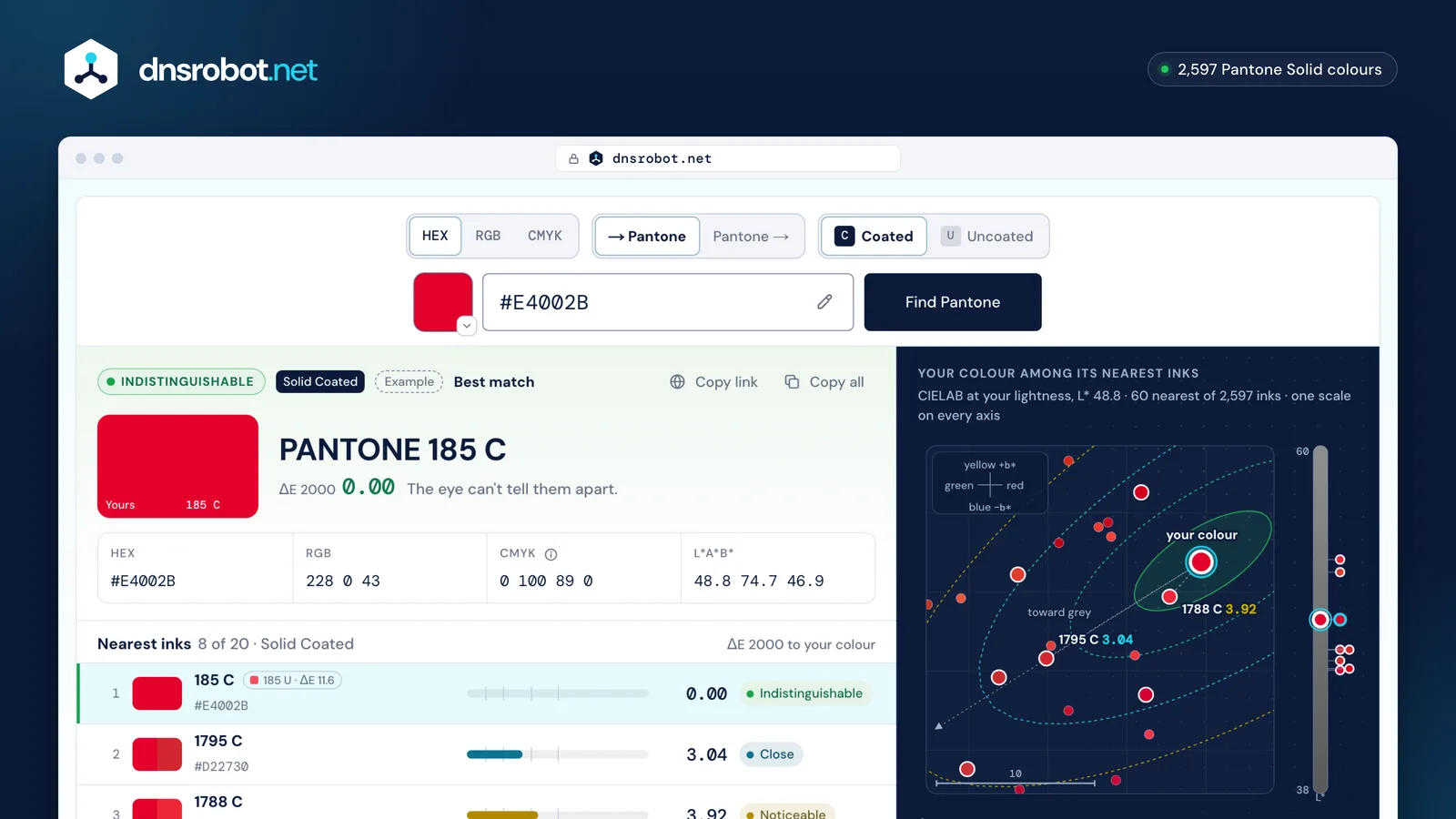
 Your colourThe HEX code, from the field, the colour picker or the eyedropper. Pasted RGB works too.The closest inkYour colour beside the nearest Pantone ink, with the difference in ΔE 2000 and what it means.The runners-upThe next closest inks, each with its own difference, to choose by eye.The neighbourhoodWhere your colour sits among the Pantone inks around it: hue around the circle, lightness on the scale.
How do you convert HEX to Pantone?
Turn the HEX code into a colour the eye can compare, then pick the Pantone ink that looks least different. Paste the code above and the converter does all four steps; for #E4002B it finds PANTONE 185 C at a difference of 0.
- 1. Read the HEX code
#E4002Bis three bytes: red E4 (228), green 00 (0), blue 2B (43). Three-digit codes like#E02double each digit. - 2. Place it in CIELAB The RGB values become L*a*b*, a space built so equal distances look about equally different: lightness L*, green–red a*, blue–yellow b*.
- 3. Measure every ink The converter measures the colour difference to each of the 2,597 Pantone inks in the chosen library with CIEDE2000, the formula the print trade uses.
- 4. Rank and judge The smallest difference wins. Under 1 nobody can tell them apart; above 5 the ink is only the nearest one, not a match.
- 1HEX#E4002B
- 2RGBR228G0B43228, 0, 43
- 3L*a*b* (D50)L* 48.8 · a* 74.7 · b* 46.9
- 4Nearest ink185 C0.01795 C3.01788 C3.9ΔE 2000 · against all 2,597 inks
PANTONE 185 C · ΔE 0.0 · Indistinguishable
Is there an exact Pantone colour for every HEX code?
No. Pantone inks cover only part of what a screen can show: for 33% of colours spread evenly over the screen's range the nearest coated ink is within ΔE 2, and for 80% it is within 5. Saturated screen colours lie outside every ink: pure blue #0000FF is ΔE 9.0 away from its nearest ink, 2736 C.
A screen makes colour with light, and its most saturated blues, greens and magentas are brighter than any ink on paper can reflect. Pantone's sRGB values for its inks are themselves screen stand-ins for printed colour. So the converter always names the nearest ink, and says plainly when it isn't close.
| Screen colour | Nearest coated ink | ΔE 2000 | |
|---|---|---|---|
| #FF0000 | Bright Red C | 3.2 | Close |
| #00FF00 | 7488 C | 10.5 | Nearest only |
| #0000FF | 2736 C | 9.0 | Nearest only |
| #FFFF00 | 395 C | 4.9 | Noticeable |
| #00FFFF | 3242 C | 9.3 | Nearest only |
| #FF00FF | 252 C | 9.8 | Nearest only |
Everything a screen shows (sRGB)What the inks reach
What does Delta E mean, and how close is close enough?
Delta E (ΔE) is the size of the difference between two colours as people see it. Under 1 it is invisible; 1 to 2 shows only side by side; 2 to 3.5 is close; 3.5 to 5 is noticeable; above 5 the colours are clearly different.
Printers commonly hold spot and brand colours to ΔE 2 or less; the ISO 12647-2 offset standard lists 3.5 for the cyan, magenta and yellow solids and 5 for black. The converter uses CIEDE2000, which corrects the older CIE76 formula for how people see differences: CIE76 exaggerates differences between saturated colours and is least uniform in the blues and greys, where CIEDE2000 adds extra corrections.
- ΔE 0.5Indistinguishable
- ΔE 1Very close
- ΔE 2Close
- ΔE 3.5Noticeable
- ΔE 5Nearest only
- ΔE 10Nearest only
- < 1IndistinguishableNo visible difference, even side by side.
- 1–2Very closeVisible only side by side, to a trained eye.
- 2–3.5CloseA small difference you can see side by side.
- 3.5–5NoticeableClearly different side by side, similar apart.
- ≥ 5Nearest onlyA different colour: the nearest ink, not a match.
Coated or uncoated: which Pantone should you choose?
Choose by the paper the job prints on: C codes show the ink on glossy coated paper, U codes the same ink on uncoated paper, where it soaks in and looks lighter and duller. The same code differs between the two by a median ΔE of 5.4.
Brochures, magazines and packaging are usually coated; letterhead, envelopes and notebooks uncoated. To convert HEX to Pantone uncoated colours, switch the library above to Uncoated: a colour that matches 185 C closely can be far from 185 U.
The same ink on two papers
- 18511.6
- 28610.5
- Reflex Blue14.3
- Black17.4
- Cool Gray 97.3
- Process Blue1.1
Coated | UncoatedMedian over every ink: ΔE 5.4
Pantone to HEX code: how do you find a Pantone colour's HEX?
Type the code in the converter's Pantone → field: 185 C gives #E4002B, 185 U gives #F15060. The HEX value is how a screen shows the ink; it is a stand-in, so check printed colour against a physical guide.
The converter reads codes the way people write them: PMS 185, 185c, pantone 286 c, Reflex Blue, cool grey 9. The table lists HEX values of colours people look up most.
| Pantone | Coated HEX | Uncoated HEX |
|---|---|---|
| 185 | #E4002B | #F15060 |
| 186 | #C8102E | #D2515E |
| Red 032 | #EF3340 | #F65058 |
| Warm Red | #F9423A | #FF665E |
| Orange 021 | #FE5000 | #FF6C2F |
| Yellow | #FEDD00 | #FFE800 |
| 354 | #00B140 | #00A95B |
| Green | #00AB83 | #00AC8C |
| Process Blue | #0085CA | #0083C4 |
| 286 | #0032A0 | #3155A4 |
| Reflex Blue | #001489 | #3B489D |
| Purple | #BB29BB | #BF54B5 |
| Black | #2D2926 | #625D5A |
| Cool Gray 9 | #75787B | #898B8F |
Why do HEX to Pantone converters give different answers?
Because they measure difference in different ways. For #FF0000, plain RGB distance and the older ΔE 76 both pick 2347 C, while ΔE 2000 picks Bright Red C, which looks closer (3.2 against 6.4).
Across 4,096 colours spread evenly over the screen's range, the nearest ink by ΔE 76 differed from the nearest by ΔE 2000 for 48% of them, and plain RGB distance for 54%. Converters also differ in their ink lists: many still carry Pantone's library from before 2019 or values that were never Pantone's.
#FF0000 · Measured by RGB distance
picks 2347 C
looks ΔE 6.4 away
- 2. 2035 C10.2
- 3. 185 C9.6
#FF0000 · Measured by ΔE 76
picks 2347 C
looks ΔE 6.4 away
- 2. 2028 C3.8
- 3. Bright Red C3.2
#FF0000 · Measured by ΔE 2000
picks Bright Red C
looks ΔE 3.2 away
- 2. 2028 C3.8
- 3. 172 C4.8
How do you use a Pantone colour in Illustrator, Photoshop, Figma or Canva?
Adobe removed Pantone's colour books between August 2022 and October 2023: Illustrator, Photoshop and InDesign now need Pantone Connect (from $30 a month or $95 a year) to pick Pantone swatches. CorelDRAW and Affinity still include Pantone palettes; Figma and Canva have no built-in Pantone library.
Without a licence, use the HEX value for the screen and give the Pantone code to your printer: a swatch named exactly PANTONE 185 C and set to spot colour prints with that ink. Files that already use Pantone swatches keep them.
- Aug 2022Adobe starts removing Pantone books
- Oct 2023The last Pantone books leave Illustrator, InDesign and Photoshop
- Illustrator, Photoshop, InDesign
Install the Pantone Connect extension from Adobe Exchange; the built-in Pantone books were removed between August 2022 and October 2023.
- CorelDRAW
Palettes docker → Palette libraries → Spot → PANTONE: more than 25 Pantone palettes come with the suite.
- Affinity
Swatches panel → the PANTONE® categories.
- Figma
No built-in Pantone library: paste the HEX value and name the style after the Pantone code.
- Canva
No Pantone library: use the HEX value; Canva converts to CMYK when you print with Canva or download a PDF Print with the CMYK profile.





Which Pantone colours were added in 2026?
Pantone added 224 colours to its Formula Guide on 16 September 2026, numbered 6225 C to 6448 C, bringing the graphics library to 2,614 solid colours. The converter matches against all 224.
Many converters still miss them, and some miss the 2019 and 2022–23 additions as well. Look one up by typing its code, such as 6288 C.
6225 C → 6448 C224
HEX to Pantone: questions and answers
How do I find the closest Pantone to a HEX code?
Can a HEX code be converted to Pantone exactly?
What Pantone colour is #FF0000?
What is the HEX code for Pantone 185 C?
Is HEX to PMS the same as HEX to Pantone?
What do the C and U after a Pantone number mean?
What Delta E is good enough for a brand colour?
Why does the Pantone colour on my screen differ from the printed guide?
Does the converter include the new 2026 Pantone colours?
Can I convert 3-digit or 8-digit HEX codes?
Is DNS Robot affiliated with Pantone?
Missing something?Suggest a feature or a new tool
Related tools
RGB to Pantone
Convert RGB values to the closest Pantone PMS colours with Delta E accuracy, plus Pantone to RGB lookup
CMYK to Pantone
Convert CMYK color values to the closest Pantone PMS color matches with Delta E accuracy
QR Code Generator
Make QR codes for links, Wi-Fi, contacts, WhatsApp and UPI or Pix payments, with your logo and colours, read back before you download SVG, PNG or PDF
QR Code Scanner
Scan QR codes from webcam or uploaded images instantly
Base64 Decode & Encode
Decode and encode Base64: text (UTF-8, URL-safe), images, PDFs and any file to Base64 or a data URI
Epoch Converter
Convert Unix timestamps to dates and dates to epoch time in any time zone, with batch conversion