











SMTP Test: Check Any Mail Server
A free SMTP checker: test any mail server live on port 25, 587, 465 or 2525. See its greeting, TLS and certificate, and whether it relays for strangers. No password, no mail sent.
Port 25: where servers deliver mail to each other. A domain or an e-mail address tests its MX servers.



- Connect
- Greeting
- EHLO
- STARTTLS
- Certificate
- EHLO after TLS
- Password login
- Relay check
One SMTP session from our test server: no password, no DATA, no mail sent. Answers are kept 2 minutes so repeat tests are fast; we keep no log of what you test.
What does an SMTP test check?
An SMTP test opens the same conversation a sending server would: it connects, waits for the 220 greeting, introduces itself with EHLO, switches to TLS with STARTTLS, checks the certificate, asks EHLO again, and on port 25 asks the server to deliver to a stranger's domain. Each step answers with a three-digit code, and the answers tell you what works.
We stop before anything leaves: no password, no DATA, so no e-mail is ever sent. Each step fails in its own way, and the way it fails says who has to fix it.
- 1Connect3 msfiltered · closed
- 2Greeting220 · 236 ms421 · 554 · silence
- 3EHLO250 · 245 ms500 → HELO
- 4STARTTLS220 · 233 ms454 · not offered
- 5TLS1.3 · 6 msold TLS · no shared cipher
- 6Certificatevalid · 58 dexpired · self-signed · wrong name
- 7EHLO again250 · 237 msAUTH before TLS
- 8Relay check550 · 475 ms250 = open relay
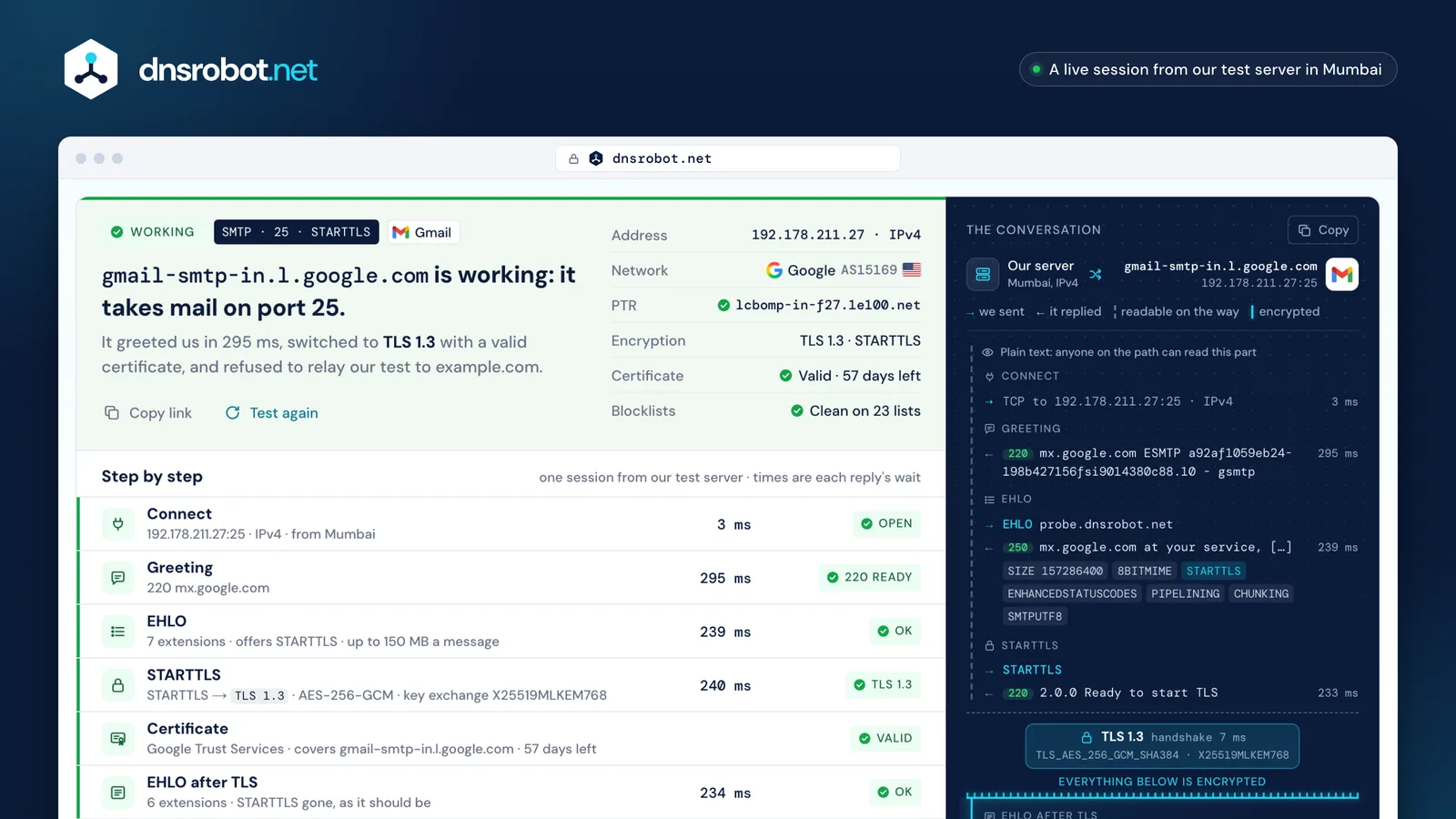
 One verdictWorking, working with problems, open relay, refused, not reachable: the answer in one sentence, with what it is based on.The factsThe address, its network, its reverse DNS name, the encryption, the certificate and the blocklists, at a glance.Step by stepEvery step of the session with the server's wait: connect, greeting, EHLO, STARTTLS, the certificate, EHLO again, login and the relay check.Where TLS startsThe whole conversation line by line. Above the seam it is readable on the way; below it, encrypted.
Which SMTP port should you use: 25, 587, 465 or 2525?
Port 25 is for servers delivering to each other: it's where a domain's MX servers listen, and nobody logs in. Port 587 is where your mail app hands a message to your provider, after STARTTLS and a password (RFC 6409). Port 465 does the same with TLS from the first byte.
Port 2525 isn't a mail port at all in the IANA registry: it belongs to “ms-v-worlds”. SendGrid, Mailgun and Postmark open it because some networks block 587. And because spam once poured out of infected home computers, most clouds and many home providers block outgoing port 25 by default.
- 587STARTTLS, then login
- 465TLS first, then login
- 2525where 587 is blocked
- 25server to server, no login
| Provider | 25 | 587 | 465 | 2525 |
|---|---|---|---|---|
| Gmail / Google Workspacesmtp.gmail.com | –– | ✓ | ✓ | –– |
| Microsoft 365smtp.office365.com | ✓ | best✓ | no✕ | –– |
| SendGridsmtp.sendgrid.net | ✓ | best✓ | ✓ | ✓ |
| Mailgunsmtp.mailgun.org | ✓ | ✓ | ✓ | ✓ |
| Postmarksmtp.postmarkapp.com | ✓ | ✓ | –– | ✓ |


Outgoing port 25 blocked by default: AWS · Google Cloud · Azure · Comcast. Port 587 must stay open (RFC 5068).




SMTP reply codes: what 220, 250, 421, 550 and 554 mean
Every SMTP reply starts with three digits. The first says what to do: 2 done, 3 send more, 4 try again later, 5 don't retry. The second groups the subject (0 syntax, 2 connection, 5 the mail system), and the third is the detail.
Most servers add an enhanced code like 5.1.1 after it (when they list ENHANCEDSTATUSCODES): class, subject (1 addressing, 7 security or policy), detail. The text after the codes is for people and differs from server to server: read the numbers first.
- 5permanent: don't retry
- 5about the mail system
- 0detail
- 5.permanent
- .1.addressing
- .1bad mailbox
5505.1.1 The email account that you tried to reach does not exist. Gmail, to our relay check
- 220Service readythe greeting · after STARTTLS
- 221Closing the connectionafter QUIT
- 250OK, doneEHLO · MAIL · RCPT · RSET
- 354Start sending the messageafter DATA: we never get here
- 421Not available now, closingthe greeting: busy or limits
- 451Try again laterRCPT: greylisting
- 454TLS not available right nowSTARTTLS
- 530Log in firstMAIL on port 587
- 535Wrong username or passwordAUTH: we never send one
- 550Mailbox unavailable or not allowedRCPT: the relay check
- 554No SMTP service herethe greeting: refused
STARTTLS vs implicit TLS: port 587 or 465?
With STARTTLS (port 587, and port 25 between servers) the conversation starts in plain text and switches to TLS halfway. Until the switch, anyone on the path can read it, and can quietly delete STARTTLS from the server's list: a sender without MTA-STS or DANE then carries on unencrypted.
With implicit TLS (port 465) the TLS handshake comes first, before the server says a word. RFC 8314 (2018) asks mail apps to prefer it; done right, both are equally safe. Between servers on port 25, only STARTTLS exists.
- ←220smtp.gmail.com ESMTP
- →EHLO probe.dnsrobot.net
- ←250SIZE · 8BITMIME · STARTTLS · …
- →STARTTLS
- ←2202.0.0 Ready to start TLS
- →EHLO probe.dnsrobot.net
- ←250SIZE · AUTH LOGIN PLAIN XOAUTH2 …
- →AUTH … (your app)
The first five lines travel readable: an attacker can strip STARTTLS here.
- ←220smtp.gmail.com ESMTP
- →EHLO probe.dnsrobot.net
- ←250SIZE · AUTH LOGIN PLAIN XOAUTH2 …
- →AUTH … (your app)
Nothing travels readable: there is no STARTTLS to strip.
EHLO: what the server's list of extensions means
A client opens with EHLO and its name; the server answers 250 with one line per extension it supports. That list is the server's menu: the largest message, whether it can switch to TLS, which login methods it takes.
After STARTTLS the client must forget the list and ask again (RFC 3207). A well-set server then drops STARTTLS and often adds AUTH, so passwords are only ever offered inside TLS. AUTH PLAIN or LOGIN in the list before TLS is a finding: an app could send the password in plain text.
- SIZE 35882577Largest message: 34.2 MBSIZE 35882577
- 8BITMIMEAccents and non-Latin text pass unchanged8BITMIME
- STARTTLSCan switch to TLS: offered only before itgone
- not yetPassword or OAuth login: offered only inside TLSAUTH LOGIN PLAIN XOAUTH2 …
- ENHANCEDSTATUSCODESReplies carry codes like 5.1.1ENHANCEDSTATUSCODES
- PIPELININGSeveral commands in one goPIPELINING
- CHUNKINGThe message in sized chunks (BDAT)CHUNKING
- SMTPUTF8Addresses like ü@example.comSMTPUTF8
Also seen: DSN delivery reports · VRFY “does this user exist?” (often off) · REQUIRETLS TLS on every hop · BINARYMIME raw binary with CHUNKING · ETRN backup servers fetch queued mail.
SMTP relay test: is your mail server an open relay?
An open relay delivers mail for anyone to anywhere, so spammers look for them and blocklists list them. RFC 2505 has asked mail servers to refuse it since 1999, and submission servers must never relay without a login (RFC 5068).
On port 25 we ask the server, as a stranger, to deliver to someone else's domain: MAIL FROM our test address, then RCPT TO:<relay-test@example.com>. A 4xx or 5xx refuses: good. A 250 accepts: a strong sign of an open relay, though a few servers only refuse later, after DATA. We never send DATA, so nothing is delivered either way.
- MAIL FROM
- RCPT TO ?
- RSET
DATAnever- QUIT
this server won't relay for this stranger to this domain. Gmail answered 550 5.1.1: it won't take mail for example.com at all.
that it refuses everyone (it may trust some networks), and a 250 doesn't prove the mail would leave: a few servers refuse after DATA.
Certificates on mail servers: MTA-STS and DANE
Between mail servers, a certificate is checked only if the receiving domain asks for it. Without a policy, a sender takes any certificate, even an expired one, and falls back to plain text if STARTTLS fails.
MTA-STS publishes a policy over HTTPS: deliver only over TLS, to these MX names, with a valid certificate. DANE pins the server's key in DNS (a TLSA record), which needs DNSSEC. Our test checks the certificate the MTA-STS way, against the server's own name, and shows the domain's policy beside it.
| Name must match the MX | Not expired | Trusted CA | Needs DNSSEC | Can't be downgraded | |
|---|---|---|---|---|---|
| Opportunistic STARTTLSno policy | – | – | – | – | – |
| MTA-STSmta-sts.<domain>/.well-known/mta-sts.txt | – | ||||
| DANE_25._tcp.<mx> TLSA, signed zone | key match | key match | not needed |
version: STSv1
mode: enforce
mx: smtp.google.com
mx: gmail-smtp-in.l.google.com
mx: *.gmail-smtp-in.l.google.com
max_age: 86400

mx.google.com
smtp.google.com
aspmx.l.google.com
gmail-smtp-in.l.google.com
alt1.gmail-smtp-in.l.google.com
… alt4, gmr-smtp-in, mx1.smtp.goog
valid until Dec 21, 2026 · Google Trust Services WE2
How to test an SMTP server from your own computer
Our test runs from our server, so it shows what the internet sees. Whether your network lets you out on port 25 or 587 is a different question, and a web page can't answer it: browsers refuse to open ports 25, 465 and 587 at all (the Fetch standard's “bad ports”).
Run one of these on your own computer. On Windows, Test-NetConnection answers in a second. On macOS and Linux, openssl s_client does the STARTTLS upgrade for you and shows the certificate; then type EHLO test and you're talking SMTP. swaks scripts a whole session.


Why a mail server refuses an SMTP test
A refusal isn't always a broken server. Mail servers defend themselves: they turn away addresses on blocklists, slow down or delay strangers, and limit how many connections one sender opens. Our test is a stranger to every server it calls, so it meets these defences first.
Read the first reply. A 4xx is temporary, and real senders retry. A 554 at the greeting or a 5xx at RCPT is a policy decision about the sender, which may not apply to yours. No answer at all is a network question, not an SMTP one.
- Our address is blocked by policy
5545.7.1 Service unavailable; client host blockedIt turns away our test server, and maybe yours. Check its blocklists and the server's allow-list.
- Too busy, or a rate limit
4214.7.0 Too many concurrent SMTP connectionsTemporary: senders retry 421 for hours. Test again in a few minutes.
- Greylisting
4514.7.1 Greylisted, please try again laterUnknown senders are asked to come back later. Real servers do, so mail arrives late, not lost.
- A slow greeting (tarpit)
… 18 s of silence … 220mail.example.netRFC 5321 lets senders wait 5 minutes. Our test waits 15 seconds and says so.
- No reverse DNS for the sender
5505.7.25 The IP address sending this message does not have a PTR recordGmail's answer to a sender without a PTR record. Our test server has one.
- A firewall drops the connection
no answer in 10 s (filtered)The port lets only known senders in, or a network on the way blocks it.
SMTP authentication: why this SMTP tester never asks for your password
Many SMTP testers ask for your username and password and send a real e-mail. We don't: a password typed into someone else's website is a password you have to change. The test shows what you need without it: whether the server offers login, by which methods, and only inside TLS.
Passwords are on their way out anyway. Google no longer lets apps sign in to Gmail with just your password, and Microsoft turns Basic authentication for SMTP AUTH off by default for existing tenants at the end of December 2026. If your app still logs in with a password, test it in the app, with an app password.
PLAINcommonOAUTHBEARERcommonSCRAM-SHA-256commonCRAM-MD5limitedLOGINobsoleteXOAUTH2obsoleteDIGEST-MD5obsolete
XOAUTH2 is marked obsolete, but it's what Gmail and Microsoft 365 apps use today.
Microsoft will announce the final removal date in the second half of 2027. Google's own pages give two dates for Workspace.
SMTP test: frequently asked questions
What is an SMTP test, and what does an SMTP checker show?
How do I test an SMTP server?
Which port should I use: 25, 587, 465 or 2525?
Is my ISP blocking port 25 or 587?
What do 220, 421 and 554 mean in an SMTP test?
What is STARTTLS, and is it required?
Why does my SMTP test time out?
Can you test SMTP authentication with my username and password?
How does the open relay test work?
What's the difference between EHLO and HELO?
Does the SMTP test send an e-mail?
What are Gmail's and Outlook's SMTP settings?
Missing something?Suggest a feature or a new tool
More e-mail and DNS tools
MX Lookup
Find mail exchange records and mail server details
SSL Certificate Check
Verify SSL certificate validity and security details
IP Blacklist Check
Check if an IP address is listed on spam or malware blacklists
Reverse DNS Lookup
Find hostnames associated with any IP address via PTR records
Port Checker
Test port connectivity and service availability
Email Checker
Verify an email address with its mail server, nothing sent, or send us a test email for a spam and deliverability report