









Registry (RDAP / WHOIS)
- What it proves
- The exact start of the current registration, the expiry and the registrar.
- What it can miss
- Any earlier registration of the same name.
Find out how old any domain is, to the day: when its current registration began, when it expires and who the registrar is, straight from the registry. Then see what the registry can't tell you: whether the name lived before, from the Wayback Machine's copies and the first certificate ever issued for it.
Type the domain above (a full URL or an email address works too) and press Check age. Each domain age lookup asks the domain's registry when the current registration began and counts the age to the day: calendar years, months and days in UTC, not days divided by 365.
Then it looks for the name's older traces: the Wayback Machine's first copy of the homepage and the first TLS certificate logged for it. When either is older than the registration, the name existed before and the registry's date isn't the whole story.
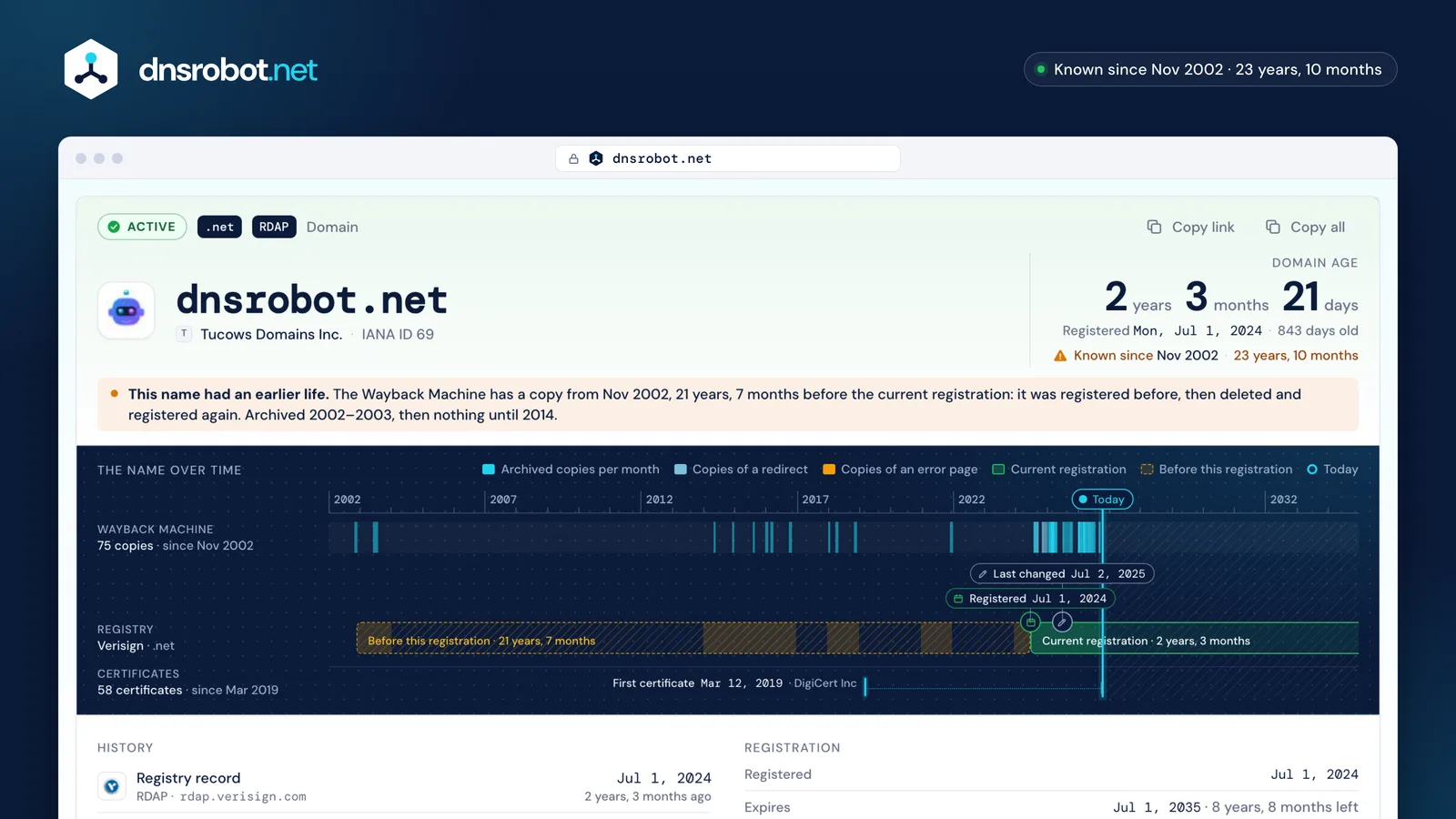
 The ageYears, months and days since the current registration began, with the exact date.The timelineEvery month the Wayback Machine saved a copy, against the registration from its start to its expiry.Earlier lifeCopies or certificates older than the registration: the name was registered before.The three sourcesRegistry, archive and CT logs, one lane each with its count and first date; the rows under the strip link to each source so you can check it yourself.
The domain registration date in the registry (its creation date) tells you when the current registration began. Renewals and moves to another registrar keep it; but when a domain expires and is deleted, the next registration starts a new record with a new date, and the old one is gone from the public record.
So the first registration ever leaves no date in WHOIS. What it leaves are traces. This checker reads the two public ones and compares them with the registry:
Our own name is a good example: the registry dates dnsrobot.net to 1 July 2024, but the Wayback Machine holds copies from November 2002 and a certificate was issued for it in March 2019. Someone else owned it first.
The name over time
Because its age restarted. A domain that isn't renewed goes through grace and redemption periods and is then deleted; whoever registers it next, often a backorder service that was waiting for it, gets a new registry record with a new creation date. The name's past stays online in archives, which is why expired domains with history are bought. To see how close a name is to that point, the domain expiry checker dates each stage, from the registrar's grace to the day it could be released.
This checker shows the registry's date as the age and flags the gap as an earlier life, with the oldest trace it found.
The opposite holds too: an old date doesn't prove one owner. A domain that's sold, or auctioned by its registrar before it's deleted, keeps its creation date. symbolics.com, the first .com ever registered, still shows 15 March 1985.
A website can be younger than its domain (a name parked for years before anyone built on it) or older than the current registration (a site that lost its domain and got it back, or a dropped name rebuilt). The website's age is when it first appeared online: the Wayback Machine's first copy is the best public answer.
This checker shows both side by side, and the timeline shows whether the site has been online continuously or came and went: long quiet spells without a single copy usually mean the name was parked, unused or not registered.
Not directly. Google's John Mueller has given the same answer since at least 2017: a domain's age is not a ranking factor, and Google's own SEO guide doesn't mention it. What an old site usually has is time to earn links, content and a reputation, and those are what count.
Where age does matter is history. Since March 2024 Google's spam policies name expired domain abuse: buying an expired domain to rank low-value content on its old reputation. Before buying one, check its archive copies for what it used to be.
“No, domain age helps nothing.”
“Primarily those who want to sell you aged domains :-)”
Often, yes. Most phishing runs on domains the criminals registered themselves (77% of 1.5 million phishing domains Interisle counted in 2024–25), and such names tend to be used within days of registration. Palo Alto Networks' Unit 42 found new domains about 18 times as likely as established top sites to be outright malicious.
A young domain isn't proof of fraud (every business starts with a new name), and an old one isn't proof of trust: criminals also age domains to look reputable. But a shop that claims decades of trading on a two-week-old domain is worth a second look. Check the age, then the WHOIS record, the SSL certificate and who hosts it.
18×
as likely as established top sites to be outright malicious: 1.27% of newly registered domains against 0.07%
Palo Alto Networks Unit 42, data from March–May 2019
ICANN's rules make every generic domain (.com, .org, .net…) publish its registration and expiry dates in RDAP, but country registries set their own rules, and some leave the dates out. For these the checker dates the name by its earliest trace instead:
| Domain | Registry | What its public record shows |
|---|---|---|
 .de | DENIC | RDAP and WHOIS show the last change only. Since December 2025 DENIC's web lookup shows the registration date. |
 .ch | SWITCH | No dates in RDAP. Swiss law makes its web lookup show the date the name was first allocated. |
 .au | auDA | No creation, renewal or expiry date at all, by policy: only the last change. |
 .eu | EURid | WHOIS shows no dates, and .eu has no RDAP server in IANA's list. |
The bulk domain age checker takes up to 50 domains: switch to Bulk, paste them (one per line, or a column copied from a sheet or CSV) and press Check all. Each row fills in as its registry answers: the registration date, the age, the expiry, the registrar and the first archived copy, flagged when it predates the registration.
Sort by age, then copy or download the table as CSV. The link in the address bar holds the whole list, so you can share it or run the same check again later.
The same data as JSON, free, for scripts: the registry record from our WHOIS API (the age fields are in it), the history as one line per source, and bulk checks as one line per domain as they land.
$ curl "https://dnsrobot.net/api/whois?q=google.com"
{
  "domain": "google.com", "registeredOn": "1997-09-15T04:00:00Z",
  "expiresOn": "2028-09-14T04:00:00Z", "updatedOn": "2019-09-09T15:39:04Z",
  "age": { "days": 10629, "years": 29, "remainingDays": 44, … },
  "registrar": { "name": "MarkMonitor Inc.", "ianaId": "292", … }, …
}$ curl "https://dnsrobot.net/api/domain-history?domain=dnsrobot.net"
{"t":"wayback","status":"ok","first":"2002-11-25T23:58:06Z","last":"2026-09-28T04:05:01Z",
"years":{"2002":[0,0,0,0,0,0,0,0,0,0,1,0], …},"codes":{…},"domain":"dnsrobot.net"}
{"t":"ct","status":"ok","first":{"date":"2019-03-12T00:00:00.000Z","issuer":"DigiCert Inc","id":1279273520},
"count":58, …,"domain":"dnsrobot.net"}
{"t":"done","ms":1840,"domain":"dnsrobot.net"}$ curl -X POST https://dnsrobot.net/api/domain-age \
-H "Content-Type: application/json" -d '{"domains": ["google.com", "wikipedia.org"]}'
{"t":"start","total":2,"inputs":["google.com","wikipedia.org"]}
{"t":"row","i":1,"domain":"wikipedia.org","status":"ok","registeredOn":"2001-01-13T00:12:14.754Z",
"registrar":"MarkMonitor Inc.","archive":{"status":"ok","first":"2001-03-31T…","captures":…}, …}
{"t":"row","i":0,"domain":"google.com", …}
{"t":"done","ms":2310}Missing something?Suggest a feature or a new tool
When a domain expires, the days left, what happens after and when it could be released; up to 50 at once
Look up domain registration, registrar, and owner details via RDAP
Check domain availability and the true 3-year price
Every DNS record from the domain's own nameservers, beside Google's and Cloudflare's cache
Verify SSL certificate validity and security details
Find out who hosts any website: web host, CDN, CMS, email provider, registrar and SSL issuer