
























Forwarding
- SPF192.0.2.80 isn't in example.com's SPF
- DKIMsignature intact
Report showsspf=fail dkim=pass → pass
DKIM-sign everything; DKIM survives forwarding. ARC (RFC 8617) helps forwarders vouch.
Theme
Check any domain's DMARC record the way a receiving mail server reads it: where the policy is found, what happens to mail that fails, whether reports reach anyone, and what SPF and DKIM need before you enforce.
Type a domain above: the checker asks DNS for the TXT record at _dmarc. plus the domain, walks up to the organizational domain when there is none (RFC 9989 §4.10), and shows what a receiving server does with mail that fails.
By hand, ask for the same name: dig +short TXT _dmarc.paypal.com, or nslookup -type=TXT _dmarc.paypal.com on Windows. One answer starting with v=DMARC1 is the record; two answers mean receivers use neither (RFC 9989 §4.10).
dig stops there. It doesn't walk up from a subdomain, check whether report addresses accept the reports, or tell which RFC a receiver follows. That's what the checker adds.
dig +short TXT _dmarc.example.comEvery answer at the name. One starting v=DMARC1 is the record.
What dig shows, and what it doesn't
$ dig +short TXT _dmarc.paypal.com 1
"v=DMARC12; p=reject; rua=mailto:d@rua.agari.com,mailto:dmarc_agg@vali.email; ruf=mailto:d@ruf.agari.com,mailto:MTc4Mzcw@ruf.vali.email3"
$ dig TXT _dmarc.mail.google.com | grep status 4
;; ->>HEADER<<- opcode: QUERY, status: NXDOMAIN
The answer comes first, as a sentence. Under it, the evidence: the record as receivers parse it, each tag coloured over its exact characters, and on navy the path a receiving server takes for this domain, ending in what it does with mail that fails.
No score: a policy at none is a phase, not a failure, and the ladder under the path says what the next step needs.
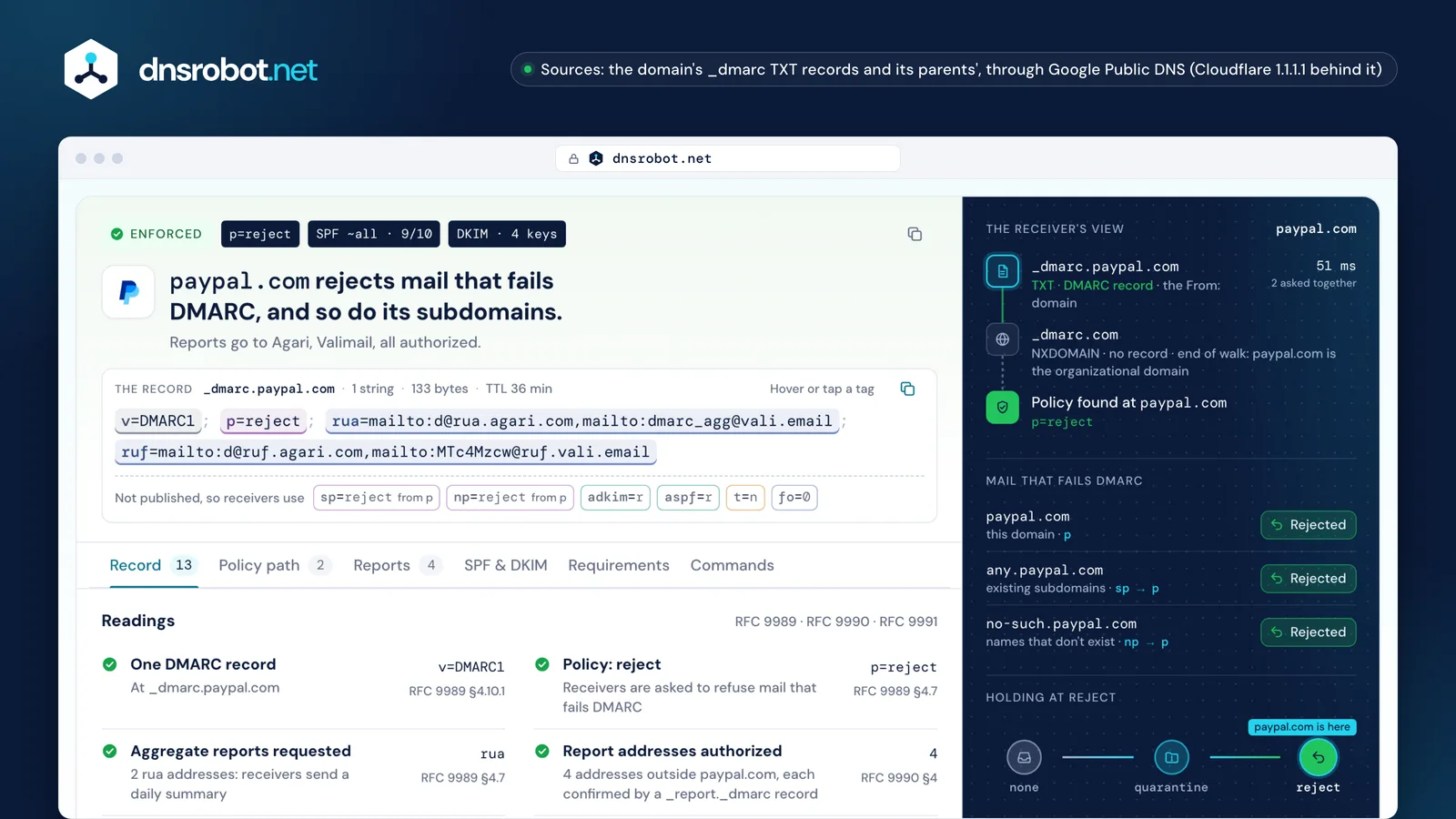
 The verdictOne sentence on what receivers do with failing mail, with the policy, SPF and DKIM at a glance.The recordEach tag coloured over its characters: hover or tap one for what it does. Defaults under it.The receiver's viewEvery DNS question a receiving server asks for the domain, in order, with its answer.Mail that fails DMARCWhat receivers do for the domain, its existing subdomains and names that don't exist.The enforcement ladderWhere the domain stands between none and reject, and what the next step needs.
DMARC tells receiving mail servers what to do with mail that uses your domain in the From: line but can't prove it came from you, and where to send reports about it (RFC 9989 §4.7).
The proof is SPF or DKIM, aligned with the From: domain: SPF passing for a bounce domain in the same organization, or a DKIM signature with d= your domain. One aligned pass is enough (RFC 9989 §5.3.5); everything else fails DMARC, and the record's policy decides: deliver, spam folder or reject.
Reports are the other half. Receivers that honour rua send a daily summary of every server that sent as your domain, which is how you find the legitimate senders you forgot before you enforce.
Two messages, one From: line
Your invoice, sent through an email servicevia a service set up with custom DKIM, so it signs with d=example.com
A forged invoice from 203.0.113.9a server example.com never authorized
550 5.7.1 Email rejected per DMARC policy for example.com
Tomorrow's aggregate report to dmarc@example.com: 1 message from 203.0.113.9, SPF fail, DKIM none, disposition reject.
p=none asks receivers to deliver failing mail as usual and only report it; quarantine asks them to treat it as suspicious, usually the spam folder; reject asks them to refuse it during the SMTP conversation.
None is a phase, not a failure: RFC 9989 §7.4 suggests at least a month there with reports flowing, and as long again at quarantine, before reject. Domains whose people post to mailing lists should stop at quarantine.
Big mailbox providers split it too: gmail.com and outlook.com publish p=none for the domain itself and sp=quarantine for subdomains, while google.com, yahoo.com and microsoft.com publish reject.
Where a forged message ends up
Deliveredp=none
apache.orggmail.comsamsung.com
23 of 192
Spam folderp=quarantine
github.comapple.comamazon.com
30 of 192
Rejectedp=reject
google.compaypal.commicrosoft.com
139 of 192
Yes, if you send to Gmail, Yahoo or Outlook.com in bulk: all three require a DMARC record, and p=none is enough to meet the rule. Enforcement (quarantine or reject) is what stops other people sending as your domain, and BIMI logos need it.
Gmail has required it since February 1, 2024 of senders of more than 5,000 messages a day to Gmail accounts; Yahoo since February 2024, without naming a volume; Outlook.com since May 5, 2025, above 5,000 a day. Without a record, Gmail answers 4.7.31 (and 4.7.32 when From: isn't aligned), and Outlook.com rejects with 550 5.7.515.
For a domain that sends nothing, DMARC is the cheapest protection there is: p=reject, a null MX and v=spf1 -all, as example.com publishes (M3AAWG).
What each mailbox provider asks of bulk senders
4.7.31 · 4.7.32DMARC must pass550 5.7.515✓Required: a record, p=none or stricteriProtection: quarantine or reject
Find the failing source in your aggregate reports, then fix it at the sender: sign it with DKIM for your own domain, or move it to a bounce domain inside your organization. Three causes cover most failures.
Forwarding keeps the DKIM signature but breaks SPF, so DKIM carries the pass. Mailing lists that edit the message break both. And an email service that signs with its own domain passes DKIM for itself, not for you: turn on its custom DKIM (usually CNAMEs like s1._domainkey) and a custom return path.
Three failures, what the report shows, and the fix
Report showsspf=fail dkim=pass → pass
DKIM-sign everything; DKIM survives forwarding. ARC (RFC 8617) helps forwarders vouch.
Report showsspf=fail dkim=fail → fail
Lists that rewrite From: fix it; domains whose people post to lists stay at quarantine (RFC 9989 §7.4).
Report showsdkim=pass(esp.example) → fail
Turn on the vendor's custom DKIM: paypal.com's s1 and s2 are CNAMEs to SendGrid, which signs as paypal.com.
A subdomain without its own record gets its organizational domain's policy: sp for subdomains that exist, np for names that don't, each falling back to p (RFC 9989 §4.7).
A subdomain that publishes its own record uses it for itself. But a record between a name and its organizational domain is never used for that name: berkeley.edu's tree shows it, where eecs.berkeley.edu's sp=none doesn't reach www.eecs.berkeley.edu (RFC 9989 §4.10.1).
np is the cheap win: names that don't exist send no real mail, so np=reject blocks forgeries from them even while p is still at none. Receivers on RFC 7489 don't know np and use sp.
berkeley.edu's tree, as a receiver reads it
eecs.berkeley.edu's sp=none is never applied: a record between a name and its organizational domain isn't used for it (RFC 9989 §4.10.1). The checker flags it as a record that isn't used.
An aggregate report is a daily XML file from each receiver that lists every server that sent mail as your domain, how many messages, and whether SPF, DKIM and DMARC passed (RFC 9990).
Read it by source: your own servers and services should show an aligned pass; a known service failing needs its custom DKIM; an unknown address failing at p=reject is spoofing, stopped. A report service (dmarcian, Valimail, EasyDMARC, Postmark and others) turns thousands of files into that list; the DMARC Report Analyzer does it in your browser, without uploading them.
Reports to an address in another domain only arrive if that domain agrees: it publishes yourdomain._report._dmarc.its-host with v=DMARC1 (RFC 9990 §4). The checker asks for you, and gives the exact record when it's missing.
One report, read line by line
<org_name>google.com</org_name>1
<date_range>Oct 23, 00:00 UTC – Oct 24, 00:00 UTC</date_range>
<policy_published>example.com · p=reject</policy_published>2
<source_ip>198.51.100.24</source_ip> <count>412</count> dkim=pass spf=fail → none3
<source_ip>203.0.113.9</source_ip> <count>37</count> dkim=fail spf=fail → reject4
paypal.com._report._dmarc.rua.agari.com TXT "v=DMARC1;"✓ authorized: reports flowReport services the checker recognisesdmarcianValimailEasyDMARCPostmarkCloudflareMimecastProofpointAgariRed SiftPowerDMARC+6 more
Missing something?Suggest a feature or a new tool
Read DMARC aggregate reports in your browser: who sends as your domain, what fails and why
Look up every TXT record of a domain and see what each one is: SPF, DMARC, DKIM and the services' verification tokens, whether each may be removed, the 255-byte strings and the answer's size
Check a domain's MTA-STS record, policy file and every mail server's certificate on port 25, the way sending servers test them; then generate a policy
Validate SPF records and check DNS lookup count per RFC 7208
Find a domain's DKIM keys across 140 common selectors, or verify an email's signature
Check BIMI records, SVG Tiny PS logos and VMC certificates, and which inboxes show the logo