











DMARC Report Analyzer
Drop your DMARC reports (.xml, .gz, .zip or the email) to see who sends as your domain, what fails and why. Read in your browser, never uploaded.
Drop your DMARC reports here
Any number at once: .xml .gz .zip .eml .msg .mbox or a whole folder. Or drop them anywhere on this page.
Reports are read in your browser and never uploaded. Hostnames: the source IP addresses only are sent to our server for reverse DNS.



 From Google, Microsoft, Yahoo and every other receiver that reports. RFC 9990 and RFC 7489, merged into one picture.
What is a DMARC aggregate report?
When a domain's DMARC record has a rua= address, mailbox providers that receive mail claiming to come from that domain send a daily summary to it: the aggregate report. It is an XML file, usually compressed, defined since May 2026 by RFC 9990 (RFC 7489 before it).
Each report covers one domain and one reporting period, usually a UTC day. It names the reporter, the policy it found in your DNS, and one record per sending address and result: how many messages, what SPF and DKIM said, and what the receiver did with them.
Reports hold no message content and no personal addresses. RFC 9990 says so in plain words: they carry "aggregated data relating to messages purportedly originating from the Domain Owner".
One aggregate report, part by part
<feedback xmlns="urn:ietf:params:xml:ns:dmarc-2.0">
  <version>1.0</version>
  <report_metadata>
    <org_name>Sample Reporter</org_name>
    <email>report_sender@example-reporter.com</email>
    <extra_contact_info>...</extra_contact_info>
    <report_id>3v98abbp8ya9n3va8yr8oa3ya</report_id>
    <date_range>
      <begin>302832000</begin>
      <end>302918399</end>
    </date_range>
    <generator>Example DMARC Aggregate Reporter v1.2</generator>
  </report_metadata>
report_metadata
Who reported, and for which period.
- org_name
- the receiver that sent the report
- report_id
- its own ID: a repeat of the same ID is the same report
- date_range
- begin and end, in Unix seconds (UTC)
  <policy_published>
    <domain>example.com</domain>
    <p>quarantine</p>
    <sp>none</sp>
    <np>none</np>
    <testing>n</testing>
    <discovery_method>treewalk</discovery_method>
  </policy_published>
policy_published
- p
- the policy for the domain itself
- sp
- for its subdomains
- np
- for subdomains that don't exist
- testing
- your t= tag: y while you test a policy
- discovery_method
- how they found your record: psl or treewalk
  <record>
    <row>
      <source_ip>192.0.2.123</source_ip>
      <count>123</count>
      <policy_evaluated>
        <disposition>pass</disposition>
        <dkim>pass</dkim>
        <spf>fail</spf>
      </policy_evaluated>
    </row>
record › row
One sending address and its results: a report has one record per address and result.
- source_ip
- the address that sent the mail
- count
- how many messages
- policy_evaluated
- DKIM and SPF after alignment, and what the receiver did (disposition)
    <identifiers>
      <envelope_from>example.com</envelope_from>
      <header_from>example.com</header_from>
    </identifiers>
record › identifiers
- header_from
- the From domain, the one DMARC protects
- envelope_from
- the bounce domain, the one SPF checked
    <auth_results>
      <dkim>
        <domain>example.com</domain>
        <result>pass</result>
        <selector>abc123</selector>
      </dkim>
      <spf>
        <domain>example.com</domain>
        <result>fail</result>
      </spf>
    </auth_results>
  </record>
record › auth_results
What DKIM and SPF said, before alignment.
- dkim
- the signing domain, its selector and the result
- spf
- the domain SPF checked and the result
</feedback>
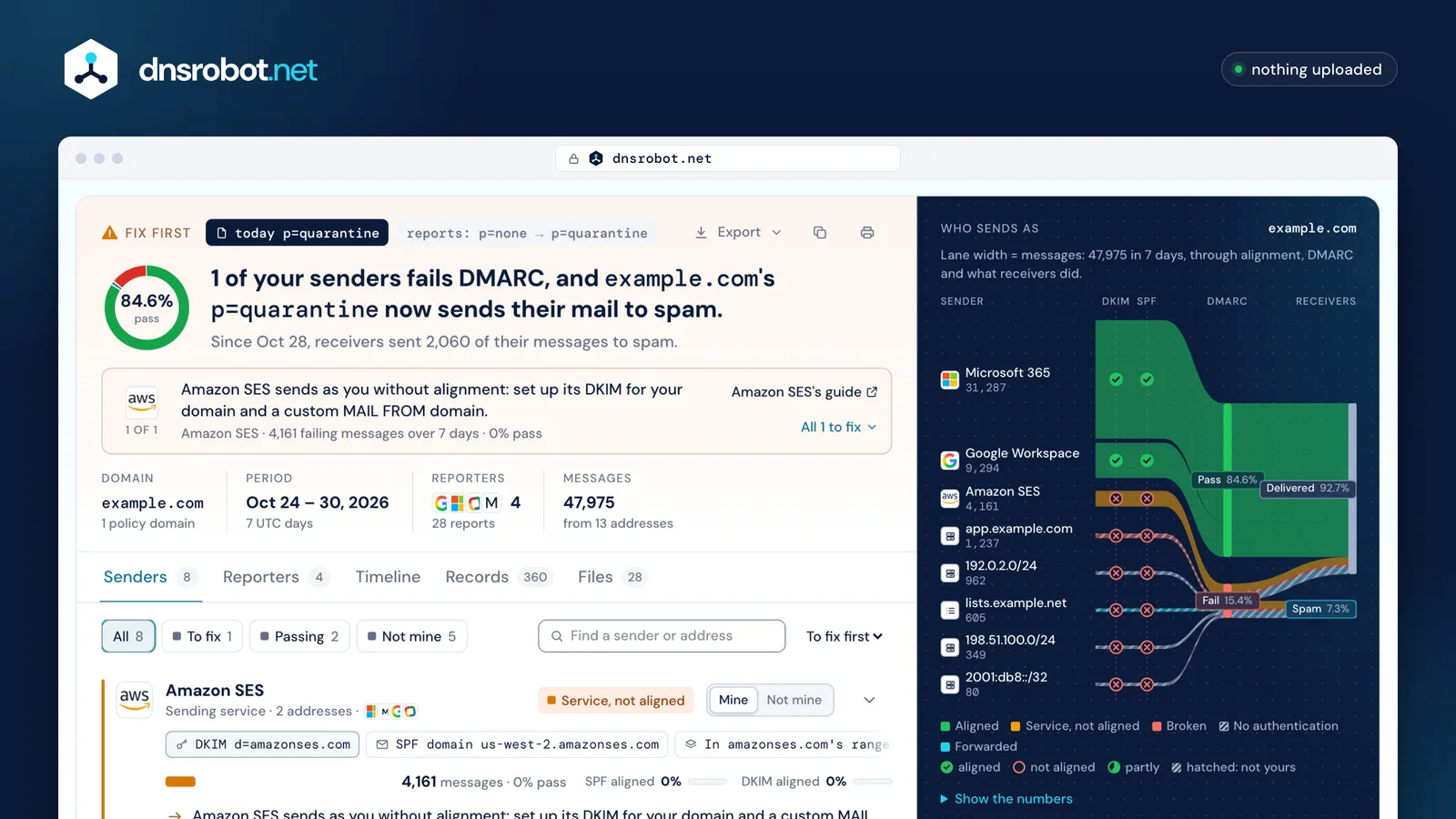
 Today's record and the reports' policyEvery report names the policy it was sent under, and today's record is read live: here p=none became p=quarantine on Oct 28, and the verdict judges by today's.The verdictWhat the reports say about enforcement: here, one of your senders still fails DMARC under p=quarantine.The next stepThe worst sender to fix first, in its own words: Amazon SES needs its DKIM for your domain and a custom MAIL FROM.Who sends as youEvery sender as a lane as wide as its mail, through DKIM and SPF alignment, DMARC, and what receivers did.Each sender, with evidenceNamed from its DKIM and bounce domains, its published ranges, its network and hostname: never guessed.
How to read a DMARC report
Read each record in four parts. row says which address sent how many messages and what the receiver decided. identifiers says which domain was in the From header. auth_results holds the raw SPF and DKIM results, and policy_evaluated holds the same results after alignment.
That last difference is the one that matters. SPF can pass for amazonses.com and DKIM can pass for mcsv.net while DMARC still fails, because neither domain is yours. DMARC passes only when SPF or DKIM passes for a domain aligned with the From address.
The analyzer does this reading for every record, then groups the records by who sent them. Most domains have a handful of real senders and a long tail of addresses that never authenticated.
One record, decoded
- row
96 messages from 54.240.27.10
- identifiers
From: example.com
Envelope (SPF): us-west-2.amazonses.com
- auth_results (raw)
DKIM pass for amazonses.comnot aligned with example.com
SPF pass for us-west-2.amazonses.comnot aligned with example.com
- policy_evaluated (aligned)
DMARC: fail · disposition quarantine
Read as: Amazon SES sending without alignment
What does "disposition none" mean in a DMARC report?
disposition is what the receiver did with the messages in that record: none (delivered as usual), quarantine (spam folder) or reject (refused). RFC 9990 adds pass for mail that passed DMARC under a quarantine or reject policy.
With p=none, every message is reported with disposition none, failing or not: the policy asks receivers only to report (RFC 9989). So "disposition none" next to a DMARC failure is normal while you are monitoring.
Under quarantine or reject, a failing record with disposition none means the receiver overrode your policy, and the reason element says why: a mailing list, a trusted forwarder, an ARC result it trusted, or your own test mode.
Policy, DMARC result and disposition
| Policy | Mail that passes DMARC | Mail that fails DMARC |
|---|---|---|
| p=none | none | noneReports only (RFC 9989) |
| p=quarantine | none or pass | quarantineSpam folder |
| p=reject | none or pass | rejectRefused |
A failing record reported as none under quarantine or reject is an override: its reason says why (mailing_list, trusted_forwarder, local_policy arc=pass, policy_test_mode).
Why does mail fail DMARC when SPF passes?
SPF checks the envelope sender (the bounce address), not the From address people see. A sending service usually bounces through its own domain, so SPF passes for the service, not for you.
DMARC needs alignment: with the default relaxed mode, the SPF domain and the From domain must share the same organizational domain. bounces.example.com aligns with example.com; amazonses.com never does.
The fix is at the service: set a custom return path (MAIL FROM) on a subdomain of yours, and sign with DKIM for your own domain. Adding the service's include to your SPF record alone does not align anything.
Two addresses on one message
- From (what people see)example.comEnvelope sender (what SPF checks)us-west-2.amazonses.comrelaxednot alignedexample.com vs amazonses.com
- From (what people see)example.comEnvelope sender (what SPF checks)bounce.example.comrelaxedalignedexample.com vs example.com
- From (what people see)example.comEnvelope sender (what SPF checks)bounce.example.comstrictnot aligned
Forwarding, mailing lists and ARC in your reports
Mail that someone forwards, or that passes through a mailing list, arrives from a server that isn't yours. SPF fails or passes for the forwarder, and DKIM survives only if nothing in the message changed. That's why these records fail even though you sent the original.
Receivers know this. Many check ARC (Authenticated Received Chain), the forwarder's own record of what the message looked like on arrival, and report an override such as local_policy with the comment arc=pass.
The analyzer puts these records in their own group, forwarded. There is nothing to fix at your end for them, and they shouldn't hold back enforcement. RFC 9989 does advise against p=reject for domains whose users post to mailing lists.
What forwarding does to SPF and DKIM
- example.com sendsSPF pass for example.comDKIM pass, d=example.com
- lists.example.net forwardsSPF pass for lists.example.netOur DKIM broken: the list added a footer
- The receiverDMARC failsARC from the list passes: delivered, reported as local_policy arc=pass
What to do with DMARC reports: from p=none to p=reject
Start at p=none with reports, and collect at least a week from several reporters. Then work through the senders, largest first.
For each service you use, make it pass DMARC on its own: its DKIM key for your domain (usually CNAME records it gives you) and, where it offers one, a custom return path. For your own servers, check that SPF lists them and that their DKIM key is published.
When every sender you recognise passes, move to p=quarantine, watch the reports again, then p=reject. What's left failing should be mail you didn't send.
The road to p=reject
- p=noneReports onlyPublish rua=, collect a week from several reporters
- p=quarantineFailing mail to spamEvery sender you recognise passes DMARC
- p=rejectFailing mail refusedWeeks at quarantine with nothing of yours failing
Who sends these reports, and what are the files?
Every receiver that supports DMARC reporting can send them: Google, Microsoft, Yahoo, Zoho, Mail.Ru and many others. Microsoft 365 sends them only when the receiving domain's mail goes straight to Microsoft 365.
RFC 9990 names the file receiver!policy-domain!begin!end.xml.gz: who reported, about which domain, and the period in seconds since 1970. Google sends a .zip instead, most others .xml.gz.
Real reports bend the standard. In our own reports, one reporter writes version 0.1, another leaves the version out, one puts every element on a single line, and the day ends at 23:59:59 for some and at the next midnight for others. The analyzer reads them all the same way.
A report's file name, part by part
google.com!example.com!1793145600!1793231999.zip
- Who reportedgoogle.com
- About which domainexample.com
- Period start2026-10-28 00:00:00 UTC
- Period end2026-10-28 23:59:59 UTC
- Format.zip
Is it safe to put DMARC reports into a website?
This page reads your reports in your browser. The files are unpacked and read on your device, and they are not uploaded, stored or logged.
Two things do leave the page, and only to name what the reports show. The sending addresses go to our server, for their hostnames. Your domain name goes to Cloudflare's and Google's public DNS, for today's DMARC, SPF and DKIM records. Network names come from files the page loads, and they don't send the address.
Aggregate reports carry no message content and no personal data (RFC 9990 §7.2). Even so, they show who sends mail for your domain, so keeping them on your device is the safer default.
In your browser
- Unpack .zip, .gz, .eml, .mbox
- Read every record
- Group by sender, explain each failure
- Draw the result
Sent, to name what the reports show
- Sending addresses → our server, for hostnames
- Your domain → public DNS over HTTPS, for today's records
Never sent: the reports themselves.
Frequently asked questions
How do I analyze a DMARC report?
Is there a free tool that can analyze DMARC reports?
What does a DMARC analyzer do?
rua= address into a list of senders: who sends mail as your domain, whether that mail passes DMARC, and why not. A DMARC record checker is a different tool: it reads your DNS record (DMARC Checker).How do I check my DMARC reports?
rua= tag (the DMARC Checker shows it). Save the attachments, or export the folder or mailbox they land in, and drop them here.What is a DMARC report?
rua= address, usually once a day. It lists every address that sent mail claiming to be from the domain, how many messages each sent, the SPF and DKIM results and what the receiver did. It holds no message content or personal data.What does disposition none mean in a DMARC report?
p=none every record says none, pass or fail: that policy only asks for reports. Under quarantine or reject, none on failing mail means the receiver overrode your policy, and the record's reason says why.Why am I getting DMARC reports from Google or Microsoft?
rua= address, so every receiver that supports reporting sends a daily report about mail it received claiming to be from your domain. Microsoft 365 sends them only for its customers' domains whose mail goes straight to Microsoft 365.How often are DMARC reports sent?
What is the difference between rua and ruf reports?
rua gets aggregate reports: daily summaries (RFC 9990), the ones this page reads. ruf gets failure (forensic) reports, one per failing message (RFC 9991); Gmail and Microsoft 365 don't send them.Why don't my report counts match the mail I sent?
Can I analyze many DMARC reports at once?
Are my reports uploaded?
Missing something?Suggest a feature or a new tool
Related tools
DMARC Checker
Check any domain's DMARC policy the way receivers read it, with reports, SPF and DKIM
DMARC Record Generator
Build your DMARC record for RFC 9989, starting from the one you publish now, and see what receivers will do with mail that fails.
SPF Record Checker
Validate SPF records and check DNS lookup count per RFC 7208
DKIM Checker
Find a domain's DKIM keys across 140 common selectors, or verify an email's signature