











TXT Record Lookup
Look up a domain's TXT records: every value read and named, who asked for it, whether it may go, and the set's size on the wire.
Every TXT value read and named. A domain, or a name such as _dmarc.example.com.
How we look it up 4 steps · about 1 s
- Root13 root servers
- TLDthe registry's servers
- Nameserverthe domain's own servers
- Answerevery TXT record
- Google8.8.8.8
- Cloudflare1.1.1.1
Every lookup walks the path itself: from a root server to the TLD's registry, then to the domain's own nameservers for the TXT records as they are now, and asks Google and Cloudflare what they still cache.
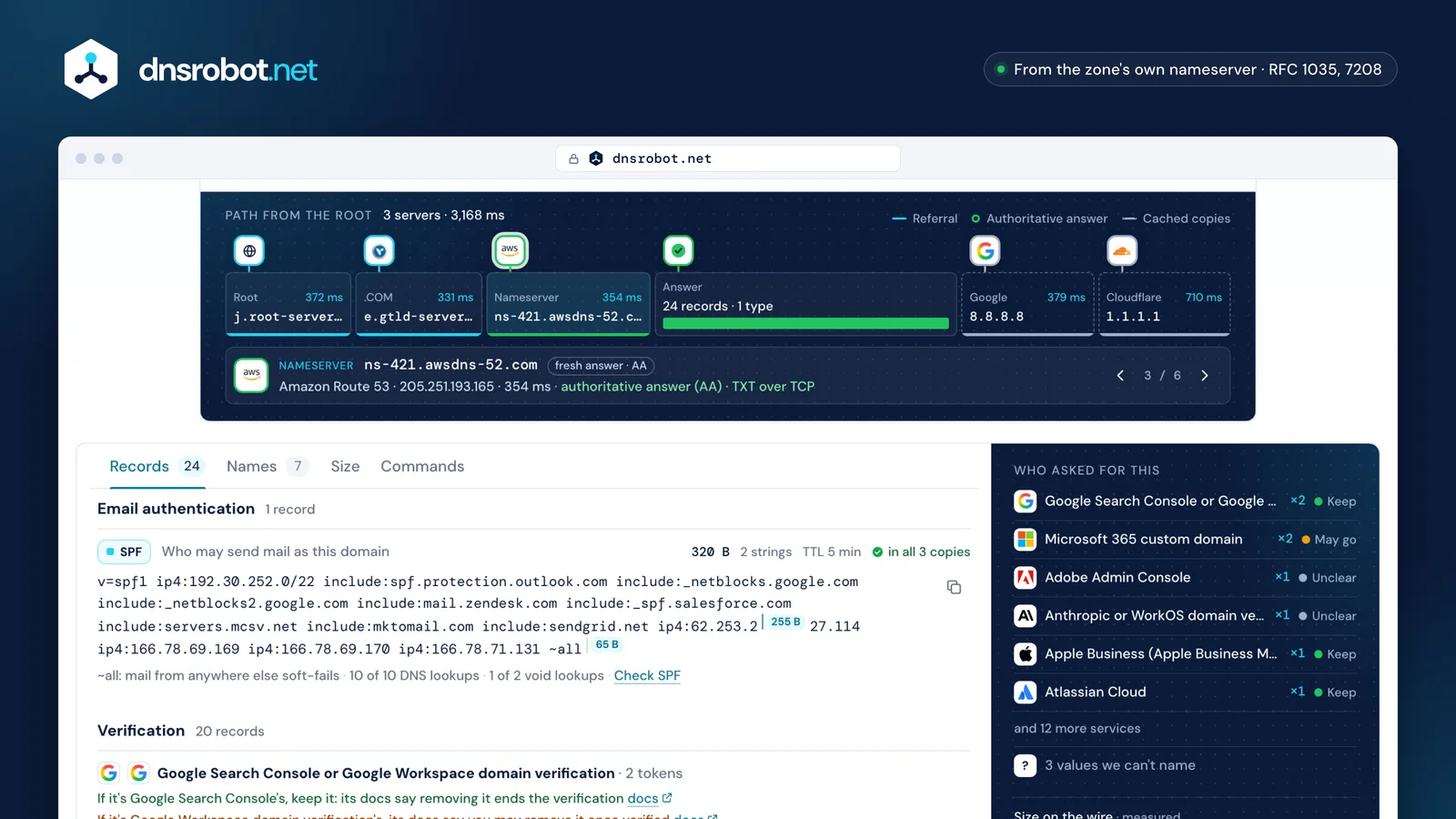
 The path from the rootThe lookup's own walk: a root server, the registry, the zone's nameserver, then what Google and Cloudflare cache.Every value, namedEach record with its kind, the service that asked for it, its bytes and TTL, and every 255-byte string boundary as sent.Who asked for thisThe services behind the verification tokens, how many each holds, and what their own docs say about keeping them.Four viewsThe records by kind, the email names beside the domain, the size on the wire against the UDP limits, and the commands.
What is a TXT record?
A TXT record holds text at a DNS name. Each record is one or more character-strings of up to 255 bytes each, and a name can hold many records: together they are the name's TXT set.
RFC 1035 defined TXT for free text. Today almost every value has a job: an SPF policy at the domain, a DMARC policy at _dmarc, a DKIM key at selector._domainkey, or a token a service asked you to publish to prove you control the domain.
The 255-byte limit is per string, not per record (RFC 1035 §3.3.14). A longer value goes out as several strings inside one record, and SPF and DKIM join them with nothing between (RFC 7208 §3.3, RFC 6376 §3.6.2.2). Most DNS hosts split a long value for you.
- 255length byteString 1 · 255 bytes
v=spf1 ip4:192.30.252.0/22 include:spf.protection.outlook.com include:_netblocks.google.com include:_netblocks2.google.com include:mail.zendesk.com include:_spf.salesforce.com include:servers.mcsv.net include:mktomail.com include:sendgrid.net ip4:62.253.2 - 65length byteString 2 · 65 bytes
27.114 ip4:166.78.69.169 ip4:166.78.69.170 ip4:166.78.71.131 ~all
v=spf1 ip4:192.30.252.0/22 include:spf.protection.outlook.com include:_netblocks.google.com include:_netblocks2.google.com include:mail.zendesk.com include:_spf.salesforce.com include:servers.mcsv.net include:mktomail.com include:sendgrid.net ip4:62.253.227.114 ip4:166.78.69.169 ip4:166.78.69.170 ip4:166.78.71.131 ~all- 320 bytes of text in 2 strings
How to look up TXT records
Type a domain above, or a name such as _dmarc.example.com. The lookup asks the domain's own nameserver, Google Public DNS and Cloudflare, and reads every value. From a terminal, dig TXT, nslookup -type=TXT and Resolve-DnsName -Type TXT ask the same question.
Answers can differ between those places. A resolver keeps its copy for the record's TTL, so after a change Google's or Cloudflare's copy may show the old set until that runs out. The domain's own nameserver always has the current set, which is why the lookup reads that one.
dig prints each string in its own quotes: "v=spf1 …" "… -all" is one record with two strings, not two records.
- The zone's own serverns-421.awsdns-52.com242,140 B5 min
- Google Public DNSdns.google241,917 B5 min
- Cloudflare DNSone.one.one.one241,928 B226 s


The same lookup from a terminal
dig github.com TXT +short+short prints only the values
What TXT record values mean
A value says what it is in its first characters: v=spf1 is SPF, v=DMARC1 DMARC, v=DKIM1 a DKIM key, v=BIMI1 BIMI, v=STSv1 MTA-STS and v=TLSRPTv1 TLS reporting. Most of the rest are verification tokens such as google-site-verification=… or MS=….
The lookup names each value by that start, the way receivers and services read it. A value that starts any other way is free text or a token from a service we don't know, and the page says so instead of guessing.
A value that almost matches is a mistake worth fixing: a space before v=spf1, or quotes typed into the value, make receivers skip the record.
- SPFexample.com
v=spf1 include:_spf.example.net ~all - DMARC_dmarc.example.com
v=DMARC1; p=reject; rua=mailto:dmarc@example.com - DKIMs1._domainkey.example.com
v=DKIM1; k=rsa; p=MIIBIjANBgkqhkiG9w0BAQEFAAOC… - BIMIdefault._bimi.example.com
v=BIMI1; l=https://example.com/brand/logo.svg - MTA-STS_mta-sts.example.com
v=STSv1; id=20261101 - TLS-RPT_smtp._tls.example.com
v=TLSRPTv1; rua=mailto:tls-reports@example.com - Verificationexample.com
google-site-verification=Xk2wPq7Lm9Vb3Nc8Rt5Yh1Jd6Fs4Ga0Ze2Ur7Io3Qp - ACME_acme-challenge.example.com
gfj9Xq5Rg85nM2bT7wLk0pYc3Vs8Hd1Ju6Ne4Ao9Ci - Sender IDexample.com
spf2.0/pra include:_spf.example.net ~all - Textexample.com
kept by the ops team, ask before removing
Which TXT records can I delete?
Verification tokens prove to a service that you control the domain. Whether one must stay depends on the service: some check again later and drop the verification when the token is gone, others read it once.
The table lists the services the lookup knows, the start of each one's token and what its own documentation says about keeping it. Where the documentation doesn't say, keep the token unless you know you no longer use the service: removing one a service still checks can cut off its sign-in, mail or admin features.
Several tokens from one service are normal, since each account or property gets its own, so the lookup counts them and never calls one stale. A value nobody documents may belong to an old project: ask your team before removing it.
94 services: 25 say keep it, 16 say it may go once verified, 53 don't sayKeepMay goUnclear
- Ahrefs Webmaster Tools / Site Audit
ahrefs-site-verification_Keep - Airtable
airtable-verification=Keep - Amazon SES
amazonses:Keep - Apple Business (Apple Business Manager) domain verification
apple-domain-verification=Keep - Atlassian Cloud
atlassian-domain-verification=Keep - Atlassian custom email domain
atlassian-sending-domain-verification=Keep - Brevo (ex-Sendinblue) domain authentication
brevo-code:Keep - Cloudflare
at cloudflare-verify.…Keep - Detectify
detectify-verification=Keep - Firebase Hosting
hosting-site=Keep - GitHub Pages
at _github-pages-challenge-…Keep - GitLab Pages
gitlab-pages-verification-code=Keep - Google Search Console
google-site-verification=Keep - HubSpot
hubspot-developer-verification=Keep - Jamf Account
jamf-site-verification=Keep - Loader.io
loaderio=Keep - Miro
miro-verification=Keep - Mixpanel
mixpanel-domain-verify=Keep - Oracle Health (Cerner) Millennium Platform app registration
cerner-client-id=Keep - Postman
postman-domain-verification=Keep - Shopify
shopify-verification-code=Keep - Stripe
stripe-verification=Keep - Tailscale
at _tailscale-challenge.…Keep - Twilio Organizations domain verification
twilio-domain-verification=Keep - Yandex Webmaster
yandex-verification:Keep - Azure Front Door
at _dnsauth.…May go - Cisco Duo Single Sign-On
duo_sso_verification=May go - Cisco Webex Control Hub
cisco-ci-domain-verification=May go - Cloudflare for SaaS
at _cf-custom-hostname.…May go - Docker
docker-verification=May go - Docusign
docusign=May go - Dynatrace
Dynatrace-site-verification=May go - GitHub
at _github-challenge-…May go - Google Workspace domain verification
google-site-verification=May go - Have I Been Pwned
hibp-verify=dweb_May go - Microsoft 365 custom domain
MS=ms…May go - Pinterest
pinterest-site-verification=May go - Salesforce custom domain
00D…May go - Sitecore Cloud Portal
sitecore-domain-verification=May go - Zoho Mail domain verification
zoho-verification=May go - Zoom
ZOOM_verify_May go - 1Password
1password-site-verification=Unclear - Adobe Admin Console
adobe-idp-site-verification=Unclear - Anthropic
anthropic-domain-verification-Unclear - Atlassian Statuspage
status-page-domain-verification=Unclear - Azure App Service custom domain
at asuid.…Unclear - Azure Communication Services Email
ms-domain-verification=Unclear - Box
box-domain-verification=Unclear - Calendly
calendly-site-verification=Unclear - Canva
canva-site-verification=Unclear - Citrix
citrix-verification-code=Unclear - Cursor
cursor-domain-verification-…=Unclear - Dropbox
dropbox-domain-verification=Unclear - Dynamics 365 Customer Insights - Journeys (formerly Dynamics 365 Marketing) domain authentication
d365mktkey=Unclear - GlobalSign
globalsign-domain-verification=Unclear - Google Workspace admin account recovery
google-gws-recovery-domain-verification=Unclear - GoTo (LogMeIn) Organization Center
logmein-verification-code=Unclear - HackerOne
h1-domain-verification=Unclear - HashiCorp Cloud Platform
hcp-domain-verification=Unclear - HPE GreenLake cloud
hpe-greenlake-domain-verification=Unclear - HubSpot
hubspot-domain-verification=Unclear - Infoblox SSO Portal
infoblox-domain-mastery=Unclear - Keybase
keybase-site-verification=Unclear - KnowBe4
knowbe4-site-verification=Unclear - Krisp
krisp-domain-verification=Unclear - Linear
linear-domain-verification=Unclear - LiveRamp
liveramp-site-verification=Unclear - Loom
loom-site-verification=Unclear - LucidLink
lucidlink-verification=Unclear - Mail.ru: VK WorkSpace (Mail.ru for business) domain verification
mailru-domain:Unclear - Mailchimp Transactional (Mandrill) sending-domain verification
mandrill_verify.Unclear - Meta (Facebook) Business domain verification
facebook-domain-verification=Unclear - Microsoft Entra External ID SAML/WS-Fed IdP federation
DirectFedAuthUrl=Unclear - MongoDB Atlas
mongodb-site-verification=Unclear - Netlify
at netlify-challenge.…Unclear - Notion
notion-domain-verification=Unclear - Official MCP Registry (Model Context Protocol): DNS publisher authentication
v=MCPv1;Unclear - OneTrust
onetrust-domain-verification=Unclear - OpenAI
openai-domain-verification=Unclear - Parallels My Account
parallels-domain-verification=Unclear - Pendo
pendo-domain-verification=Unclear - Proton Mail
protonmail-verification=Unclear - Salesforce Marketing Cloud Account Engagement (Pardot) domain validation
pardot…Unclear - Salesforce Marketing Cloud Engagement
SFMC-Unclear - Segment
segment-site-verification=Unclear - Shopify
at shopify_verification.…Unclear - Slack
slack-domain-verification=Unclear - Smartsheet
smartsheet-site-validation=Unclear - TeamViewer
teamviewer-sso-verification=Unclear - TikTok for Developers
tiktok-developers-site-verification=Unclear - Vercel
vc-domain-verify=Unclear - Webflow
one-time-verification=Unclear - WorkOS domain verification
…-domain-verification-…=Unclear - Zapier
zapier-domain-verification-challenge=Unclear






























































Long TXT records and the 255-character limit
One string holds at most 255 bytes. A long SPF policy or a 2048-bit DKIM key must be split into several strings inside one record, never into several records.
Receivers join the strings of one record with nothing between them. So a split must fall where the joined text still reads right: inside a name is fine (include:_spf.goo + gle.com), but ending one string with include:a.example and starting the next with include:b.example glues them into include:a.exampleinclude:b.example, which no receiver can read.
Split records are worse. Two v=spf1 records are a permanent error (RFC 7208 §4.5), the second half of an SPF record published as a record of its own is ignored, and a DKIM key split into two records can't verify anything.
Joins cleanly
- String 1 · 240 B
v=spf1 ip4:192.0.2.0/24 … include:_spf.example.net+ space - String 2 · 29 B
include:_spf.example.org -all
Joined
… include:_spf.example.net include:_spf.example.org -allGlued at the boundary
- String 1 · 239 B
v=spf1 ip4:192.0.2.0/24 … include:_spf.example.net - String 2 · 29 B
include:_spf.example.org -all
Receivers read this term
include:_spf.example.netinclude:_spf.example.org -allSplit into two records: the tail is ignored
v=spf1 ip4:192.0.2.0/24 … include:_spf.example.netinclude:_spf.example.org -all
How many TXT records is too many?
DNS sets no limit on the number, but a name's whole TXT set goes out in one answer. Over 1,232 bytes, the size DNS Flag Day 2020 settled on for UDP, resolvers get a truncated answer and ask again over TCP (RFC 7766).
That costs a round trip, and a network that blocks DNS over TCP gets no answer at all. Without EDNS (RFC 6891), UDP carries only 512 bytes (RFC 1035 §4.2.1).
Big companies' sets are well over: measured on 2026-11-01, 7 of these 8 apex TXT sets need TCP. Removing the tokens of services you no longer use is the way down.
- google.com1,187 B17 records
- github.com1,928 B24 records
- apple.com2,149 B23 records
- cloudflare.com2,539 B29 records
- stripe.com2,971 B39 records
- dropbox.com4,482 B49 records
- microsoft.com4,660 B60 records
- atlassian.com8,233 B98 records

TXT records for email
Six email standards live in TXT records, each at its own name. A record at the wrong name does nothing: receivers look only where its standard says.
SPF sits at the domain and lists who may send its mail; DMARC at _dmarc says what receivers do with mail that fails; DKIM keys at selector._domainkey; BIMI at default._bimi; MTA-STS at _mta-sts, with its policy file on mta-sts. over HTTPS; TLS-RPT at _smtp._tls.
The lookup asks every one of those names beside the domain (the Names view). For a full check of one, open its checker.
- SPFexample.com
v=spf1 include:_spf.example.net -allSPF Checker - DMARC_dmarc.example.com
v=DMARC1; p=quarantine; rua=mailto:dmarc@example.comDMARC Checker - DKIMs1._domainkey.example.com
v=DKIM1; k=rsa; p=MIIBIjANBgkq…DKIM Checker - BIMIdefault._bimi.example.com
v=BIMI1; l=https://example.com/brand/logo.svg; a=https://example.com/brand/vmc.pemBIMI Checker - MTA-STS_mta-sts.example.com
v=STSv1; id=20261101MTA-STS Checker - TLS-RPT_smtp._tls.example.com
v=TLSRPTv1; rua=mailto:tls-reports@example.comMTA-STS Checker
TXT record questions
How do I check a domain's TXT records?
dig example.com TXT, nslookup -type=TXT example.com or, in PowerShell, Resolve-DnsName example.com -Type TXT.Can I remove Google's site verification TXT record?
google-site-verification= value is the same form for both, so a lookup can't tell. Google Search Console says: "Important: To stay verified, don't remove the DNS record from your provider, even after verification succeeds." Removing it ends that verification at Google's next check. Google Workspace says of its sign-up verification: "Once verified, the TXT record can be safely removed." If you use Search Console for the domain, keep it.How many TXT records can a domain have?
What is the 255-character limit on TXT records?
Why do two SPF records break email?
v=spf1 record at a name stops with a permanent error (RFC 7208 §4.5), so SPF fails for all of the domain's mail. Merge every sender into one record.How long do TXT record changes take to show?
Is an SPF record a TXT record?
Do TXT records affect my website?
Missing something?Suggest a feature or a new tool
Related tools
DNS Lookup
Every DNS record from the domain's own nameservers, beside Google's and Cloudflare's cache
SPF Record Checker
Validate SPF records and check DNS lookup count per RFC 7208
DMARC Checker
Check any domain's DMARC policy the way receivers read it, with reports, SPF and DKIM
DKIM Checker
Find a domain's DKIM keys across 140 common selectors, or verify an email's signature
MTA-STS Checker
Check a domain's MTA-STS record, policy file and every mail server's certificate on port 25, the way sending servers test them; then generate a policy
BIMI Record Checker
Check BIMI records, SVG Tiny PS logos and VMC certificates, and which inboxes show the logo