











DNS Lookup
Free DNS lookup tool for any domain, host or IP: every DNS record from the domain's own nameservers, beside what Google and Cloudflare cache, so you see when a change reaches everyone.
A domain, a host, a URL, an email address or an IP. Every lookup asks the servers again: nothing comes from our cache.
How we look it up 4 steps · about 1 s
- Root13 root servers
- TLDthe registry's servers
- Nameserverthe domain's own servers
- Answerevery record type
- Google8.8.8.8
- Cloudflare1.1.1.1
Every lookup walks the path itself: from a root server to the TLD's registry, then to the domain's own nameservers for the records as they are now, and asks Google and Cloudflare what they still cache.
What a DNS lookup shows
A DNS lookup asks the Domain Name System what it holds for a name: the IP addresses of a website (A and AAAA), its mail servers (MX), its nameservers (NS), its text records (TXT) and more. This DNS check asks three places at once: the domain's own authoritative nameservers, which hold the current truth, and two of the world's busiest public resolvers, Google Public DNS and Cloudflare 1.1.1.1, which serve cached copies to millions of people.
When they disagree, you have found the usual reason a DNS change "isn't working": a resolver still has the old answer and keeps it until the record's TTL runs out. The result says which one, what it still serves and how long until it refreshes.
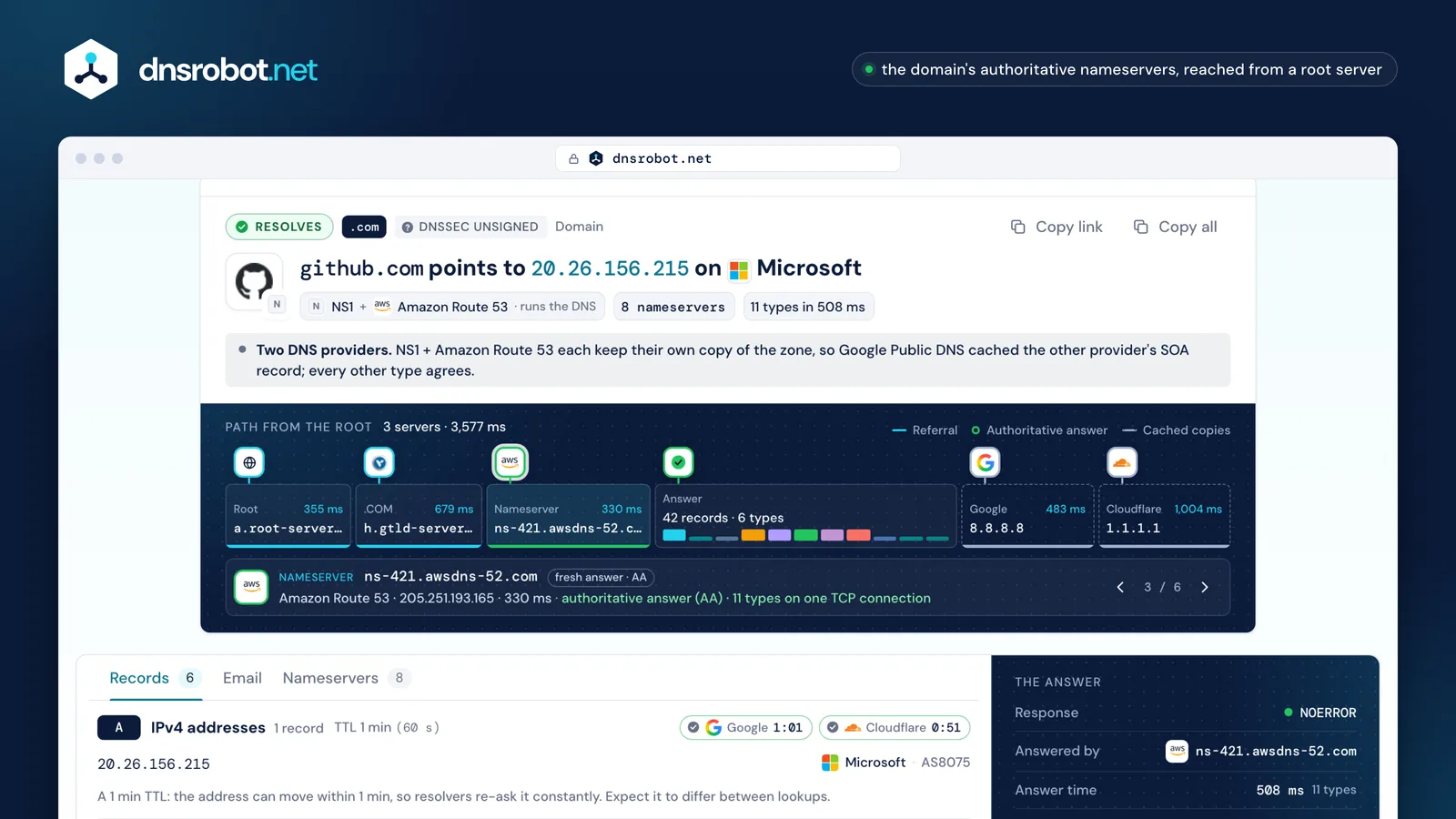
 The pathFrom a root server to the domain's TLD and its own nameservers, with what each said and how fast.Fresh vs cachedEach record type from the domain's nameservers beside Google's and Cloudflare's copy, and the time left on it.Each record explainedWhat a value means in words: mail priority, SOA timers, CAA rules, the service behind a TXT token.DNSSEC and emailWhether the answers are signed and validated, and the domain's MX, SPF and DMARC setup.
DNS record types explained
A domain's zone holds records of different types, each with a name, a TTL and a value. These are the ones a DNS record lookup shows:
| Type | What it holds | Example value |
|---|---|---|
| A | An IPv4 address for the name: where browsers connect. | 203.0.113.20 |
| AAAA | An IPv6 address for the name. | 2001:db8::20 |
| CNAME | An alias: this name is another name, look that one up instead. It can't sit beside other records, so not at the domain's apex. | www.example.com → example.com |
| MX | A mail server for the domain, with a preference: the lowest number is tried first. A single MX of 0 and "." means the domain takes no mail. | 10 mail.example.com |
| NS | The nameservers that hold the domain's records. | ns1.example.net |
| TXT | Free text: SPF, DMARC and DKIM for email, and tokens that prove the domain to Google, Microsoft and others. | v=spf1 include:_spf.example.net -all |
| SOA | The zone's start of authority: its primary server, contact, serial number and refresh, retry, expire and negative-caching timers. | ns1.example.com hostmaster.example.com 2026102001 7200 3600 1209600 300 |
| CAA | Which certificate authorities may issue certificates for the domain. | 0 issue "letsencrypt.org" |
| HTTPS | How to connect before the first request: HTTP/3 support, ports and address hints. Chrome, Firefox and Apple's systems ask for it. | 1 . alpn=h3,h2 |
| SRV | Where a service runs (priority, weight, port, host), under names like _sip._tcp. | 10 5 5060 sip.example.com |
| PTR | The name behind an IP address: reverse DNS. | 20.113.0.203.in-addr.arpa → host.example.com |
| DSDNSKEY | DNSSEC: the zone's public keys (DNSKEY) and their fingerprint at the parent zone (DS), which chain the signatures up to the root. | 2371 13 2 3299… |
How does a DNS lookup work?
Your device doesn't search the whole internet. It asks one resolver, usually your ISP's or a public one like Google or Cloudflare, and the resolver follows referrals down the name until a server that holds the answer replies:
- 1
Ask a root server
With nothing cached, the resolver starts at one of the 13 root servers, a to m, run by 12 organisations. The root doesn't know example.com, but it knows who runs .com. A busy resolver already knows that and skips this step.
- 2
Follow the referral to the TLD
The .com servers don't hold example.com's records either. They refer the resolver to the domain's own nameservers, the ones in its NS records.
- 3
Get the authoritative answer
The domain's nameservers answer with the AA (authoritative answer) flag set: this is the record as its owner published it.
- 4
Cache it for the TTL
The resolver keeps the answer for as long as its TTL says and hands the same copy, its TTL counting down, to everyone who asks until it runs out.
This tool walks that path itself from Cloudflare's network, so you see each step. Then it asks Google and Cloudflare to show what their caches hold.
Path from the root
- Roota.root-servers.net16 ms · referral: the 13 .com servers
- .COMa.gtld-servers.netVerisign · 150 ms · referral: ns1–ns2.example.com
- Nameserverns1.example.comexample.com · 203.0.113.53 · 20 msauthoritative answer (AA) · 11 types on one TCP connection
- Answer8 records · 7 typesNOERROR · 31 ms · 4 empty (CNAME, HTTPS, DNSKEY, DS)
- Google Public DNS8.8.8.8same records · oldest copy refreshes in 2:58
- Cloudflare DNS1.1.1.1same records · oldest copy refreshes in 4:04


Why do I still see the old DNS record?
Because a resolver cached it. Every record carries a TTL (time to live) in seconds, and a resolver that fetched the record keeps serving its copy until that time runs out, then asks again. Changing the record at your DNS host changes the authoritative answer at once; resolvers that already hold the old one keep it until it expires.
So a change takes as long as the old record's TTL, not a fixed 24 to 48 hours, and often less: a TTL is a maximum, and Google Public DNS keeps records about six hours at most. A missing record is cached too: "no such name" or "no record of that type" is kept for the lower of the SOA record's TTL and its last field, MINIMUM. Even a failure is cached, for up to 5 minutes.
What you can do
- Check the authoritative answer here. If the domain's own nameservers show the new value, the change is done; only caches are behind.
- Lower the TTL before a planned change, at least one old TTL ahead, so caches drop the old value fast. Raise it again afterwards.
- Ask Google and Cloudflare to drop their copy: both have a public page that refreshes a name in their cache (Google, Cloudflare).
- Clear your computer's cache: on Windows run
ipconfig /flushdns.
- Authoritativens1.example.com · AA
The domain's own nameserver. Whatever it answers is the current record: change it here and the rest follows.
- Cached8.8.8.8 · TTL counting down
A resolver's copy, served until its TTL runs out. This is what most of the world sees, and why a change seems "not to work".
- Your own cacheyour computer · your router
Your computer and router keep copies too. Flushing clears the first; the router's expires on its own.
nslookup and dig: DNS lookup commands
The same lookups from a terminal: nslookup comes with Windows, macOS and Linux, dig with macOS and most Linux systems, and Resolve-DnsName with PowerShell on Windows. The result above gives the commands for the exact lookup you ran.
| To look up | nslookup | dig |
|---|---|---|
| A records | nslookup example.com | dig example.com |
| Mail servers | nslookup -type=MX example.com | dig example.com MX |
| Text records | nslookup -type=TXT example.com | dig example.com TXT |
| Ask one resolver | nslookup example.com 8.8.8.8 | dig @8.8.8.8 example.com |
| Reverse DNS | nslookup 8.8.8.8 | dig -x 8.8.8.8 |
| Just the values | — | dig +short example.com |
| The path from the root | — | dig +trace example.com |
"Non-authoritative answer" in nslookup's output means the reply came from a resolver, not from the domain's own nameservers. To get the authoritative one, name one of the domain's nameservers as the server: nslookup example.com ns1.example.net.
ANY doesn't mean all records: a server may answer with one type, or with a placeholder that only says "RFC8482", and 1.1.1.1 refuses it. This tool asks each type separately. The dig that comes with macOS doesn't know HTTPS records: ask for TYPE65 instead.
DNS errors: NXDOMAIN, SERVFAIL and REFUSED
Every DNS answer carries a response code. An empty result is not always an error, and the code says where to look:
| Answer | What it means | What to check |
|---|---|---|
| NOERROR | The name exists and records of the type came back. | Nothing; compare the values. |
| NODATA | The name exists, but has no record of this type: NOERROR with an empty answer, not a code of its own. | Add the record at your DNS host if it should exist. |
| NXDOMAIN | The name doesn't exist at all, and no name below it does either. | The spelling, that the domain is registered and not expired, and for a subdomain that it was created. |
| SERVFAIL | The resolver couldn't get a valid answer: the nameservers failed, or DNSSEC validation did. | The DNSSEC verdict, and that the domain's nameservers answer. |
| REFUSED | The server won't answer this question: it isn't authoritative for the domain and doesn't recurse for you. | That the NS records point at servers that host the zone. |
| Timeout | No answer at all. | The nameservers are down, blocked or have the wrong address. |
DNSSEC: secure, unsigned or broken?
DNSSEC signs a zone's records so a resolver can prove they weren't forged. The parent zone publishes a DS record, a fingerprint of the domain's key, and the domain publishes its keys in DNSKEY records, so the signatures chain up to the root. Google Public DNS and Cloudflare 1.1.1.1 both validate it.
- DNSSEC secure
Secure
Signed, and Google's validating resolver checked the signatures: its answer carried the AD (authenticated data) bit, its statement that the answer validated.
- DNSSEC unsigned
Unsigned
No DS record at the parent: the zone isn't signed. It resolves normally; its answers just can't be proven genuine.
- DNSSEC broken
Broken
Validation fails, so validating resolvers answer SERVFAIL and the domain is unreachable for their users, while the data is there with checking disabled. A typical cause is a DS at the parent that matches none of the zone's keys, after a move to a new DNS host.
Email records in a DNS lookup
Mail for a domain goes to its MX servers, and receivers check TXT records before they trust it: SPF lists the servers allowed to send for the domain, in one record that may cause at most 10 DNS lookups; DMARC at _dmarc says what to do with mail that fails, found by walking up the name when a subdomain has none (RFC 9989, since May 2026); MTA-STS at _mta-sts asks senders to deliver over TLS. The result reads all of them and names the mail provider behind the MX hosts.
For a deeper check of one record, use the MX lookup, SPF checker and DMARC checker.
DNS lookup API
Two free endpoints, with CORS for browsers. /api/dns-query asks one resolver for one type and keeps the fields of our older API; /api/dns-lookup streams this page's full lookup as JSON lines.
$ curl -X POST https://dnsrobot.net/api/dns-query \
    -H "Content-Type: application/json" \
    -d '{"domain": "google.com", "recordType": "MX", "dnsServer": "8.8.8.8"}'
{
  "status": "success", "responseTime": 4,
  "resolvedIPs": ["10 smtp.google.com"],
  "dnsServer": "8.8.8.8", "recordType": "MX", "domain": "google.com", …
}$ curl "https://dnsrobot.net/api/dns-lookup?domain=google.com"
{"t":"start","name":"google.com","kind":"name","types":["A","AAAA","CNAME","MX",…]}
{"t":"hop","hop":{"zone":".","server":"a.root-servers.net","ms":16,"outcome":"referral",…}}
{"t":"answers","source":"google","server":"dns.google","sets":[{"type":"A",…}]}
{"t":"answers","source":"auth","server":"ns1.google.com","sets":[…]}
{"t":"dnssec","verdict":"unsigned",…}
{"t":"done","ms":57}DNS Lookup FAQ
What is a DNS lookup?
How do I check the DNS records of a domain?
Can I run nslookup online?
How long does a DNS change take to show up?
What is a non-authoritative answer?
What does NXDOMAIN mean?
What does SERVFAIL mean?
What is TTL in DNS?
How do I do a reverse DNS lookup?
How do I find a domain's nameservers?
What is the difference between a DNS lookup and a DNS propagation check?
Is this DNS lookup free, and do you keep what I look up?
Missing something?Suggest a feature or a new tool
More DNS tools
TXT Record Lookup
Look up every TXT record of a domain and see what each one is: SPF, DMARC, DKIM and the services' verification tokens, whether each may be removed, the 255-byte strings and the answer's size
DNSSEC Checker
Test a domain's DNSSEC from the root key down: whether the chain of trust verifies, which resolvers refuse it, and the fix at its DNS host and registrar
CAA Record Checker
See which certificate authorities may issue for a domain, read the way a CA reads CAA, against the certificates in use; then generate a correct set
WHOIS Lookup
Look up domain registration, registrar, and owner details via RDAP
MX Lookup
Find mail exchange records and mail server details
NS Lookup
Discover nameservers for any domain with provider detection