








Bulk IP Lookup
Paste a list, a CSV or a server log and look up to 10,000 IP addresses at once: country, city, network and kind, read in your browser.
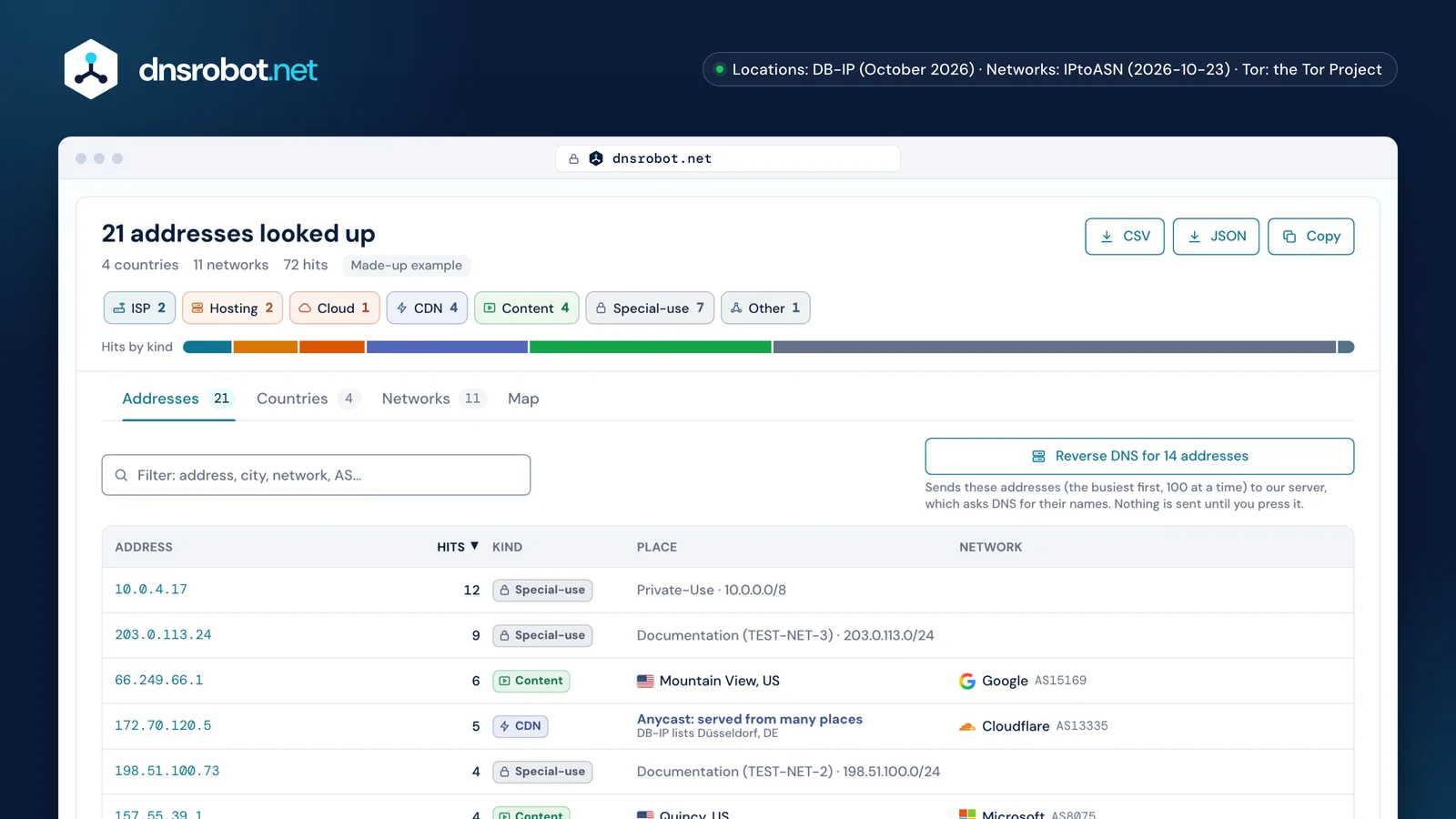
 The whole runAddresses, countries, networks and hits at a glance, with the whole table as CSV, JSON or a copy.Kinds at a glanceEvery address gets a kind from its network: ISP, mobile, hosting, cloud, CDN, relay, Tor or special-use. Each chip filters the table.Hits by kindThe ribbon shows who sent the requests: in a server log, crawlers and data centers stand out at once.Every addressUp to 10,000 rows with place, network and kind, sorted and filtered, each opening IP Lookup or ASN Lookup.
How do I look up many IP addresses at once?
Paste them, or any text that holds them, into the box above (or drop a file) and press Look up. The bulk IP address lookup pulls out every IPv4 and IPv6 address in the text, counts repeats as hits, and gives each address a place, a network and a kind.
It reads lists, CSV files and logs as they are: an Apache or nginx access log starts each line with the client's address, a firewall log writes SRC= and DST=, and URLs carry [2001:db8::1]:443. One address can be spelled many ways, so 2001:DB8:0:0::1 and 2001:db8::1 are counted as one, a zone like %eth0 is dropped, and ::ffff:192.0.2.1 is read as the IPv4 address it stands for.
The table shows each address with its hits, its kind, the city and country, and the network that announces it with its AS number. The address opens IP Lookup for the registry record, the AS number opens ASN Lookup.
The log
203.0.113.24 - - [01/Nov/2026:08:00:07 +0000] "GET / HTTP/1.1" 200 200 "-"…10.0.4.17 - - [01/Nov/2026:08:00:27 +0000] "GET /healthz HTTP/1.1" 200 …66.249.66.1 - - [01/Nov/2026:08:01:00 +0000] "GET /sitemap.xml HTTP/1.1" …198.51.100.73 - - [01/Nov/2026:08:01:17 +0000] "GET /pricing HTTP/1.1" 200 …2001:db8:4a1::17 - - [01/Nov/2026:08:01:47 +0000] "GET /blog/dns-basics HTTP/1…157.55.39.1 - - [01/Nov/2026:08:02:01 +0000] "GET /robots.txt HTTP/1.1" 2…What was read
10.0.4.1712 hitsSpecial-usePrivate-Use203.0.113.249 hitsSpecial-useDocumentation (TEST-NET-3)66.249.66.16 hitsContentGoogle172.70.120.55 hitsCDNCloudflare198.51.100.734 hitsSpecial-useDocumentation (TEST-NET-2)157.55.39.14 hitsContentMicrosoft213.133.100.984 hitsCloudHetzner




72 lines → 21 addresses · 72 hits
How accurate is bulk IP geolocation?
To the city for most networks, by DB-IP's own account: street level for some providers, city level for most, only the country in rare cases, and better on fixed lines than on mobile networks.
The free City Lite file this page reads is a subset of DB-IP's paid database, with less coverage and its own lower accuracy index, and it stops at the city: no accuracy radius, no postal code. So the map shows cities, never anything finer, and no IP address locates a household or a person.
Anycast addresses are the clearest limit. Google Public DNS, Cloudflare's 1.1.1.1 and Quad9 answer from many places at once, yet each range gets one city in the file: a place to file it under, not where your answer came from. So this page marks them Anycast: served from many places, keeps DB-IP's city only as a note, and leaves them off the map and out of the country counts.
| Address | Place on this page | Network registered in |
|---|---|---|
8.8.8.8 | Anycast: served from many placesDB-IP lists Mountain View, USNetwork registered in: United States |  United States United States |
2001:4860:4860::8888 | Anycast: served from many placesDB-IP lists Montreal, CANetwork registered in: United States | United States |
1.1.1.1 | Anycast: served from many placesDB-IP lists Sydney, AUNetwork registered in: United States | United States |
9.9.9.9 | Anycast: served from many placesDB-IP lists Berkeley (North Berkeley), USNetwork registered in: United States | United States |
75.75.75.75 | Northlake, United StatesNetwork registered in: United States | United States |
168.126.63.1 |  Seongnam-si (Buljeong-ro), South KoreaNetwork registered in: South Korea Seongnam-si (Buljeong-ro), South KoreaNetwork registered in: South Korea | South Korea |
213.186.33.99 |  Roubaix, FranceNetwork registered in: France Roubaix, FranceNetwork registered in: France | France |
119.29.29.29 |  Singapore, SingaporeNetwork registered in: China Singapore, SingaporeNetwork registered in: China |  China China |


What does the network (ASN) tell you?
Who carries the address: the autonomous system that announces its range on the internet, from IPtoASN's tables of BGP routes. Its holder and kind say whether a request came from a home line, a phone, a data center or a CDN.
The kind comes from ASN Lookup's tables: networks with many users behind them (APNIC Labs' estimates) are ISPs or mobile carriers, data centers and clouds are hosting, and the content networks of Google, Microsoft or Meta are their own kind. A range no network announces says Not routed.
Hosting doesn't mean bad: monitors, crawlers and corporate proxies live there too. But a real visitor on a phone or a home line rarely browses from a data center, unless through a VPN.
ISP17%
- Cisco OpenDNSAS36692
- KTAS4766
- LG U+AS3786
- XfinityAS7922
Hosting13%
- Alibaba CloudAS45102
- Tencent CloudAS132203
- ZenlayerAS21859
Cloud8%
- HetznerAS24940
- OVHcloudAS16276
CDN13%
- CloudflareAS13335
Content13%
- GoogleAS15169
Other38%
- Quad9AS19281
- AdGuard SoftwareAS212772
- ControldAS398962
- NextDNSAS34939
- SB Professional ServicesAS24013
- LumenAS3356
- Taiwan Network Information CenterAS131644


Find bots and VPNs in a server log
Paste the log and read the hits by kind: crawlers come from their operators' networks, scripts and VPN exits from hosting and cloud, privacy relays from Akamai's, Cloudflare's or Fastly's ranges, and Tor exits are matched against the Tor Project's own list.
A user agent can say anything, so confirm a crawler by its address: Google and Bing publish their crawlers' ranges, and the address's reverse DNS name must end in googlebot.com or search.msn.com, then point back to the same address. The reverse DNS button asks our server for up to 100 names at a time.
Before blocking, remember who shares an address: carrier-grade NAT puts many subscribers behind one, and iCloud Private Relay shares relay addresses among users of the same area. And behind a proxy or CDN, your log holds the proxy's addresses unless the server logs the forwarded one.
- Special-use35 49%
- Content15 21%GoogleMicrosoft
- CDN10 14%CloudflareAkamaiFastly
- Hosting4 6%Alibaba CloudZenlayer
- Cloud4 6%Hetzner
- ISP3 4%XfinityKT
- Other1 1%Quad9


66.249.66.1Claims Googlebot: its reverse DNS name must end in googlebot.com, and that name must point back to 66.249.66.1.
157.55.39.1Claims Bingbot: its reverse DNS name must end in search.msn.com, and that name must point back to 157.55.39.1.
Which addresses can't be located?
Private, carrier-grade NAT, loopback, link-local, documentation and other special-use addresses. IANA's special-purpose registries list them, and those marked not globally reachable are answered here without any lookup.
10.0.0.0/8, 172.16.0.0/12 and 192.168.0.0/16 are private networks, 100.64.0.0/10 sits between a carrier's NAT and its customers, and 192.0.2.0/24, 198.51.100.0/24, 203.0.113.0/24 and 2001:db8::/32 exist for examples like this page's. A log full of them shows a load balancer or a health check, not visitors.
A few blocks in the registry are reachable and get looked up, like AS112's. And 240.0.0.0/4 in a log behind Cloudflare can be its Pseudo IPv4 stand-in for an IPv6 visitor.
answered without a lookup looked up
224.0.0.0/4MulticastRFC 5771240.0.0.0/4Reserved (formerly Class E)RFC 1112 40.0.0.0/8"This network"RFC 791 3.210.0.0.0/8Private-UseRFC 1918127.0.0.0/8LoopbackRFC 1122 3.2.1.3100.64.0.0/10Shared Address Space (carrier-grade NAT)RFC 6598172.16.0.0/12Private-UseRFC 1918198.18.0.0/15BenchmarkingRFC 2544169.254.0.0/16Link LocalRFC 3927192.168.0.0/16Private-UseRFC 1918192.0.0.0/24IETF Protocol AssignmentsRFC 6890 2.1192.0.2.0/24Documentation (TEST-NET-1)RFC 5737192.88.99.0/24Deprecated (6to4 Relay Anycast)RFC 7526198.51.100.0/24Documentation (TEST-NET-2)RFC 5737203.0.113.0/24Documentation (TEST-NET-3)RFC 5737192.31.196.0/24AS112-v4RFC 7535192.52.193.0/24AMTRFC 7450192.175.48.0/24Direct Delegation AS112 ServiceRFC 7534
IPv6::1/128 Loopback Address::ffff:0:0/96 IPv4-mapped Address2001:db8::/32 Documentation2002::/16 6to43fff::/20 Documentationfc00::/7 Unique-Localfe80::/10 Link-Local Unicastff00::/8 Multicast
Bulk IP lookup questions
How many IP addresses can I look up at once?
Are the IP addresses I paste sent anywhere?
Where does the location data come from?
Can it tell if an IP address is a VPN, proxy or Tor?
How do I get the IP addresses out of a server log?
Why do some addresses say special-use?
How do I check if an IP address is really Googlebot?
Can I download the results?
Missing something?Suggest a feature or a new tool
Related tools
IP Lookup
Look up IP address geolocation, ISP, and network details instantly
ASN Lookup
Look up Autonomous System Number details and IP ranges
Reverse DNS Lookup
Find hostnames associated with any IP address via PTR records
IP Blacklist Check
Check if an IP address is listed on spam or malware blacklists
What Is My ISP
Discover your ISP, ASN, and connection details
Subnet Calculator
Network, broadcast, usable hosts and masks for any IPv4 or IPv6 block, plus VLSM, splits and cloud subnets