











Htpasswd Generator
Generate htpasswd lines for Basic auth, check a password against a hash and get the config for your server. Hashed in your browser: nothing is sent.
ForPick the servers that will read the file: the format follows.
Users
Timing bcrypt on this device…
Written as $2y$, the prefix htpasswd writes and Apache reads itself.
Hashed in your browser: no username, password, hash or file is sent.
.htpasswd
Your lines appear here once a user has a password.
Config
# The folder's .htaccess is read only with AllowOverride AuthConfig (the default is None)
AuthType Basic
AuthName "Restricted area"
AuthUserFile /etc/apache2/.htpasswd
Require valid-user
The same with htpasswd
htpasswd -c -B -C 10 /etc/apache2/.htpasswd alice-c creates the file and replaces one that's already there. htpasswd asks for the password, so it never lands in your shell history. -C sets the cost: htpasswd's own default is 5.
Made-up examples: their password is example.
A hash can't be decrypted: it can only be checked against a password you think it is, or guessed.
Hashed in your browser: no username, password, hash or file is sent.
Hashed in your browser: no username, password, hash or file is sent.
Paste or drop a file to see its users.
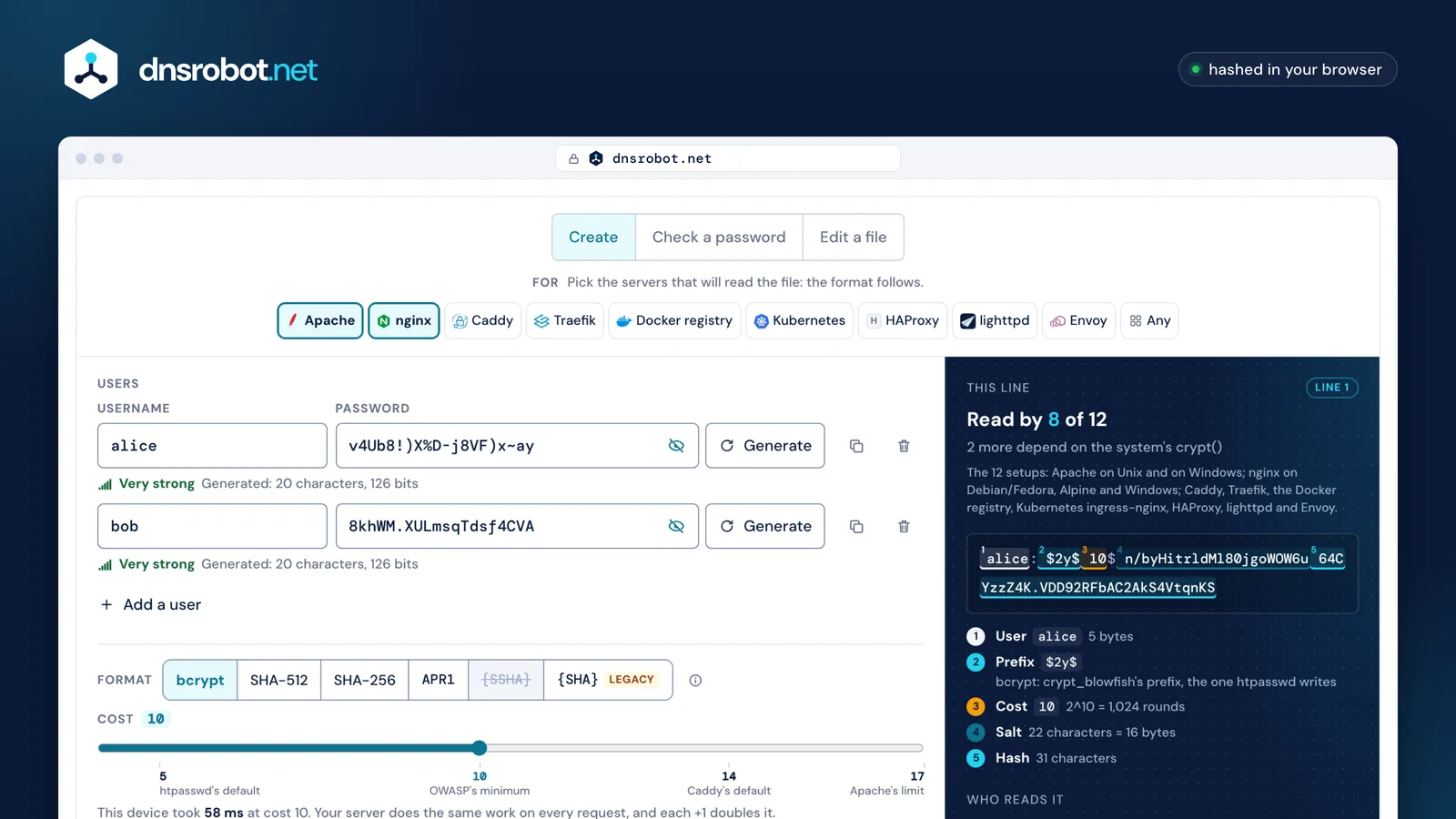
 Pick your serversThe format follows what every server you pick can read. A format one of them can't read is greyed out, with the reason.Users and passwordsType a password or generate one. Each row is checked as you type: the name, duplicates, bcrypt's 72 bytes.Cost, measured hereThis device times bcrypt at your cost. The server does the same work on every request.The line, taken apartThe user, the prefix, the cost, the salt and the hash, each labelled.Who reads it12 server setups (Apache and nginx counted per platform), each with its verdict for this exact line and a link to the source behind it.
What is an .htpasswd file?
An .htpasswd file is a plain text list of users for HTTP Basic authentication: one user:hash line per person, where the hash is the password run through a one-way function. The web server reads it, hashes the password a visitor types and lets them in when the two match.
Blank lines and lines starting with # are ignored, and one file may mix formats: an old APR1 line can sit beside a new bcrypt one. A user name can't contain a colon, because the colon ends it. nginx also allows a third field, user:hash:comment.
The file name is only a convention. Apache and nginx read whatever path the config names, which is why the file belongs outside the folders the site serves.
- # Staff for /admin (made-up users)comment, ignored
- alice:$2y$10$GOFDR7FOEpGjbKq1go5zqOiigqxbHSfsE.MgL3d1S8vlgaPXIU5Hmbcrypt
$2y$ - bob:$apr1$0004OXNq$i6YwcVFBuJVDFjZPdI.Mj.APR1-MD5
$apr1$ - deploy:$6$X1579n12DD/8189D$RTZHmnLhKZWe.OXy47I41v1ne6ciHJCJOTupDzAPHwKxXfiY3LdMZYAMZyk7QbBqd3oKnyyHTgwkHMr5jJyRu1SHA-512-crypt
$6$
Which htpasswd hash format should I use?
Use bcrypt ($2y$) at cost 10 or more unless your server can't read it. Apache, nginx on Linux, Caddy, Traefik, the Docker registry and ingress-nginx all do. SHA-512-crypt is next, APR1-MD5 and {SHA} are fast to guess, and Envoy reads nothing but {SHA}.
The prefix matters as much as the algorithm. Apache's own bcrypt code reads $2y$ and $2a$ but sends $2b$ to the operating system, so a $2b$ line never works on Apache for Windows. It also refuses any bcrypt cost above 17, even when checking a password. That's why this tool writes $2y$ and stops the slider at 17.
Everything nginx doesn't read itself ($apr1$, {SHA}, {SSHA}, {PLAIN}) goes to the system's crypt(). bcrypt therefore works on Debian, Ubuntu, Fedora and Alpine, but not on nginx for Windows.
 Apache Apache | Apache on Windows |  nginx on Debian, Ubuntu, Fedora nginx on Debian, Ubuntu, Fedora | nginx on Alpine | nginx on Windows |  Caddy Caddy |  Traefik Traefik |  Docker registry Docker registry |  Kubernetes ingress-nginx Kubernetes ingress-nginx | HAProxy |  lighttpd lighttpd |  Envoy Envoy | |
|---|---|---|---|---|---|---|---|---|---|---|---|---|
bcrypt $2y$ | reads it | reads it | reads it | reads it | doesn't read it | reads it | reads it | reads it | reads it | through the system's crypt() | through the system's crypt() | doesn't read it |
SHA-512-crypt $6$ | through the system's crypt() | doesn't read it | reads it | reads it | doesn't read it | doesn't read it | doesn't read it | doesn't read it | reads it | through the system's crypt() | through the system's crypt() | doesn't read it |
SHA-256-crypt $5$ | through the system's crypt() | doesn't read it | reads it | reads it | doesn't read it | doesn't read it | doesn't read it | doesn't read it | reads it | through the system's crypt() | through the system's crypt() | doesn't read it |
APR1-MD5 $apr1$ | reads it | reads it | reads it | reads it | reads it | doesn't read it | reads it | doesn't read it | reads it | doesn't read it | reads it | doesn't read it |
Salted SHA-1 {SSHA} | doesn't read it | doesn't read it | reads it | reads it | reads it | doesn't read it | doesn't read it | doesn't read it | reads it | doesn't read it | doesn't read it | doesn't read it |
SHA-1 {SHA} | reads it | reads it | reads it | reads it | reads it | doesn't read it | reads it | doesn't read it | reads it | doesn't read it | reads it | reads it |
✓ reads it– through the system's crypt()✗ doesn't read it
Sources: apache/apr-util on GitHub · nginx/nginx on GitHub · besser82/libxcrypt on GitHub · packages.debian.org · fedoraproject.org · git.musl-libc.org · nginx/docker-nginx on GitHub · caddyserver/website on GitHub · golang/crypto on GitHub · traefik/traefik on GitHub · containous/go-http-auth on GitHub · distribution/distribution on GitHub · kubernetes/ingress-nginx on GitHub · haproxy/haproxy on GitHub · lighttpd/lighttpd1.4 on GitHub · envoyproxy/envoy on GitHub · apple-oss-distributions/Libc on GitHub · nginx.org
How does Basic auth check the password?
Basic auth has no session. The browser sends the user name and password with each request, only base64-encoded, and the server hashes the password again every time to compare it with the line in the file. That is why it must run over HTTPS.
Base64 isn't encryption: anyone who sees the request reads the password. A slow hash (bcrypt) also means slow work on every request, and Apache's credential cache doesn't avoid it: it keeps the hash, not the answer, and checks it again on each hit. HAProxy's manual warns about the same CPU cost.
- Browser asks for /admin/ with no credentials
GET /admin/ - Server answers 401 with
401 Unauthorized · WWW-Authenticate: Basic realm="Staff only" - Browser asks the user, then sends
Authorization: Basic YWxpY2U6ZXhhbXBsZQ==base64 ofalice:example - Server finds alice's line, hashes the password with its salt and cost, compares
alice:$2y$10$GOFDR7FOEpGjbKq1go5zqOiigqxbHSfsE.MgL3d1S8vlgaPXIU5Hm200 OK: the hashes match · on every request
How high should the bcrypt cost be?
Cost 10 to 12 suits most sites. Each step doubles the work for an attacker and for your server alike, and Basic auth pays it on every request. htpasswd's own default is only 5, OWASP asks for at least 10, and Apache refuses anything above 17.
The cost is a power of two: cost 12 is 4× the work of cost 10, and cost 14 (Caddy's default) is 16×. The tool times your choice on this device before it hashes, and anything from 13 up runs with an estimate and a Cancel button.
- 41/64×
- 51/32×htpasswd's default
- 61/16×
- 71/8×
- 81/4×
- 91/2×
- 101×OWASP's minimum
- 112×
- 124×
- 138×
- 1416×Caddy's default
- 1532×
- 1664×
- 17128×Apache's limit
- 18256×
- 19512×Alpine (musl) limit
Sources: openbsd/src on GitHub · httpd.apache.org · OWASP/CheatSheetSeries on GitHub · caddyserver/website on GitHub · apache/apr-util on GitHub · git.musl-libc.org
How do I password-protect a folder in Apache (.htaccess)?
Create the Apache htpasswd file outside the web root, then put four lines in the folder's .htaccess: AuthType Basic, an AuthName, the AuthUserFile path and Require valid-user. Apache reads .htaccess only where AllowOverride AuthConfig is set, and it defaults to None.
This page works as an htaccess password generator: it writes the line, the .htaccess and the command. Make the file with htpasswd -c only the first time: -c creates the file and replaces an existing one, users and all. Add more users without it. Type the password at the prompt rather than with -b, which leaves it in your shell history and the process list.
# The folder's .htaccess is read only with AllowOverride AuthConfig (the default is None)
AuthType Basic
AuthName "Staff only"
AuthUserFile /etc/apache2/.htpasswd
Require valid-user
How do I use an htpasswd file with nginx?
An nginx htpasswd file uses the same lines as Apache's. Add auth_basic with a realm and auth_basic_user_file with the file's path to a location or server block, then reload nginx. nginx reads APR1, {SHA}, {SSHA} and {PLAIN} itself and hands every other line to the operating system's crypt().
That handoff decides whether a bcrypt or SHA-512 line works. On Debian 11 and later, Fedora 28 and later, and Alpine, the system's crypt library has both, and so do the official nginx images, which are built on Debian and Alpine. On nginx for Windows, crypt() is a stub that returns the password itself, so only nginx's own formats work there.
location /admin/ {
    auth_basic           "Staff only";
    auth_basic_user_file /etc/nginx/.htpasswd;
}- Debian 11+, Ubuntu (libxcrypt)every cost
- Fedora 28+, CentOS Stream (libxcrypt)every cost
- Alpine (musl), the nginx:alpine imagecost 19 or less
- glibc 2.38 or older without libxcryptno bcrypt in glibc's own crypt
- nginx for Windowscrypt() is a stub
Sources: packages.debian.org · fedoraproject.org · git.musl-libc.org · nginx/docker-nginx on GitHub · sourceware.org · nginx/nginx on GitHub
Caddy, Traefik, the Docker registry, Kubernetes, HAProxy, lighttpd and Envoy
Each reads htpasswd-style lines with its own rules. Caddy and the Docker registry take bcrypt only, Traefik takes bcrypt, APR1 and {SHA} but no SHA-crypt, and Envoy takes {SHA} alone. Pick the server above the tool and it only offers what that server reads.
In a docker-compose label every $ of the hash must be doubled for Traefik, or Compose reads it as a variable. Kubernetes' ingress-nginx wants the file stored in a secret under the key auth. That project is retired: it gets no releases after March 2026.
CaddyReads bcrypt $2y$
example.com {
	basic_auth /admin/* {
		alice $2y$10$PLx/GYXnERh3/6UD9K9hJ.ARXqGdzhixub8wmilx5Ym.PnEfON3YW
	}
}TraefikReads bcrypt $2y$, APR1-MD5 $apr1$, SHA-1 {SHA}
labels:
  - "traefik.http.middlewares.auth.basicauth.users=alice:$$2y$$10$$PLx/GYXnERh3/6UD9K9hJ.ARXqGdzhixub8wmilx5Ym.PnEfON3YW"
  - "traefik.http.routers.app.middlewares=auth"
Docker registryReads bcrypt $2y$
auth:
  htpasswd:
    realm: "Staff only"
    path: /auth/htpasswd
Kubernetes ingress-nginxReads bcrypt $2y$, SHA-512-crypt $6$, SHA-256-crypt $5$, APR1-MD5 $apr1$, Salted SHA-1 {SSHA}, SHA-1 {SHA}
# Save the file as "auth" (the name is the secret's key), then:
kubectl create secret generic basic-auth --from-file=auth

# On the Ingress:
#   nginx.ingress.kubernetes.io/auth-type: basic
#   nginx.ingress.kubernetes.io/auth-secret: basic-auth
#   nginx.ingress.kubernetes.io/auth-realm: "Staff only"
Through the system's crypt(): bcrypt $2y$, SHA-512-crypt $6$, SHA-256-crypt $5$
userlist site_users
    user alice password '$2y$10$PLx/GYXnERh3/6UD9K9hJ.ARXqGdzhixub8wmilx5Ym.PnEfON3YW'

frontend www
    acl auth_ok http_auth(site_users)
http-request auth realm "Staff only" unless auth_oklighttpdReads APR1-MD5 $apr1$, SHA-1 {SHA} · through the system's crypt(): bcrypt $2y$, SHA-512-crypt $6$, SHA-256-crypt $5$
server.modules += ("mod_auth", "mod_authn_file")
auth.backend = "htpasswd"
auth.backend.htpasswd.userfile = "/etc/lighttpd/.htpasswd"
auth.require = ( "/admin/" => ("method" => "basic", "realm" => "Staff only", "require" => "valid-user") )EnvoyReads SHA-1 {SHA}
- name: envoy.filters.http.basic_auth
  typed_config:
    "@type": type.googleapis.com/envoy.extensions.filters.http.basic_auth.v3.BasicAuth
    users:
      inline_string: |-
alice:{SHA}w0mcJylzCn+AfvuGdqkty2+KP48=How do I install and use the htpasswd command?
To install htpasswd, add Apache's tools: the apache2-utils package on Debian, Ubuntu and Alpine, and httpd-tools on Fedora and RHEL. Then htpasswd -c -B -C 10 file alice creates a file with one bcrypt user, -D removes a user and -v checks a password.
Each command asks for the password, so it never lands in your shell history. Leave -c out when you add a second user: it replaces the whole file.
sudo apt install apache2-utilsPackage apache2-utils
- Create the file with the first user
- htpasswd -c -B -C 10 /etc/apache2/.htpasswd alice
- Add or change a user
- htpasswd -B -C 10 /etc/apache2/.htpasswd alice
- Remove a user
- htpasswd -D /etc/apache2/.htpasswd alice
- Check a password
- htpasswd -v /etc/apache2/.htpasswd alice
Sources: packages.debian.org · packages.ubuntu.com · packages.fedoraproject.org · pkgs.alpinelinux.org · httpd.apache.org
Can an htpasswd hash be decrypted?
No. A hash is one-way: there's nothing to decrypt. Anyone holding the file can only guess passwords and hash each guess, and the format decides how fast that goes. The Check tab answers the honest version of the question: does this password match this line?
One graphics card tries 70 billion unsalted SHA-1 guesses a second but about 9,500 bcrypt guesses at cost 10. A list of a billion leaked passwords takes under a second against a {SHA} line and about 29 hours against one bcrypt line. Whatever the format, a long random password is what keeps a stolen file useless.
- Salted SHA-1
{SSHA}70.7 billion guesses a second - SHA-1
{SHA}70.5 billion guesses a second - APR1-MD5
$apr1$87.9 million guesses a second - SHA-512-crypt
$6$1.48 million guesses a second - bcrypt
$2y$, cost 109,525 guesses a second
Sources: gist.github.com · openbsd/src on GitHub
htpasswd FAQ
Is it safe to make an htpasswd line in a browser?
What format does htpasswd use by default?
$apr1$, a variant of MD5) unless you tell it otherwise, the default since Apache 2.2.18. -B writes bcrypt, but at cost 5, below OWASP's minimum of 10, so add -C 10 or more. From Apache 2.4.59, -5 and -2 write SHA-512-crypt and SHA-256-crypt. This page writes bcrypt at cost 10 unless you pick otherwise.$2y$, $2b$ or $2a$: which bcrypt prefix should I use?
$2y$, the prefix Apache's htpasswd writes. $2y$ and $2b$ are the same algorithm, so a hash can be relabelled from one to the other. The difference is who reads it: Apache's own code reads $2a$ and $2y$ but not $2b$, which then depends on the system's crypt() and never works on Apache for Windows. nginx on a current Linux, Caddy, Traefik and the Docker registry read all three.Why does my bcrypt line fail on nginx?
Does htpasswd -c overwrite my file?
-c creates the file, and if one already exists at that path it is replaced, users and all. Use -c only for the first user and add the others without it: htpasswd /etc/apache2/.htpasswd bob. -D deletes a user and -v checks a password. Leave the password off the command line and let htpasswd ask for it: -b puts it in your shell history.Where should the .htpasswd file go?
/etc/apache2/.htpasswd or /etc/nginx/.htpasswd are common choices. Give Apache's AuthUserFile an absolute path, since a relative one is read from the ServerRoot. The Docker registry reads its file once, at startup.Why does Basic auth need HTTPS?
Can a username contain a colon or spaces?
Missing something?Suggest a feature or a new tool
Related tools
Bcrypt Generator
Make a bcrypt hash at any cost, check a password against one and take a hash apart in your browser, with which libraries read $2a$, $2b$ and $2y$
Password Generator
Strong random passwords, passphrases and PINs made in your browser, each with its exact bits and crack time
Password Strength Tester
How long a password takes to crack by 8 named attacks, the patterns that weaken it, and a private breach check
HTTP Header Checker
Response headers exactly as sent, with a Mozilla Observatory security grade