








Ping IPv6: Online IPv6 Ping Test
Ping any IPv6 address or hostname from 11 cities at once, with its IPv4 address beside it. Each ping is a TCP connect to port 443, not ICMP.
Can you ping an IPv6 address?
Yes. IPv6 has its own ping, ICMPv6 echo, and every IPv6 host is required to answer it.
An IPv6 ping sends an ICMPv6 Echo Request (type 128) and waits for an Echo Reply (type 129). RFC 4443 says every node must answer echo requests, and the reply must come from the address you pinged and carry your data back unchanged.
A firewall can still drop it. RFC 4890, the IETF's advice on ICMPv6 firewalls, lists Echo Request and Echo Reply as traffic that must not be dropped, says filtering echo isn't necessary in IPv6 the way it was in IPv4, and that connectivity checks should be allowed by default. Where a firewall drops it anyway, no reply doesn't prove a host is down.
A TCP connect times the same round trip another way: the probe sends a SYN to a port and the host answers with a SYN-ACK, or with a refusal if nothing listens there. Both take one trip there and back on the same path, which is why this page can time it from places that can't send ICMP.
Every IPv6 node must answer (RFC 4443), but a firewall can drop it.
Answered by any open port, even where ICMPv6 is dropped.
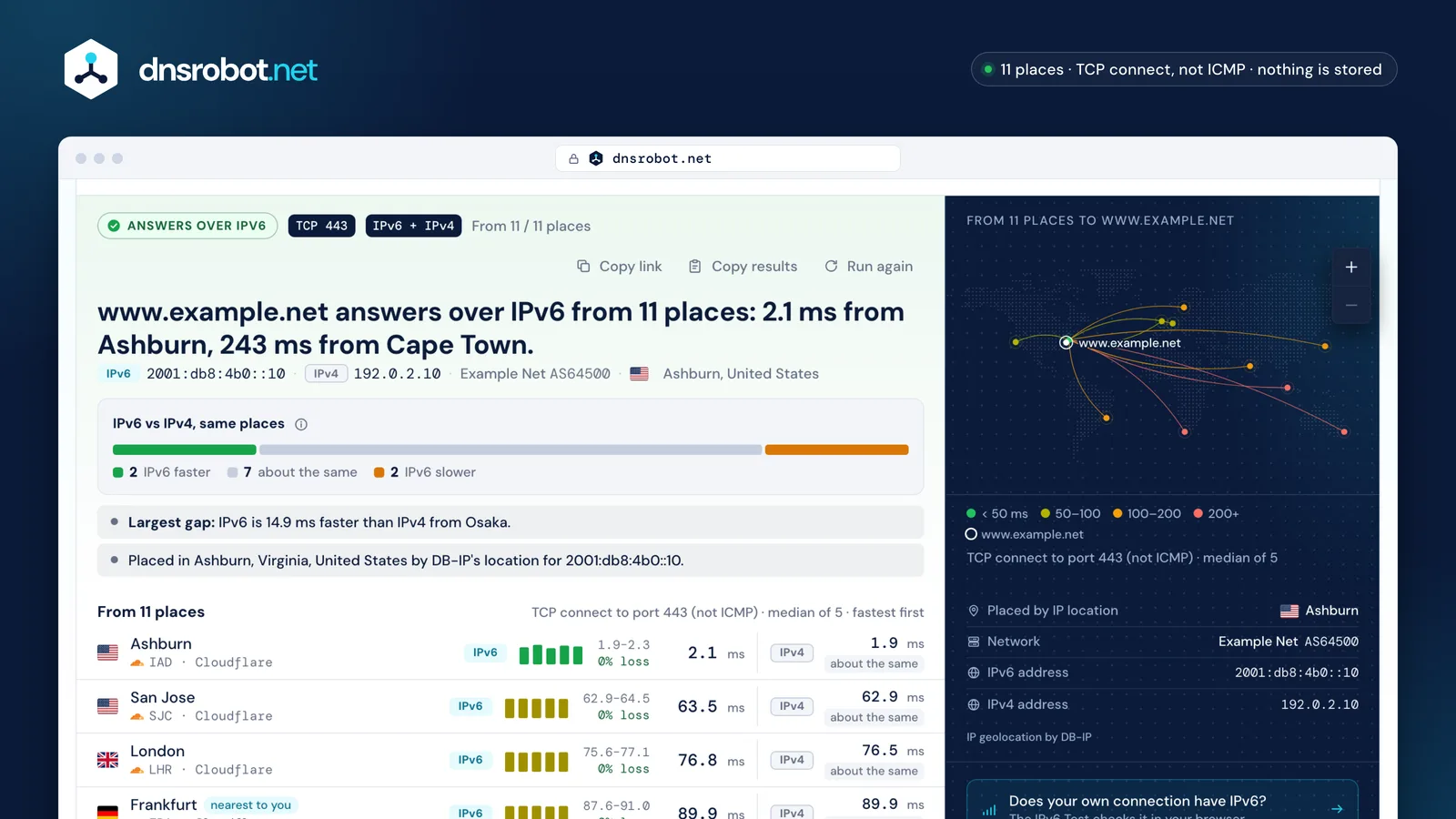
 IPv6 vs IPv4From how many places IPv6 is faster, about the same or slower than IPv4 for this name, measured in the same run.Every placeThe median of 5 TCP connects to the IPv6 address, the fastest and slowest attempt, and the loss.Beside IPv4The same place's IPv4 round trip, and the difference when both answered.On the mapAn arc from each place to where the IPv6 address is located, coloured by milliseconds.
How do I ping an IPv6 address online?
Type the IPv6 address or a hostname at the top of this page and press Ping IPv6: 11 places time a TCP connect to it, five times each.
Each place is a Cloudflare location running our code: ten placed around the world and the one nearest you. Every place opens a TCP connection to the address on port 443 (or the port you pick) and times how long the connection takes to open. That's the round trip from that city, not from your computer.
For a name that has both an AAAA and an A record, such as www.wikipedia.org, the same places also connect to its IPv4 address in the same run, so each row shows IPv6 and IPv4 side by side.
Why not ICMPv6? A web page can't send ICMP, Cloudflare's Workers have no raw sockets, and our own probe server has no IPv6 route yet. So every number here is a TCP connect time, and the page says so. A host that answers only ICMPv6 echo and has every port closed looks silent here: ping it from your own computer instead.
 San Jose
SJC- Ashburn
IAD  London
LHR Stockholm
ARN Singapore
SIN Sydney
SYD São Paulo
GRU Cape Town
CPT Mumbai
BOM Osaka
OsakaKIX- nearest to you
- TCP connect over IPv6 (and IPv4 for a dual-stack name)
- Mumbai · our server: no IPv6 route, no ICMPv6
How to ping IPv6 from the command line
Windows uses ping /6, macOS uses ping6, and Linux uses ping -6. With an IPv6 address, plain ping works on Windows and Linux too.
Windows: Microsoft documents the switch as /6, and says it's only needed for a name: ping 2001:4860:4860::8888 already pings over IPv6, while ping /6 ipv6.google.com makes Windows pick the name's IPv6 address. It sends 4 echoes and waits 4 seconds for each.
macOS: ping6 is the IPv6 tool. Apple's ping manual describes IPv4 only and points to ping6.
Linux: iputils' ping handles both families, and -6 forces IPv6. The separate ping6 was merged into ping in 2015; a ping6 link to it still works. Pinging a link-local fe80:: address may need its interface, as %eth0 after the address or with -I eth0.
- Windows
- macOS
- Linux


ping /6 ipv6.google.com/6 is needed only for a name: ping 2001:4860:4860::8888 alone already uses IPv6. Sends 4 echoes and waits 4 s for each. Windows also accepts -6 for the same switch.
How to ping Google's IPv6 address
Ping 2001:4860:4860::8888 or 2001:4860:4860::8844, Google Public DNS's IPv6 addresses, or the name ipv6.google.com.
Google lists 2001:4860:4860::8888 and 2001:4860:4860::8844 as its public DNS servers' IPv6 addresses (written out in full, 2001:4860:4860:0:0:0:0:8888). When we measured, 2001:4860:4860::8888 answered a TCP connect in about 3 ms from both London and Mumbai: the nearest Google site answers.
Quad9's recommended service answers at 2620:fe::fe and 2620:fe::9, the IPv6 twins of 9.9.9.9 and 149.112.112.112.
ipv6.google.com had only an IPv6 address when we checked on November 1, 2026 (Google doesn't document that it stays that way). Pinging it is a quick test of whether your own connection reaches IPv6: if ping -6 ipv6.google.com fails while ping google.com works, your network has no IPv6 route.
Public IPv6 addresses that answer pings


Why does IPv6 ping fail when IPv4 works?
Usually one of four things: the name has no AAAA record, your own network has no IPv6, a link-local address is missing its zone, or a firewall drops ICMPv6.
No AAAA record. A name is reachable over IPv6 only if it publishes an IPv6 address. Many sites still publish only an IPv4 one, and this page says so instead of pinging.
No IPv6 on your network. If ping -6 says "Network is unreachable", your computer has no IPv6 route at all: the problem is your connection, not the host. The IPv6 Test checks your connection in the browser.
A link-local address without its zone. Addresses starting fe80:: exist on every network link, so your system may need to know which one: a zone after the address, an interface name such as fe80::1%eth0 or a number such as %1 (RFC 4007 shows both). No website can ping them: they never leave the link.
ICMPv6 filtered. Some firewalls drop echo requests even though RFC 4890 says they should pass. If the TCP rows above answer while your ping doesn't, the host is up and just ignores ping. Blocking the other ICMPv6 messages is worse: without Packet Too Big, parts of the internet become unreachable.
- 1Does the name have an AAAA record?NoNo IPv6 address: only its IPv4 can answer. Ping it over IPv4 →
- 2Does your network have IPv6?No"Network is unreachable" or "no route": your connection has no IPv6. Run the IPv6 Test →
- 3Is it a link-local fe80:: address?YesGive the zone: ping fe80::1%eth0 (only on that link).
- 4Does it answer a TCP connect from here?YesUp: its firewall drops ICMPv6 echo, though RFC 4890 says connectivity checks should be allowed.NoDown, or every port filtered too.
Is IPv6 faster than IPv4?
Not by itself. Both families cross the same distance; what differs is the route each takes, and that depends on the networks in between.
Browsers and operating systems use Happy Eyeballs (RFC 8305): they ask for the AAAA and A records together, wait up to 50 ms for the AAAA answer, start the IPv6 connection first, and start IPv4 250 ms later if IPv6 hasn't connected. Whichever handshake finishes first wins.
So IPv6 is preferred, not required. A fast IPv6 path is used; a slow one costs up to a quarter of a second on the first connection before IPv4 takes over. The IPv4 column on this page shows which case a site is in, place by place: the same places, the same run, the same port.
For gaming the same holds: what matters is the path from your network to the game's servers. RFC 8305 even lets a system that remembers past round trips prefer whichever address has been faster.
Which IPv6 addresses can't be pinged online?
Addresses outside global unicast, and the special-purpose blocks IANA lists: loopback, link-local, unique local, documentation, multicast and the ones that wrap an IPv4 address.
IANA assigns public IPv6 addresses from 2000::/3. Its special-purpose registry lists the blocks with other jobs and says, for each one, whether it's globally reachable. This page refuses every listed block before anything is dialled, and names the block and why.
Two forms carry an IPv4 address inside: IPv4-mapped addresses (::ffff:192.0.2.10) and NAT64's 64:ff9b::192.0.2.10. Pinging them really pings the IPv4 host, so the page names the IPv4 address and links the IPv4 ping.
| Block | IANA's name | Globally reachable (IANA) | This page |
|---|---|---|---|
::/128 | Unspecified Address RFC 4291 | No | Refused |
::1/128 | Loopback Address RFC 4291 | No | Refused |
::ffff:0:0/96 | IPv4-mapped Address RFC 4291 | No | Points to the IPv4 inside |
64:ff9b::/96 | IPv4-IPv6 Translation (NAT64 well-known prefix) RFC 6052 | Yes | Points to the IPv4 inside |
64:ff9b:1::/48 | IPv4-IPv6 Translation (local use) RFC 8215 | No | Points to the IPv4 inside |
100::/64 | Discard-Only Address Block RFC 6666 | No | Refused |
100:0:0:1::/64 | Dummy IPv6 Prefix RFC 9780 | No | Refused |
2001::/23 | IETF Protocol Assignments RFC 2928 | No | Refused |
2001::/32 | TEREDO RFC 4380; RFC 8190 | Not set | Refused |
2001:1::1/128 | Port Control Protocol Anycast RFC 7723 | Yes | Refused |
2001:1::2/128 | Traversal Using Relays around NAT Anycast RFC 8155 | Yes | Refused |
2001:1::3/128 | DNS-SD Service Registration Protocol Anycast RFC 9665 | Yes | Refused |
2001:2::/48 | Benchmarking RFC 5180 | No | Refused |
2001:3::/32 | AMT RFC 7450 | Yes | Refused |
2001:4:112::/48 | AS112-v6 RFC 7535 | Yes | Refused |
2001:10::/28 | Deprecated (previously ORCHID) RFC 4843 | Not set | Refused |
2001:20::/28 | ORCHIDv2 RFC 7343 | Yes | Refused |
2001:30::/28 | Drone Remote ID Protocol Entity Tags (DETs) RFC 9374 | Yes | Refused |
2001:db8::/32 | Documentation RFC 3849 | No | Refused |
2002::/16 | 6to4 RFC 3056 | Not set | Points to the IPv4 inside |
2620:4f:8000::/48 | Direct Delegation AS112 Service RFC 7534 | Yes | Refused |
3fff::/20 | Documentation RFC 9637 | No | Refused |
5f00::/16 | Segment Routing (SRv6) SIDs RFC 9602 | No | Refused |
fc00::/7 | Unique-Local RFC 4193; RFC 8190 | No | Refused |
fe80::/10 | Link-Local Unicast RFC 4291 | No | Refused |
ff00::/8 | Multicast RFC 4291 | Not set | Refused |
2000::/3 | Global unicast RFC 4291 | – | Pinged |
IPv6 ping questions
Can you ping an IPv6 address?
How can I ping an IPv6 address online?
How do I ping Google's IPv6 address?
Is IPv6 better for gaming?
What is ping6?
Why does ping -6 say "Network is unreachable"?
Why does this IPv6 ping use TCP instead of ICMPv6?
Can I ping a link-local fe80:: address online?
Missing something?Suggest a feature or a new tool
Related tools
Ping Test
Test your ping, jitter and packet loss, see your ping to 34 cloud regions, and ping any website or IP from 11 cities
IPv6 Test
Test if your IPv6 works, which family your browser picks and if a site has IPv6
Traceroute
Trace the route to any website or IP from 8 cities, hop by hop, each network named
Port Checker
Test port connectivity and service availability
DNS Lookup
Every DNS record from the domain's own nameservers, beside Google's and Cloudflare's cache
IP Lookup
Look up IP address geolocation, ISP, and network details instantly