











PGP Key Generator
Make a PGP key pair for email, Git commit signing or file transfer. It's generated in your browser and never leaves it.
UseEach one sets the key type and expiry below.
Most people leave it empty. It goes in brackets: Name (Comment) <email>.
Opening the sealed panel…
Need a passphrase? The Password Generator makes a long one in your browser.
ExampleA made-up key for Ada Lovelace <ada@example.com>. Generate yours to replace it.
Your public key
Share this one: people use it to encrypt to you and to check your signatures. It starts with -----BEGIN PGP PUBLIC KEY BLOCK-----.
-----BEGIN PGP PUBLIC KEY BLOCK-----

xjMEauWuEBYJKwYBBAHaRw8BAQdAwqdyYNp8UcpUWg5YUJUECHnyjHkR2YAFLVOU
DdgKUCXNHkFkYSBMb3ZlbGFjZSA8YWRhQGV4YW1wbGUuY29tPsKQBBMWCgBCBYJq
5a4QApsDBYkFpOwAAwsJBwMVCggDFgIAAh4BAhkBFiEEKqgOwwupxgm99UgD3Si5
YZZ3XpIJEN0ouWGWd16SAAAVJwEA9Uikc/LLwXJB2boOrYfN9nQeCGZYLLwNSuRc
YmZEH4YA/R4GaCYPnyKB3zfTn8Ulua+gtd/bN249QetN+9ovki8HzjgEauWuEBIK
KwYBBAGXVQEFAQEHQDtFzFPV2dFISflgWWYVW9zDL2VUf7bl/8TXFxzl5rJZAwEI
B8J+BBgWCgAwBYJq5a4QApsMBYkFpOwAFiEEKqgOwwupxgm99UgD3Si5YZZ3XpIJ
EN0ouWGWd16SAAA+MwEAv8mIPPRwJGmP+8wZFbjVL+BiiB/O4EEYknxGcR2WbbsA
/2pzXLmH7nOBCVSrkyJ+sFQbhw98T31yYphwMzQFmnsP
=om6i
-----END PGP PUBLIC KEY BLOCK-----
Fingerprint
2AA8 0EC3 0BA9 C609 BDF5 4803 DD28 B961 9677 5E92
40 hex digits: the SHA-1 of the primary key. Compare all of it when you check a key.
- Long key ID
- DD28B96196775E92
- 16 hex digits, the ID Git and gpg use. Two keys can share an ID: the fingerprint is what proves it's yours.
- Short key ID
- 96775E92
- 8 digits: too short to identify a key on its own.
- Encryption subkey
- 82907BD6704BBEBF
- Created
- 2026-10-31
- Expires
- 2029-10-31
- Private key protection
- AES-256, passphrase stretched by Iterated and Salted S2K (SHA-256): GnuPG and Thunderbird read it
Generated in your browser, in a sealed frame whose policy blocks every network request. Nothing is uploaded.
Why a sealed frame
The passphrase, the private key and the revocation certificate are made and kept in a separate frame with its own origin. Its security policy blocks every network request, so this page's code in it can only hand the files to your browser's downloads, and the page's own scripts can't read into it. The page receives the public key alone. A browser extension you've allowed to read every site can still see into the frame, as it can into any page.
Will it work in…?
For the Ed25519 key you pickedWorks in 6 of 9
- GnuPG 2.4 · 2.5
- Gpg4win (Kleopatra)
- GPG Suite (macOS)
- Thunderbird
- Proton Mail
- keys.openpgp.org
- GitHub
- Sequoia (sq)
- OpenKeychain (Android)







Each answer comes from the app's own documentation or source code. Open a fact to see the source.
| App | Checked | This key | Why |
|---|---|---|---|
| GnuPG 2.4 | 2.4.9; end of life 2026-06-30 | Works | GnuPG's default key type since 2.3.0. Versions before 2.4.7 need the armor checksum, which this page keeps on v4 keys. K21K28K7 |
| GnuPG 2.5 | 2.5.24, the stable release | Works | GnuPG's default key type. K21 |
| Gpg4win (Kleopatra) | 5.1.1 with GnuPG 2.5.24 | Works | Runs GnuPG 2.5.24, whose default key type this is. K31K21 |
| GPG Suite (macOS) | 2023.3 with GnuPG 2.2.41, its newest release | Works | GnuPG 2.2 reads Ed25519 and Curve25519 keys (since 2.1.7). K32G22 |
| Thunderbird | 159 (RNP 0.18.1) and ESR 140 (RNP 0.17.1) | Works | Its own ECC option makes this exact key type: EdDSA with a Curve25519 encryption subkey. K37K36 |
| Proton Mail | help pages and web client code | Doesn't work | With your settings: Proton rejects a key with an expiry date: pick No expiry. K39 |
| keys.openpgp.org | the keyserver Thunderbird, GPG Suite and OpenKeychain use by default | See the note | With your settings: With no email in the user ID only the key's technical data is published: it can be found by fingerprint, not by address. K57K58G32 |
| GitHub | GitHub Docs | Doesn't work | With your settings: GitHub verifies commits only from a key whose email is a verified address on your account. K62G27 |
| Sequoia (sq) | sq 1.5 on sequoia-openpgp 2 | Works | sq's own default key (Cv25519, RFC 4880 profile). K46 |
| OpenKeychain (Android) | 6.0.4 (Android); no longer actively developed | Works | Its default key since 6.0.0: EdDSA with a Curve25519 encryption subkey. K56G35 |
Next steps
A made-up key for Ada Lovelace <ada@example.com>. Generate yours to replace it.
GnuPG
Import
gpg --import ada-lovelace-dd28b96196775e92-secret.ascAdds the private key to your keyring, with the public key it contains. G13G40
Check
gpg --list-secret-keys --keyid-format=long 2AA80EC30BA9C609BDF54803DD28B96196775E92The fingerprint it lists must match the one above, digit for digit. G14G5
Trust
gpg --edit-key 2AA80EC30BA9C609BDF54803DD28B96196775E92 trustAnswer 5 (I trust ultimately), then type quit. gpg trusts a key that way only when it made the key itself. G15
Export
gpg --armor --export 2AA80EC30BA9C609BDF54803DD28B96196775E92 > ada-lovelace-dd28b96196775e92-public.ascWrites the public key out again whenever you need to share it. G18
Extend
gpg --quick-set-expire 2AA80EC30BA9C609BDF54803DD28B96196775E92 2y && gpg --quick-set-expire 2AA80EC30BA9C609BDF54803DD28B96196775E92 2y '*'Sets a new expiry on the key, then on its subkey. Share the updated public key afterwards. G16
Revoke
gpg --import ada-lovelace-dd28b96196775e92-revocation.ascFirst delete the colon before -----BEGIN in the file. Then publish the revoked key: a revocation can't be taken back. K30G17
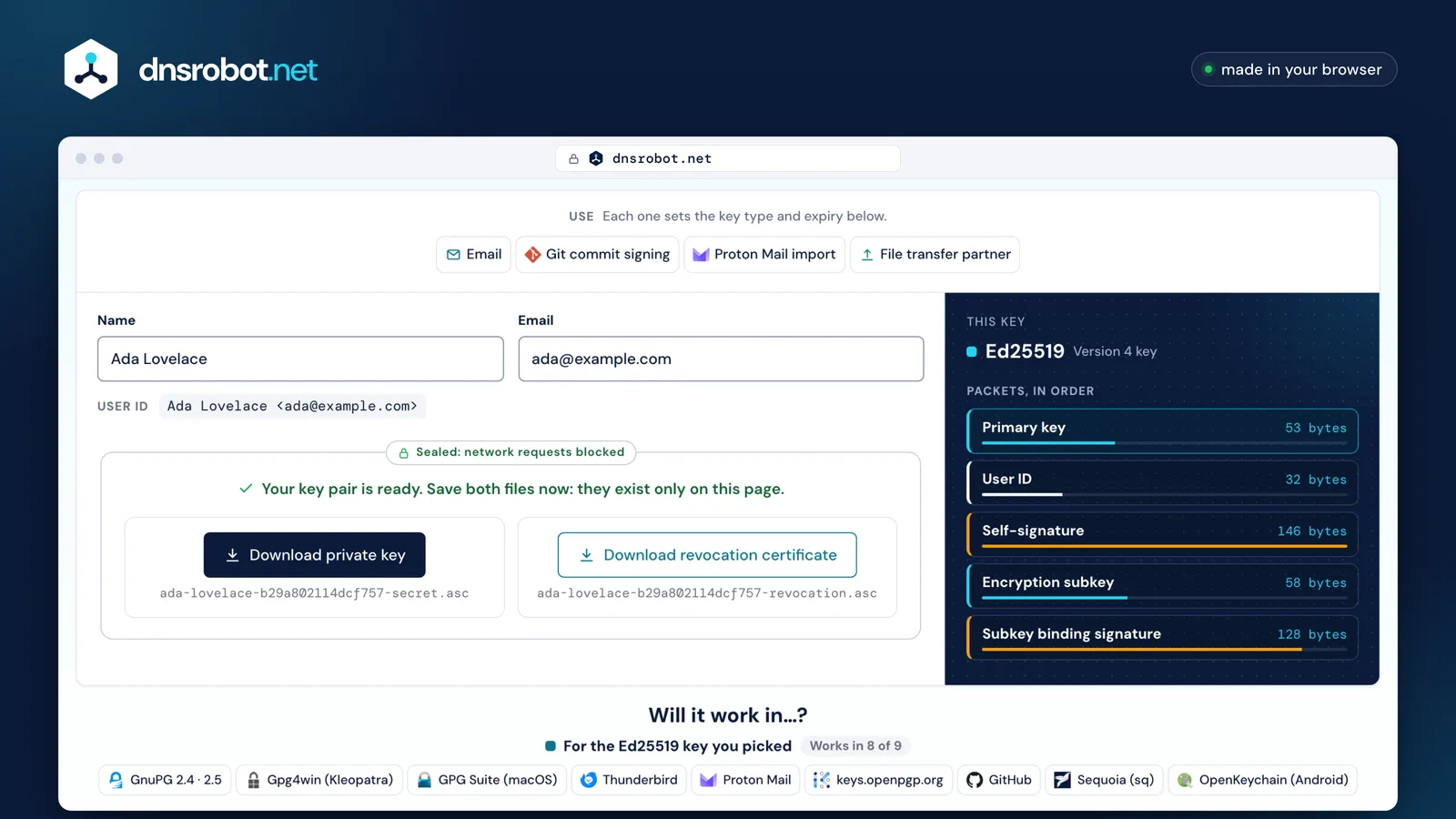
 Pick a useEmail, Git commit signing, Proton Mail or a file-transfer partner: each sets the key type and the expiry it needs.Your user IDName and email, written into the key as Name <email>. Nothing you type is sent or stored.A sealed frameThe passphrase, the private key and the revocation certificate exist only in this panel, whose security policy blocks every network request.This keyThe key's packets in order, each with its real size: the primary key, your user ID, the signatures and the subkey.Will it work in…?GnuPG, Thunderbird, Proton Mail, GitHub and more, each answer linked to the app's own documentation or code.
What is a PGP key? Inside the public key block
A PGP key is a key pair in the OpenPGP format: a public key you share and a private key you keep. When you generate a PGP key you get both, each made of packets: the primary key, your user ID, a signature that ties them, and a subkey for encryption. As text, the public half is a PGP public key block, starting with -----BEGIN PGP PUBLIC KEY BLOCK-----.
By convention the primary key certifies and signs, and a separate subkey encrypts. The self-signature on your user ID holds the key's flags, its expiry and the ciphers it prefers. The fingerprint is a hash of the primary key packet: 40 hex digits for a v4 key, 64 for v6. A key ID is only a slice of it, and two keys can share one, so check the whole fingerprint.
The private key file has the same packets with the secret numbers added, encrypted under your passphrase, so it contains the public key too. Share only the public key block. Its last line before the tail is a checksum that RFC 9580 discourages, kept on v4 keys because some GnuPG versions fail without it.
Armorada-lovelace-dd28b96196775e92-public.asc
Armor header line
-----BEGIN PGP PUBLIC KEY BLOCK-----The packets, base64
xjMEauWuEBYJKwYBBAHaRw8BAQdAwqdyYNp8UcpUWg5YUJUECHnyjHkR2YAFLVOUDdgKUCXNHkFkYSBMb3ZlbGFjZSA8YWRhQGV4YW1wbGUuY29tPsKQBBMWCgBCBYJq5a4QApsDBYkFpOwAAwsJBwMVCggDFgIAAh4BAhkBFiEEKqgOwwupxgm99UgD3Si5YZZ3XpIJEN0ouWGWd16SAAAVJwEA9Uikc/LLwXJB2boOrYfN9nQeCGZYLLwNSuRcYmZEH4YA/R4GaCYPnyKB3zfTn8Ulua+gtd/bN249QetN+9ovki8HzjgEauWuEBIKKwYBBAGXVQEFAQEHQDtFzFPV2dFISflgWWYVW9zDL2VUf7bl/8TXFxzl5rJZAwEIB8J+BBgWCgAwBYJq5a4QApsMBYkFpOwAFiEEKqgOwwupxgm99UgD3Si5YZZ3XpIJEN0ouWGWd16SAAA+MwEAv8mIPPRwJGmP+8wZFbjVL+BiiB/O4EEYknxGcR2WbbsA/2pzXLmH7nOBCVSrkyJ+sFQbhw98T31yYphwMzQFmnsPChecksum (CRC24)
=om6iArmor tail
-----END PGP PUBLIC KEY BLOCK-----Packets417 bytes
Primary key53 bytes
- version
- 4
- created
- 2026-10-31
- algorithm
- EdDSALegacy (22)
- public key
- C2A77260…D80A5025 · 32 bytes
fingerprint = SHA-1 of this packet
2AA80EC30BA9C609BDF54803DD28B96196775E92
key ID = its last 16 hex digits: DD28B96196775E92
User ID32 bytes
- User ID
- Ada Lovelace <ada@example.com>
Self-signature146 bytes
- flags
- Certify, Sign
- expiry
- 2029-10-31
- preferences
- AES-256, AES-128 · SHA2-512, SHA2-256 · ZLIB, Uncompressed
- issuer
- DD28B96196775E92
Subkey58 bytes
- version
- 4
- created
- 2026-10-31
- algorithm
- ECDH (18)
Binding signature128 bytes
- flags
- Encrypt communications, Encrypt storage
- expiry
- 2029-10-31
- issuer
- DD28B96196775E92
Ed25519 or RSA: which key type?
Choose Ed25519 unless someone asks you for RSA. It's been GnuPG's default since 2.3.0, it's Proton Mail's and Sequoia's default too, every app in our table takes it, and its keys and signatures are a small fraction of RSA's size. RSA 3072 and 4096 are for older software and partners who require RSA.
Both are strong today: Ed25519 is designed for about the 128-bit security level, the level NIST gives RSA 3072. RSA 4096 is more work to break but stays below NIST's next level, which needs 7,680 bits, and its keys, signatures and generation are bigger and slower. RFC 9580 deprecates RSA and forbids generating it below 3072 bits, which is why this page offers nothing smaller.
What's the difference between v4 and v6 keys?
A v6 key is the new format from RFC 9580 (2024): Ed25519 and X25519 keys, a SHA-256 fingerprint, and Argon2 with AEAD to protect the private key. It's what the RFC asks software to create, but GnuPG, Thunderbird and keys.openpgp.org can't use one yet, so this page makes v4 keys unless you pick v6.
GnuPG 2.4, and 2.5 up to 2.5.22, refuse a v6 key outright; 2.5.23 and later accept its algorithms only with --allow-9980, an option GnuPG's own manual doesn't suggest. Thunderbird builds its OpenPGP library without v6 support, and keys.openpgp.org fails to parse a v6 upload. Sequoia, OpenPGP.js and Proton's GopenPGP read and make v6 keys, and Proton Mail accepts v6 imports only after you opt in to its post-quantum keys.
Our v4 keys also tell senders they read only the older message format, SEIPD v1. A v4 key that announced v2 would invite apps like Sequoia to send messages that GnuPG up to 2.5.22 and Thunderbird can't open. And this page never puts the new Ed25519 inside a v4 key: RFC 9580 allows it, but GnuPG and Thunderbird can't use that either.
v4 key
- Fingerprint
- SHA-1, 40 hex digits
- 2AA8 0EC3 0BA9 C609 BDF5 4803 DD28 B961 9677 5E92
- Private key
- Iterated and Salted S2K + AES-256
v6 key
- Fingerprint
- SHA-256, 64 hex digits
- BFA7 91BE BFFC BABF 3830 FCB1 A29B A9EA 6F93 9A82 CDC3 73F6 93C8 A530 A6DC 946F
- Private key
- Argon2id + AES-256-OCB
| v4 key | v6 key | ||
|---|---|---|---|
| Ed25519 | RSA | Ed25519 (v6) | |
| GnuPG 2.4 | works | works | doesn't |
| GnuPG 2.5 | works | works | doesn't |
| Gpg4win (Kleopatra) | works | works | doesn't |
| GPG Suite (macOS) | works | works | doesn't |
| Thunderbird | works | works | doesn't |
| Proton Mail | works | works | not documented, or a condition |
| keys.openpgp.org | works | works | doesn't |
| GitHub | works | works | not documented, or a condition |
| Sequoia (sq) | works | works | works |
| OpenKeychain (Android) | works | works | not documented, or a condition |
- works
- doesn't
- not documented, or a condition
K1K3K2K9K10K11K23K24K25K34K38K59K45K49K50K54K44K16K27K35K47K5
Should a PGP key expire? Expiry and the revocation certificate
Yes: set an expiry and keep the revocation certificate. An expiry retires a key you've lost track of, and while you hold the private key you can move the date at any time and share the updated public key. The revocation certificate retires the key early, at once, if it's lost or stolen.
Three years is the default here, as in GnuPG, Thunderbird and Sequoia. GitHub's own guide suggests a key that never expires, but GitHub keeps commits it verified before a key expired verified, and you can add expired keys. Proton Mail rejects a key with any expiry, so its use case sets none.
This page makes the revocation certificate with the key, as GnuPG does, with a colon before its first line so it can't be imported by accident. To use it, delete the colon, import the file with gpg --import and publish the revoked key. Store it apart from the private key: anyone holding it can revoke your key, and a published revocation can't be undone.
Created2026-10-31today
Expires2029-10-31+3 years
New expiry2031-10-31+2 years
RevokedRevoke: import the revocation certificate
Key lost: the expiry retires it
Extend: gpg --quick-set-expire
- Created2026-10-31today
- RevokedRevoke: import the revocation certificate
- Expires2029-10-31+3 yearsKey lost: the expiry retires it
- New expiry2031-10-31+2 yearsExtend: gpg --quick-set-expire
No expiry: valid until revoked
How does the passphrase protect the private key?
The passphrase is stretched into an AES-256 key that encrypts the secret part of the file. A v4 key uses Iterated and Salted S2K with SHA-256, the method GnuPG and Thunderbird read. A v6 key uses Argon2id with 64 MiB of memory and AES-256 in OCB mode, which RFC 9580 recommends.
The salt is random for every key, so the same passphrase gives a different file each time, and the iteration count, or Argon2's memory, makes every guess cost an attacker work. None of it rescues a short passphrase: a long, random one is what protects the file. Make one with our Password Generator. There's no recovery if you forget it, and with No passphrase the file holds the key in the clear.
v4 keyGnuPG and Thunderbird read it
- Your passphrase
- Salt (random)9896 59D3 F963 ED0D8 bytes
- Iterated and Salted S2K, SHA-25616,777,216 bytes hashed
- AES-256 key
- AES-256, CFB modeSHA-1 checksum
- Encrypted secret key54 bytes
v6 keyRFC 9580's recommendation
- Your passphrase
- Salt (random)7E5D 5766 82B9 DDF0 76BA 0EA7 E5C7 13CE16 bytes
- Argon2id3 passes · 4 lanes · 64 MiB
- HKDF-SHA256
- AES-256 key
- AES-256, OCB modeauthentication tag
- Encrypted secret key48 bytes
How do I import the key into GnuPG, Thunderbird or Proton Mail?
Import the private key file: it holds the public key too. In GnuPG, gpg --import the file. In Thunderbird, use Account Settings → End-To-End Encryption → Add Key… → Import an existing OpenPGP Key. In Proton Mail, use Settings → All settings → Encryption and Keys → Email encryption keys → Import key.
After the gpg import key step, check the fingerprint with gpg --list-secret-keys --keyid-format=long and tell gpg the key is yours: gpg --edit-key, then trust and 5 (ultimate). gpg trusts a key that way only when it made the key itself. Kleopatra (Gpg4win) and GPG Suite run GnuPG underneath, so a key imported there lands in the same keyring.
Thunderbird asks you to select the imported key for the account afterwards. Proton asks for the key's passphrase and takes it only with no expiry and one user ID with your Proton address: the Proton Mail import use case sets both. Give other people only the public key.
The private key fileada-lovelace-dd28b96196775e92-secret.asc
GnuPG
gpg --import ada-lovelace-dd28b96196775e92-secret.asc- Check the fingerprint
- trust → 5
Thunderbird
- Account Settings
- End-To-End Encryption
- Add Key…
- Import an existing OpenPGP Key
Proton Mail
- Settings → All settings
- Encryption and Keys
- Email encryption keys
- Import key
asks for the passphrase
How do I add a GPG key to GitHub and sign commits?
Import the private key into GnuPG, point Git at its long key ID with git config --global user.signingkey, switch on commit.gpgsign, then paste the public key at GitHub → Settings → SSH and GPG keys → New GPG key. The key's email must be a verified address on your GitHub account, and the one Git commits with.
A GitHub GPG key is an ordinary OpenPGP public key: GitHub lists EdDSA and RSA among the algorithms it supports, so the default Ed25519 key works. It doesn't mention v6 keys, so don't use one for Git. Signing needs the private key in GnuPG; the public key on GitHub is what it checks each signed commit against, and a commit it verified stays verified after the key expires.
Your computer

- Private key in GnuPG
ed25519/DD28B96196775E92 - Git's config
git config --global user.signingkey DD28B96196775E92 - git commit -SSigned commit
GitHub
- Your public key, added in Settings
-----BEGIN PGP PUBLIC KEY BLOCK----- - Email is a verified address
ada@example.com - Signature matches the key
DD28B96196775E92
Verified
How do I publish my public key?
Upload the public key to keys.openpgp.org and confirm the email it sends: until you do, it publishes the key but not your address. On your own domain, serve it by Web Key Directory (WKD) at a fixed address or as an OPENPGPKEY record in DNS, and point security.txt's Encryption: field at it.
WKD's file name is the SHA-1 of the part before the @, in z-base-32, and GnuPG looks there by default when you encrypt to an address it has no key for. The server must send the binary key, not the armored text, plus a policy file. The DNS record's name is the SHA-256 of the same part, cut to 28 bytes, under _openpgpkey; check it with our DNS Lookup. WKD is still an Internet-Draft, and OPENPGPKEY an experimental RFC.
Thunderbird, GPG Suite and OpenKeychain look keys up on keys.openpgp.org by default, and it lets you remove your address later. Older keyservers can't delete a key once it reaches them, so publish only the public key, and only when you're sure.
Ada Lovelace <ada@example.com>ada-lovelace-dd28b96196775e92-public.asc
keys.openpgp.org
https://keys.openpgp.org/upload after you confirm the email
DNS OPENPGPKEYbinary key
fdee430d40bd57deeac186cd9790033d0f06f909a8806e7ce6e717ab . _openpgpkey. example. com SHA-256 of “ada”, first 28 bytes
WKD, advancedbinary key
https:// openpgpkey. example. com/ . well-known/ openpgpkey/ example. com/ hu/ huin1uygftjfco69ypidm11zuqef9jyy ? l= ada SHA-1 of “ada”, z-base-32
WKD, directbinary key
https:// example. com/ . well-known/ openpgpkey/ hu/ huin1uygftjfco69ypidm11zuqef9jyy ? l= ada SHA-1 of “ada”, z-base-32
security.txt
Encryption: https:// example. com/ pgp-key. txt a link, never the key
PGP key FAQ
Is it safe to generate a PGP key online?
What's the difference between PGP and GPG?
Which key type should I choose?
How long should my PGP key last?
What do I do with the revocation certificate?
I forgot my passphrase: can I recover the key?
Why won't Proton Mail import my key?
How do I fix "gpg: signing failed: No secret key"?
Missing something?Suggest a feature or a new tool
Related tools
DKIM Record Generator
Create a DKIM key pair in your browser and get the selector._domainkey TXT record to publish
CSR Generator
Create a certificate signing request and private key in your browser: RSA or ECDSA, with SANs and the matching OpenSSL command
SSL Converter
Convert PFX to PEM, PEM to PFX, P7B, DER, CRT and CER: the files your server needs, in order, and your private key never leaves your browser
Password Generator
Strong random passwords, passphrases and PINs made in your browser, each with its exact bits and crack time
Email Header Analyzer
Parse raw email headers and trace the email journey
DNS Lookup
Every DNS record from the domain's own nameservers, beside Google's and Cloudflare's cache
MX Lookup
Find mail exchange records and mail server details