ERR_ADDRESS_UNREACHABLE: What It Means & How to Fix It
Advertisement
What Is ERR_ADDRESS_UNREACHABLE?
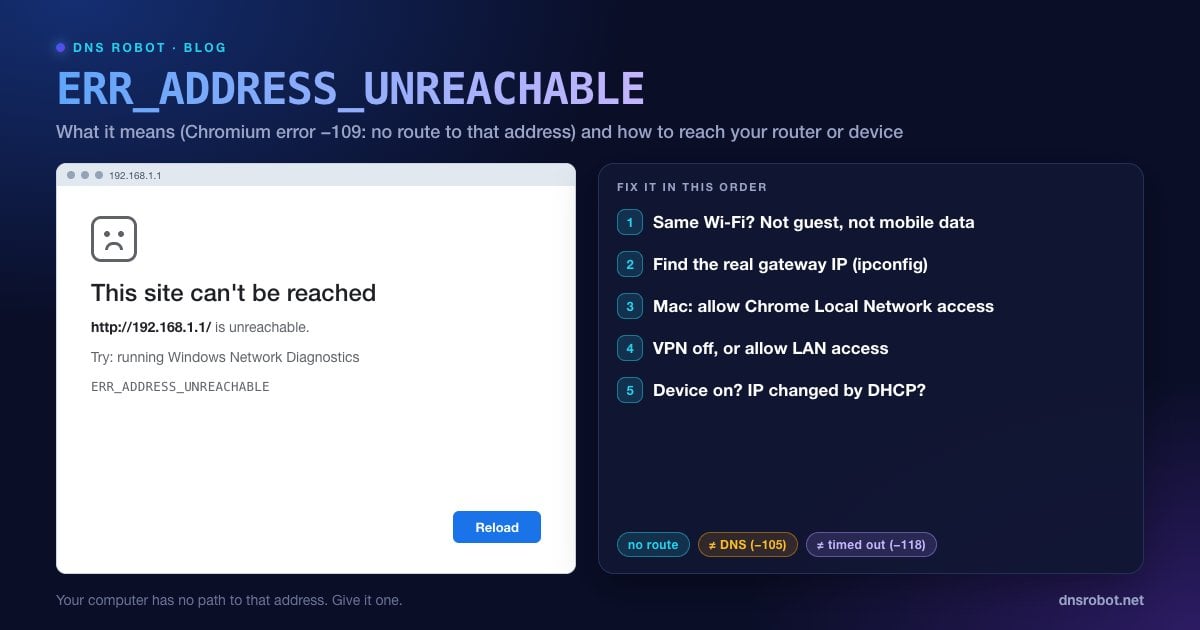
ERR_ADDRESS_UNREACHABLE is the Chrome and Edge error that says "This site can't be reached. http://192.168.1.1/ is unreachable." (or whatever address you typed). In Chromium it's net error -109, and the source code explains it plainly: "The IP address is unreachable. This usually means that there is no route to the specified host or network."
Most connection errors mean the browser found a path to the server and something went wrong on the way. This one means the browser had no path at all: your device doesn't know how to get packets to that address, or the operating system refused to let the browser try.
That's why it mostly happens with local, private addresses: your router's admin page, a NAS, a printer, a security camera, Home Assistant, a Raspberry Pi, or a dev server on another computer. Those addresses only exist inside one network, so you can reach them only when you're actually on that network with nothing blocking the way.
Why It Happens: The 7 Usual Causes
| Cause | Typical situation |
|---|---|
| You're not on that network | Phone on mobile data, laptop on a neighbour's or office Wi-Fi |
| Wrong IP for this network | Typing 192.168.1.1 when your router is 192.168.0.1 or 10.0.0.1 |
| macOS Local Network permission denied | Chrome or Edge on macOS 15 Sequoia or later, while Safari works |
| VPN routes everything elsewhere | Full-tunnel VPN without "allow LAN access" |
| Guest Wi-Fi or client isolation | Devices on the guest network can't see each other or the admin page |
| Device is off or its IP changed | NAS rebooted and DHCP gave it a new address |
| IPv6 address but no IPv6 route | Opening an IPv6 address on a network that only has IPv4 |
Advertisement
Fix 1: Make Sure You're on the Same Network
This solves the problem more often than anything else. To reach a router or local device, your phone or computer must be connected to that network's Wi-Fi or Ethernet:
Phones: turn mobile data off while you test. Some phones switch to mobile data when the Wi-Fi has no internet, which makes local addresses unreachable.
Laptops: check which Wi-Fi network you're actually on. Many homes have several (the main network, guest, a 5 GHz name, an extender).
Compare addresses: your device's local IP and the target usually share the first three numbers, for example
192.168.1.23and192.168.1.1. If yours is192.168.0.23, you're on a different subnet and192.168.1.1isn't reachable from there. The Subnet Calculator shows exactly which addresses are in the same subnet.
Fix 2: Find the Router's Real IP Address
Not every router uses 192.168.1.1. Common defaults include 192.168.0.1, 10.0.0.1, 192.168.1.254 and 192.168.100.1 (often a cable modem). Your router's address is shown as the default gateway:
# Windows (Command Prompt): look for "Default Gateway"
ipconfig

# macOS: the "gateway:" line
route -n get default

# Linux: the address after "default via"
ip route | grep defaultOn an iPhone, go to Settings → Wi-Fi → tap the (i) next to your network: the Router field is the address to open. On Android, open Settings → Network & internet → Internet → tap your Wi-Fi network: the gateway is listed under network details (exact menu names vary by brand). The What Is My IP page shows your public IP, which is a different address from these private ones.
Advertisement
Fix 3: On a Mac, Allow Chrome Local Network Access
Starting with macOS 15 Sequoia, apps need permission to talk to devices on your local network. If Chrome, Edge, Brave or Firefox was denied (or never asked), every local address shows ERR_ADDRESS_UNREACHABLE in that browser, while Safari and your iPhone reach it fine. Many people hit this after a macOS upgrade, when their NAS or router page stopped loading in Chrome only.
To fix it:
Open System Settings → Privacy & Security → Local Network.
Turn the switch on for Google Chrome (and any other browser you use).
Quit the browser completely (Cmd + Q) and reopen it, then try the address again.
Fix 4: Turn Off the VPN (or Allow LAN Access)
A full-tunnel VPN sends all your traffic, including traffic for local addresses, to the VPN server, which has no route to your home network. Disconnect the VPN and try again.
If you need the VPN on, look in its settings for an option such as Allow LAN access, Local network sharing, or Bypass VPN for local network. Most consumer VPN apps have one. Workplace VPNs often block local access deliberately, so ask your IT team.
Advertisement
Fix 5: Leave the Guest Network or Turn Off Client Isolation
Guest Wi-Fi networks are designed to keep visitors away from your devices. They use client isolation (also called AP isolation), so devices on the guest network can reach the internet but not the router's admin page, your printer or your NAS. Mesh systems and ISP routers often enable it on the main network too.
Connect to the main network instead. If the setting is on for your main network, log in to the router from a wired computer and turn off AP isolation or client isolation in the wireless settings.
Fix 6: Check That the Device Is On and Still Has the Same IP
Routers hand out local addresses with DHCP, and after a reboot a NAS, camera or printer can come back with a different one. Your bookmark then points to an address that no longer exists.
Ping it:
ping 192.168.1.50. "Destination host unreachable" or no replies means nothing is answering at that address.Find its new IP: check the router's connected-devices list, or run
arp -ato list devices your computer has recently talked to. A MAC address identifies the device even when its IP changes, and the MAC Lookup tool shows the manufacturer.Stop it happening again: create a DHCP reservation for the device in the router so it always gets the same IP.
Advertisement
Fix ERR_ADDRESS_UNREACHABLE on iPhone and Android
iPhone, Local Network permission: apps, including Chrome, need permission to reach devices on your Wi-Fi. Go to Settings → Privacy & Security → Local Network and allow the browser or app.
iPhone, check the subnet: Settings → Wi-Fi → tap (i) shows your IP Address and the Router address. If the first three numbers differ from the address you're opening, you're on the wrong network.
Android: turn off mobile data while testing, turn off any VPN or ad-blocking app, and make sure you're not on the guest network.
Both: forget the Wi-Fi network and rejoin it, which refreshes the IP address and route.
For Developers: net::ERR_ADDRESS_UNREACHABLE in Apps and Emulators
Developers usually see this error from an Android WebView or a phone testing a local dev server:
Android emulator:
localhostinside the emulator is the emulator itself. Use10.0.2.2to reach your computer's localhost.Real phone to dev server: the phone must be on the same Wi-Fi (not guest) and use the computer's LAN IP, for example
http://192.168.1.23:3000. Bind the server to all interfaces (next dev -H 0.0.0.0,vite --host), or you'll get a refused connection instead.Mac on Sequoia or later: a dev server accepting connections from your phone doesn't need Local Network permission, and tools run from Terminal or over SSH are allowed automatically. A browser on the Mac does need it to open LAN addresses, as in Fix 3.
Docker and WSL2 sit on their own virtual subnets. Publish ports (
-p 3000:3000) and connect through the host's IP rather than the container's internal IP.
ERR_ADDRESS_UNREACHABLE vs Similar Errors
| Error | Code | What it means |
|---|---|---|
| ERR_ADDRESS_UNREACHABLE | -109 | No route to that IP address at all |
| ERR_NAME_NOT_RESOLVED | -105 | DNS couldn't turn the name into an IP address |
| ERR_CONNECTION_TIMED_OUT | -118 | A route exists, but nothing answered |
| ERR_INTERNET_DISCONNECTED | -106 | The device has no network connection at all |
If you can reach local devices but no websites, see Wi-Fi connected but no internet. For public websites that hang, see ERR_CONNECTION_TIMED_OUT, and for DNS failures, ERR_NAME_NOT_RESOLVED. A traceroute or the tracert command shows exactly where the path to an address ends.
See where the path to an address ends
DNS Robot's Traceroute shows every hop between our servers and a public host, so you can tell a dead server apart from a broken route. For local addresses, run tracert or traceroute on your own computer.
Try TracerouteAdvertisement
Frequently Asked Questions
It means your device has no network route to the IP address you tried to open, so the browser couldn't even attempt a connection. In Chromium it is net error -109. It usually involves a local address such as a router, NAS or printer that you can only reach from inside that network.