PR_CONNECT_RESET_ERROR in Firefox: Causes & How to Fix It
Advertisement
What Is PR_CONNECT_RESET_ERROR?
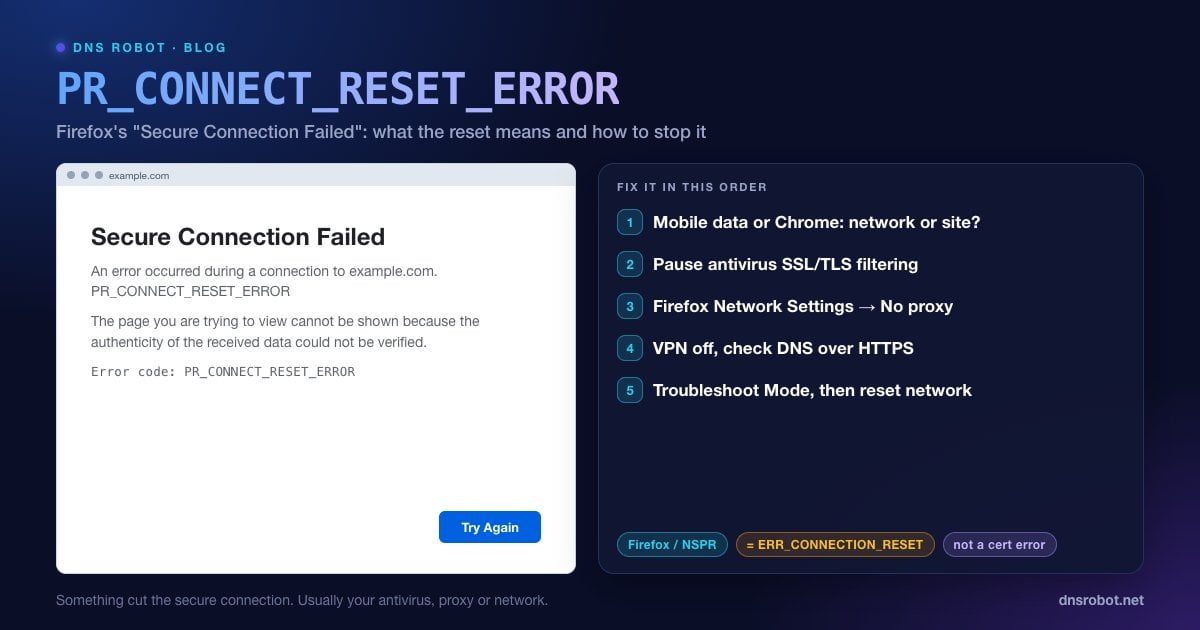
PR_CONNECT_RESET_ERROR is an error code from Firefox. It appears on a page titled "Secure Connection Failed" with the line "An error occurred during a connection to example.com" and the note that the page "cannot be shown because the authenticity of the received data could not be verified."
Despite that wording, the problem usually isn't a bad certificate. The code comes from NSPR, the networking library Firefox uses, and it means the connection was reset: while Firefox was setting up the secure connection, something sent a TCP reset (RST) and cut it off. Firefox can't confirm a secure session that never finished, which is why it phrases the error as an authenticity problem.
It's the Firefox equivalent of Chrome's ERR_CONNECTION_RESET, and the causes are largely the same: software or a network device between you and the site is killing the connection.
What Causes PR_CONNECT_RESET_ERROR?
| Cause | Typical clue |
|---|---|
| Antivirus HTTPS filtering (ESET, Kaspersky, Avast, Bitdefender and others) | Many HTTPS sites fail, but only on computers with that product |
| A proxy set in Firefox or the system | Every site fails, or only sites that go through the proxy |
| VPN or a security extension | Works as soon as the VPN is disconnected |
| School, workplace or ISP filtering | One site fails on one network only, works on mobile data |
| The website's server or firewall | Fails for everyone, in every browser |
Advertisement
Fix 1: Find Out Whether It's Your Network
Open the site on your phone using mobile data with Wi-Fi off. If it loads there, the reset comes from your computer or your network.
Open it in Chrome or Edge on the same computer. If those show ERR_CONNECTION_RESET too, the cause is outside Firefox: antivirus, VPN, proxy or the network.
Check the site from outside with DNS Robot's Port Checker on port 443 and the SSL Checker. If both succeed for us, the site's server is working and something on your side is resetting the connection.
Fix 2: Pause Your Antivirus's HTTPS Filtering
This is the most common cause. Antivirus products decrypt HTTPS traffic to scan it, and when the scanner can't handle a site it resets the connection, so Firefox reports PR_CONNECT_RESET_ERROR. The setting has different names: SSL/TLS protocol filtering (ESET), Scan encrypted connections (Kaspersky), HTTPS scanning in Web Shield or Web Guard (Avast and AVG), or Encrypted web scan (Bitdefender).
Turn off only that option, restart Firefox and reload. If the site works, add it to the product's exclusions, turn filtering back on, and update the antivirus.
Advertisement
Fix 3: Check Firefox's Proxy Setting
Firefox has its own proxy setting, separate from Windows and macOS. Open Settings → General, scroll to Network Settings and click Settings… (in the newest redesigned Settings, search for "proxy" and click Configure proxy). If you don't use a proxy on purpose, choose No proxy (or Use system proxy settings if your organisation sets one), click OK and reload.
If the computer is set to use a proxy, check the system setting too: on Windows 11, Settings → Network & internet → Proxy; on a Mac, System Settings → Network → your connection → Details… → Proxies.
Fix 4: Turn Off VPN and Check DNS over HTTPS
Disconnect any VPN completely and disable VPN or proxy add-ons in about:addons, then reload. If the site only fails on one network, the opposite can also work: a trusted VPN gets around a filter that resets connections to blocked sites, as long as using one is allowed there.
Firefox can also use DNS over HTTPS, and a filtering resolver can send you to an address that resets HTTPS connections. In Settings → Privacy & Security → DNS over HTTPS, try switching between Default Protection and Off, or choose a different provider, then reload. Our guide to networks that block encrypted DNS explains why some networks interfere with it.
Advertisement
Fix 5: Try Troubleshoot Mode and Clear Site Data
Troubleshoot Mode starts Firefox with add-ons and custom settings disabled: open the menu → Help → Troubleshoot Mode… → Restart. If the site works there, an add-on or setting is to blame.
Clear the site's data: click the padlock in the address bar → Clear cookies and site data….
Refresh Firefox as a last resort: open
about:supportand click Refresh Firefox. It removes add-ons and resets settings but keeps bookmarks, history and saved passwords.
Fix 6: Reset the Network Stack
If every browser on the computer fails, reset its network configuration. On Windows, run these in an administrator Command Prompt and restart; on a Mac, remove and re-add the Wi-Fi network and flush the DNS cache.
netsh winsock reset
netsh int ip reset
netsh winhttp reset proxy
ipconfig /flushdnsAdvertisement
For Website Owners
If visitors on many networks report PR_CONNECT_RESET_ERROR, something in front of your web server is resetting HTTPS connections. Check whether a firewall, rate limiter or WAF is blocking their IP addresses or countries, whether the server supports TLS 1.2 and 1.3 with a complete certificate chain, and whether the web server process restarts or crashes. The ERR_CONNECTION_RESET guide covers the server-side checks in detail, and HTTP Headers shows what a successful request returns.
Firefox Error Codes and Their Chrome Equivalents
| Firefox | Chrome / Edge | Meaning |
|---|---|---|
| PR_CONNECT_RESET_ERROR | ERR_CONNECTION_RESET | The connection was cut with a TCP reset |
| PR_END_OF_FILE_ERROR | ERR_CONNECTION_CLOSED | The connection closed during the secure handshake |
| SSL_ERROR_NO_CYPHER_OVERLAP | ERR_SSL_VERSION_OR_CIPHER_MISMATCH | No TLS version or cipher in common |
| The connection has timed out | ERR_CONNECTION_TIMED_OUT | The server never answered |
Full guides: ERR_CONNECTION_CLOSED, ERR_SSL_VERSION_OR_CIPHER_MISMATCH and Your connection is not private for certificate warnings.
Is the site's HTTPS working from outside?
DNS Robot's Port Checker tests port 443 from our servers. If it's open for us but Firefox resets for you, the problem is your antivirus, proxy, VPN or network, not the site.
Try Port CheckerAdvertisement
Frequently Asked Questions
It means the connection Firefox was using to set up a secure (HTTPS) session was reset: something sent a TCP reset and cut it off. Firefox shows it as "Secure Connection Failed". It's the Firefox version of Chrome's ERR_CONNECTION_RESET.